Building Better Digital Habits, Improving Customer Experiences, and Making Consistent Progress With Artificial Intelligence
Building a professional business website is an exciting accomplishment.
You design your pages.
You organize your services.
You add helpful information.
You connect your Contact forms.
You may even introduce an AI-powered website assistant to help customers find answers.
Then you publish your website.
But here's an important question:
WHAT HAPPENS AFTER YOUR WEBSITE GOES LIVE?
Does everything stay the same?
Do you wait until something breaks?
Do you only make improvements when a customer complains?
Or do you create a simple routine that helps your website continue improving?
A successful website requires more than a beautiful design.
It needs attention, testing, accurate information, and ongoing improvements.
The good news?
YOU DON'T HAVE TO SPEND EVERY DAY REBUILDING YOUR WEBSITE.
You can create a weekly improvement routine that fits your schedule.
Whether you're a solo entrepreneur, a small business owner, or someone exploring AI-powered website solutions, a consistent routine can help you stay organized.
In Blog #110, we're exploring 50 practical strategies for creating a weekly AI website improvement routine that keeps your business moving forward.
PART 1: UNDERSTAND THE VALUE OF A WEEKLY ROUTINE
1. Recognize That Websites Need Ongoing Attention
Websites change as businesses grow.
Services evolve.
Customer questions change.
Technology gets updated.
A regular review helps you identify what needs attention.
2. Focus on Consistency Instead of Perfection
You don't need to improve everything in one week.
Small, thoughtful changes can be more manageable than occasional major overhauls.
3. Give Your Routine a Clear Purpose
Your weekly routine should help you maintain website quality, evaluate customer needs, and complete important improvements.
4. Avoid Creating Unnecessary Work
Don't add tasks simply to fill your schedule.
Focus on actions that serve a useful purpose.
5. Build a Routine You Can Maintain
A realistic routine is more valuable than an ambitious schedule you cannot sustain.
PART 2: REVIEW YOUR AI WEBSITE ASSISTANT
6. Test Common Customer Questions
Ask questions your visitors frequently ask.
For example:
"What services do you offer?"
"How can I contact you?"
"How do I get started?"
7. Review Answer Accuracy
Compare the assistant's responses with approved business information.
8. Check for Unsupported Claims
Look for invented prices, services, promises, policies, or project timelines.
9. Review Unanswered Questions
Identify questions the assistant couldn't answer appropriately.
10. Test Human Support Options
Make sure customers can still contact your business when AI cannot help.
PART 3: CHECK IMPORTANT WEBSITE FUNCTIONS
11. Test Your Contact Form
Confirm that required fields work and submissions reach the intended destination.
Use clearly labeled test information.
12. Check Important Links
Review navigation, service links, and essential calls to action.
13. Review Mobile Usability
Open your website on a smartphone or use appropriate device testing tools.
14. Check Accessibility
Review keyboard navigation, readable text, clear labels, and other important accessibility features.
15. Review Website Performance
Look for unusual loading delays, broken content, or other technical problems.
Some critical issues may require immediate attention rather than waiting for the weekly review.
PART 4: REVIEW CUSTOMER QUESTIONS AND FEEDBACK
16. Look for Repeated Customer Questions
Frequently asked questions may reveal opportunities to clarify your website content.
17. Review Customer Feedback
Identify patterns in comments, inquiries, and support requests.
18. Separate Feedback From Testimonials
Private customer feedback should not automatically become a public testimonial.
Publishing a testimonial requires an appropriate review and permission process.
19. Identify Confusing Website Content
If customers repeatedly misunderstand a service, consider rewriting its explanation.
20. Turn Feedback Into Action
Choose a specific improvement instead of simply collecting comments.
PART 5: REVIEW YOUR WEBSITE CONTENT
21. Check Service Information
Make sure descriptions reflect what your business currently offers.
22. Review Pricing Information
If your website displays prices, verify that they match your current offerings.
23. Update Frequently Asked Questions
Add or revise answers when recurring customer questions reveal missing information.
24. Check Important Business Details
Review relevant contact information, policies, and other essential details.
25. Maintain Consistent Branding
Check that your website uses the correct logo, colors, messaging, and current business tagline.
PART 6: REVIEW WEBSITE ANALYTICS
26. Choose a Few Meaningful Metrics
Focus on measurements related to your website's goals.
27. Review Customer Task Completion
Can visitors complete important actions?
28. Check AI Assistant Performance
Review accuracy, helpfulness, and handoff results when reliable data is available.
29. Investigate Unusual Changes
A sudden increase in failed forms or unanswered questions may deserve attention.
30. Avoid Reacting to Every Small Fluctuation
Small samples and ordinary variation can create misleading trends.
Look for meaningful evidence before making changes.
PART 7: CHOOSE YOUR WEEKLY IMPROVEMENT PRIORITIES
31. Create a Weekly Improvement List
Record problems and opportunities discovered during your review.
32. Identify Urgent Issues
Privacy, security, serious misinformation, and broken essential functions may need prompt attention.
33. Choose One Main Improvement
A focused goal can be easier to complete than several competing projects.
34. Define What Success Looks Like
For example:
"Customers can successfully find and submit the project inquiry form."
35. Set a Realistic Completion Target
Consider the time and resources required.
PART 8: IMPLEMENT AND TEST CHANGES
36. Make Focused Updates
Change what is necessary to address the identified problem.
37. Keep a Record of Changes
Document what you updated and why.
38. Test the Updated Feature
Verify that the change works as intended.
39. Check for Unintended Problems
A change to one page or workflow can sometimes affect another.
40. Confirm the Change Is Published
If your website platform separates preview from live publishing, verify that approved changes are actually live.
PART 9: ORGANIZE YOUR WEEKLY WORKFLOW
41. Create a Recurring Review Time
Choose a day and time that works for your schedule.
42. Use a Simple Checklist
A checklist helps you review important areas consistently.
43. Track Task Status
Use statuses such as:
Not Started.
In Progress.
Testing.
Completed.
Blocked.
44. Keep Notes About Important Findings
Document problems, decisions, and next steps.
45. Protect Time for Other Business Responsibilities
Website improvement is important, but it shouldn't consume every hour of your workweek.
PART 10: BUILD A CONTINUOUS IMPROVEMENT HABIT
46. Review What You Completed
At the end of each week, identify finished work.
47. Evaluate What Remains Unresolved
Determine which tasks need more time or support.
48. Learn From Your Results
Consider whether completed improvements produced the intended outcome.
49. Prepare for the Following Week
Choose the next priority using current information.
50. Stay Consistent Without Becoming Rigid
Your routine should support your business, not control it.
Adjust when important customer needs or business priorities change.
REVIEW → PRIORITIZE → IMPROVE → TEST → DOCUMENT → REPEAT
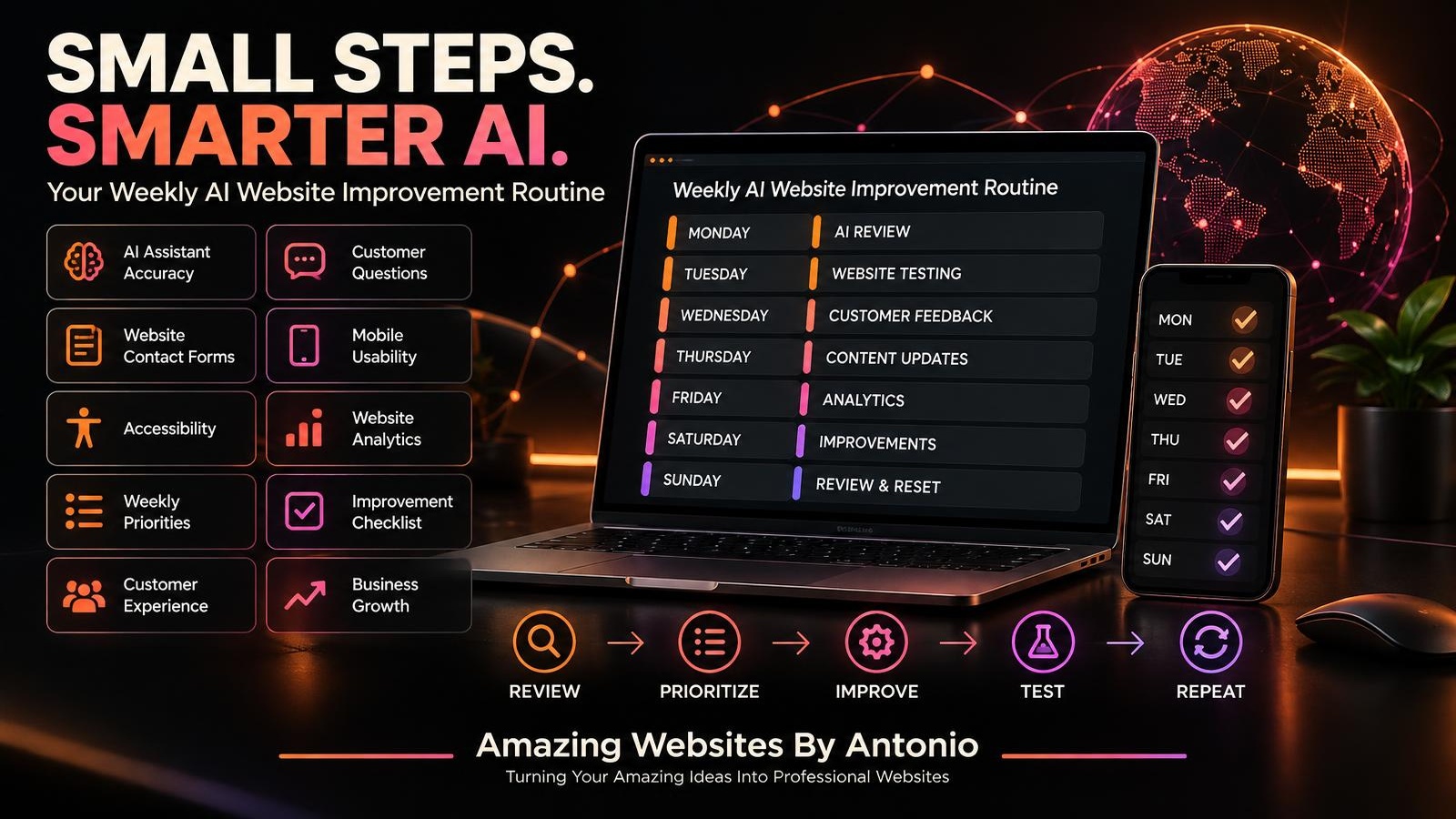
YOUR SEVEN-DAY AI WEBSITE IMPROVEMENT ROUTINE
This example distributes tasks throughout the week.
You can also combine the activities into one or two dedicated work sessions if that better fits your schedule.
MONDAY — AI ASSISTANT REVIEW
Focus: Accuracy and Customer Questions
- Test common AI assistant questions.
- Review incorrect responses.
- Identify unanswered questions.
- Check human handoff options.
- Record important findings.
Weekly Goal: Identify AI assistant issues that need attention.
TUESDAY — WEBSITE FUNCTIONALITY
Focus: Essential Website Features
- Test Contact forms.
- Check important links.
- Review mobile layouts.
- Test key navigation paths.
- Identify technical problems.
Weekly Goal: Verify that important customer actions work.
WEDNESDAY — CUSTOMER EXPERIENCE
Focus: Feedback and Communication
- Review customer inquiries.
- Identify repeated questions.
- Examine customer feedback.
- Review confusing service descriptions.
- Record improvement opportunities.
Weekly Goal: Understand what customers need.
THURSDAY — WEBSITE CONTENT
Focus: Accuracy and Clarity
- Review important service information.
- Update selected FAQs.
- Verify relevant business details.
- Check branding consistency.
- Improve unclear wording.
Weekly Goal: Keep essential information useful and current.
FRIDAY — ANALYTICS AND PRIORITIES
Focus: Performance and Decision-Making
- Review available website metrics.
- Examine AI assistant performance.
- Identify meaningful trends.
- Select the next improvement.
- Record your decision.
Weekly Goal: Choose an improvement supported by evidence.
SATURDAY — IMPLEMENTATION AND TESTING
Focus: Making Progress
- Complete the selected improvement.
- Test the updated feature.
- Check for unintended problems.
- Verify publication when applicable.
- Document results.
Weekly Goal: Complete and verify a meaningful change.
SUNDAY — REVIEW AND RESET
Focus: Reflection and Planning
- Review completed work.
- Identify unfinished tasks.
- Document lessons learned.
- Prepare next week's priorities.
- Take time to rest and recharge.
Weekly Goal: Begin the next week with a clear plan.
IMPORTANT: This schedule is flexible. You do not need to work seven days a week. Combine tasks or designate rest days according to your business needs.
COPY-READY WEEKLY AI WEBSITE REVIEW TEMPLATE
BUSINESS NAME:
[Enter Business Name]
WEEK OF:
[Enter Date]
PREPARED BY:
[Enter Name]
SECTION 1 — AI ASSISTANT
Common Questions Tested:
[Enter Number or Details]
Incorrect Answers Found:
[Enter Findings]
Unanswered Questions:
[Enter Findings]
Human Handoff Issues:
[Enter Findings]
SECTION 2 — WEBSITE FUNCTIONALITY
Contact Form Status:
Working / Needs Attention / Not Tested
Important Links:
Working / Needs Attention / Not Tested
Mobile Usability:
Working / Needs Attention / Not Tested
Accessibility Findings:
[Enter Findings]
SECTION 3 — CUSTOMER EXPERIENCE
Repeated Questions:
[Enter Findings]
Customer Feedback Themes:
[Enter Findings]
Confusing Website Content:
[Enter Findings]
SECTION 4 — ANALYTICS
Relevant Metrics Reviewed:
[Enter Metrics]
Important Trends:
[Enter Findings]
Data Limitations:
[Enter Notes]
SECTION 5 — WEEKLY IMPROVEMENT
MAIN PRIORITY:
[Enter Improvement]
REASON FOR PRIORITY:
[Explain Why]
EXPECTED OUTCOME:
[Define Success]
PERSON RESPONSIBLE:
[Enter Name]
STATUS:
Not Started / In Progress / Testing / Completed / Blocked
TEST RESULTS:
[Enter Findings]
SECTION 6 — WEEKLY SUMMARY
Completed Work:
[Enter Tasks]
Outstanding Issues:
[Enter Issues]
Lessons Learned:
[Enter Notes]
Next Week's Main Priority:
[Enter Priority]
YOUR 30-DAY WEEKLY ROUTINE IMPLEMENTATION PLAN
WEEK 1 — ESTABLISH YOUR ROUTINE
Choose your review schedule.
Create a checklist.
Identify important website functions.
Define your initial priorities.
WEEK 2 — COMPLETE YOUR FIRST REVIEW
Test the AI assistant.
Check Contact forms.
Review customer questions.
Identify important issues.
WEEK 3 — MAKE A FOCUSED IMPROVEMENT
Select one meaningful problem.
Implement an appropriate change.
Test the results.
Document what happened.
WEEK 4 — EVALUATE AND REFINE
Review your completed work.
Identify recurring problems.
Adjust your checklist.
Prepare the next month's improvement priorities.
THE WEEKLY AI WEBSITE IMPROVEMENT FRAMEWORK
REVIEW
Understand what is happening.
↓
IDENTIFY
Find important problems and opportunities.
↓
PRIORITIZE
Choose what matters most.
↓
IMPROVE
Make a focused change.
↓
TEST
Verify the result.
↓
DOCUMENT
Record findings and decisions.
↓
REPEAT
Continue improving over time.
WEEKLY AI WEBSITE IMPROVEMENT CHECKLIST
- ☐ I have reviewed important AI assistant responses.
- ☐ I have checked for incorrect information.
- ☐ I have identified unanswered customer questions.
- ☐ I have tested available human handoff options.
- ☐ I have checked important Contact forms.
- ☐ I have reviewed essential website links.
- ☐ I have considered mobile usability.
- ☐ I have reviewed accessibility concerns.
- ☐ I have checked important service information.
- ☐ I have reviewed relevant customer feedback.
- ☐ I have kept private feedback separate from public testimonials.
- ☐ I have reviewed available performance data.
- ☐ I have identified urgent problems.
- ☐ I have selected a meaningful improvement.
- ☐ I have documented the expected outcome.
- ☐ I have tested completed changes.
- ☐ I have verified publication when applicable.
- ☐ I have recorded important decisions.
- ☐ I have reviewed unfinished work.
- ☐ I have prepared for the following week.
FINAL THOUGHTS
Improving an AI-powered business website doesn't have to become overwhelming.
You don't need to redesign everything every week.
You don't need to purchase every new AI tool.
And you don't need to make constant changes just to feel productive.
What matters is creating a routine that helps you stay informed, identify important issues, and make meaningful progress.
Some weeks, your biggest accomplishment may be fixing a broken form.
Other weeks, it may be updating an AI knowledge base.
Or improving a service description.
Or helping customers find the information they need.
Every thoughtful improvement has a purpose.
CONSISTENCY DOESN'T MEAN DOING EVERYTHING.
IT MEANS CONTINUING TO DO WHAT MATTERS.
Start with a manageable routine.
Review your website.
Listen to your customers.
Choose your priorities.
Test your improvements.
And keep moving forward.
ONE WEEK.
ONE CLEAR PRIORITY.
ONE STEP TOWARD A BETTER WEBSITE.
Because meaningful business growth often begins with consistent action.
REVIEW WITH PURPOSE.
IMPROVE WITH CONFIDENCE.
BUILD BETTER EXPERIENCES.
KEEP MOVING FORWARD.
Amazing Websites By Antonio
Turning Your Amazing Ideas Into Professional Websites