Imagine opening your business website one morning.
Everything was working yesterday.
Your homepage looked beautiful.
Your Contact form was receiving customer inquiries.
Your AI website assistant was answering questions.
And your website was helping visitors learn about your services.
But today, something is wrong.
Maybe your website won't load.
Maybe customers cannot submit inquiries.
Maybe your AI assistant is giving incorrect information.
Or perhaps an important integration has stopped working.
What do you do?
Where do you start?
Who do you contact?
And how do you keep a technical problem from becoming an even bigger business problem?
THIS IS WHY EVERY BUSINESS WEBSITE NEEDS AN INCIDENT RESPONSE PLAN.
An incident response plan is a documented process for identifying, assessing, containing, resolving, and learning from unexpected problems.
It helps you make organized decisions when something goes wrong.
For AI-powered websites, incident response is especially important because issues may involve both traditional website functionality and AI-generated customer interactions.
But here's the good news:
YOU DON'T NEED A LARGE TECHNOLOGY TEAM TO CREATE A USEFUL INCIDENT RESPONSE PLAN.
Even a solo entrepreneur can prepare a practical system.
In Blog #115, we're exploring 50 strategies to help you respond to website incidents, protect your customers, and restore important functionality.
PART 1: UNDERSTAND WEBSITE INCIDENT RESPONSE
1. Know What a Website Incident Is
A website incident is an unexpected event that disrupts functionality, affects users, or creates a security, privacy, or reliability concern.
2. Understand the Difference Between an Issue and an Incident
An issue might be a minor formatting problem.
An incident usually requires a coordinated response because of its impact, urgency, or potential risk.
3. Recognize That AI Introduces Additional Risks
AI assistants can provide inaccurate information, mishandle customer requests, or behave unexpectedly after configuration changes.
4. Prepare Before Something Goes Wrong
A written plan is easier to follow than trying to invent a process during an emergency.
5. Keep the Plan Simple and Accessible
Your incident response plan should be easy to locate and understand when you need it.
PART 2: IDENTIFY COMMON WEBSITE INCIDENTS
6. Website Outages
Your website becomes unavailable or important pages fail to load.
7. Contact Form Failures
Customers cannot submit inquiries, or submissions fail to reach their intended destination.
8. AI Assistant Errors
Your assistant repeatedly gives inaccurate, misleading, or inappropriate responses.
9. Integration Failures
Connected services such as email notifications, payments, or automations stop working correctly.
10. Security and Privacy Incidents
Unauthorized access, suspected data exposure, or other serious security concerns require prompt attention.
PART 3: CREATE INCIDENT SEVERITY LEVELS
11. Define Critical Incidents
Critical incidents may include confirmed or suspected exposure of sensitive customer information, compromised administrative access, or widespread failure of essential operations.
12. Define High-Severity Incidents
Examples include major Contact form failures or serious AI assistant misinformation affecting important customer decisions.
13. Define Medium-Severity Incidents
Examples include significant usability problems with available workarounds.
14. Define Low-Severity Incidents
Examples include minor visual problems that do not substantially interfere with important tasks.
15. Evaluate Actual Impact
Severity should reflect the situation, not just the type of problem.
A seemingly small technical error may be serious if it exposes private information.
PART 4: DETECT AND CONFIRM INCIDENTS
16. Review Monitoring Alerts
Use available website, form, integration, and security alerts.
17. Listen to Customer Reports
Customers may discover problems that automated tools miss.
18. Verify the Problem
When safe, reproduce the issue to understand what is happening.
19. Record When the Incident Started
Document the earliest known occurrence and how it was discovered.
20. Identify Affected Features
Determine whether the problem affects one page, one integration, or the entire website.
PART 5: CONTAIN THE PROBLEM
21. Stop Further Harm
If a feature creates an immediate risk, consider temporarily disabling it using supported controls.
22. Protect Customer Information
Limit access to potentially affected data and avoid exposing private details during troubleshooting.
23. Restrict Compromised Access
If an account may be compromised, follow the provider's security recovery procedures, including credential and session controls where supported.
24. Pause Unsafe Automations
An automation sending incorrect information or exposing data may need to be paused until it can be reviewed.
25. Preserve Useful Evidence
Keep relevant logs, timestamps, and error details securely.
Avoid deleting important evidence before understanding the incident.
PART 6: INVESTIGATE THE ROOT CAUSE
26. Review Recent Changes
Determine whether the incident began after a website update, AI configuration change, or integration adjustment.
27. Examine Relevant Error Reports
Use available logs and diagnostic information without sharing secrets or private customer data.
28. Test Affected Workflows
Carefully examine the features involved.
29. Identify External Dependencies
Determine whether a connected service or hosting provider is contributing to the problem.
30. Avoid Guessing
If the cause is uncertain, document what you know and continue investigating.
PART 7: RESTORE IMPORTANT FUNCTIONALITY
31. Prioritize Essential Customer Services
Restore important functions such as website access and customer inquiries before optional visual enhancements.
32. Use Verified Recovery Options
Follow the recovery or version history procedures supported by your website platform.
33. Correct AI Assistant Information
If the problem involves incorrect AI answers, update the appropriate approved knowledge source or configuration.
34. Repair Failed Integrations
Review relevant connection settings, permissions, and service status.
35. Restore Services Carefully
Avoid introducing additional problems by making too many untested changes at once.
PART 8: TEST THE RECOVERY
36. Verify the Original Problem Is Resolved
Repeat the relevant tests that previously failed.
37. Test Related Features
Confirm that corrections haven't disrupted other important workflows.
38. Check the Live Website
Make sure the published website—not only the preview—works as expected.
39. Monitor for Recurrence
Continue observing the affected features after recovery.
40. Confirm Incident Closure
Close the incident only after required checks are complete and remaining risks are appropriately addressed.
PART 9: COMMUNICATE DURING AN INCIDENT
41. Keep Communication Accurate
Explain what is known without making unsupported claims.
42. Provide Alternative Contact Options
When possible, give customers a reliable way to reach your business if the website is unavailable.
43. Avoid Promising Unverified Recovery Times
Only share estimated restoration times when they are reasonably supported.
44. Protect Privacy in Public Updates
Do not publish customer records, private error logs, passwords, or confidential technical details.
45. Understand Notification Obligations
Security and privacy incidents may trigger legal, regulatory, contractual, or provider notification requirements.
Seek appropriate professional guidance when necessary.
PART 10: LEARN AND PREVENT FUTURE INCIDENTS
46. Create an Incident Report
Document what happened, the impact, and how the issue was resolved.
47. Review the Root Cause
Identify the factors that contributed to the incident.
48. Improve Monitoring
Add appropriate alerts or checks for problems that were previously missed.
49. Update Testing Procedures
Use lessons learned to strengthen future website quality assurance.
50. Practice Your Response Plan
Periodically review the plan and run safe tabletop exercises.
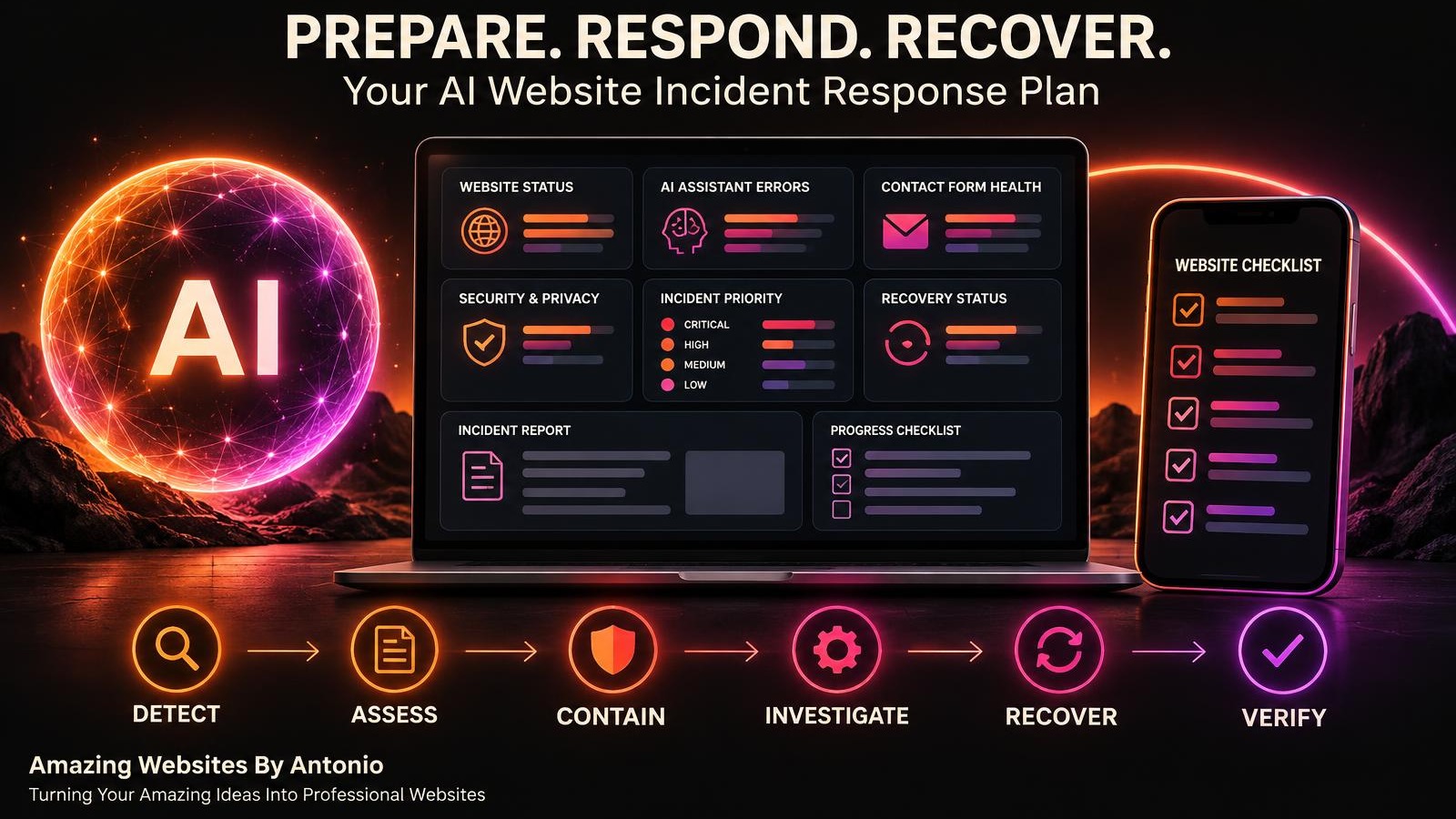
DETECT → ASSESS → CONTAIN → INVESTIGATE → RECOVER → VERIFY → LEARN
YOUR AI WEBSITE INCIDENT SEVERITY GUIDE
| Severity | Example | Recommended Response |
|---|---|---|
| Critical | Suspected customer data exposure or compromised admin access | Begin immediate containment and security escalation |
| High | Contact form fails for all visitors | Investigate promptly and provide an alternative contact method |
| Medium | Mobile navigation fails on some devices | Prioritize correction and test affected devices |
| Low | Minor decorative alignment issue | Add to the routine improvement queue |
These are illustrative classifications. Actual severity depends on customer impact, scope, and risk.
YOUR FIRST 24 HOURS: WEBSITE INCIDENT RESPONSE CHECKLIST
This is an example sequence, not a requirement to wait for each time window. Critical incidents need action immediately.
STAGE 1 — IMMEDIATE RESPONSE
Goal: Identify and Contain
- Confirm the incident.
- Record the discovery time.
- Identify affected systems.
- Assign a severity level.
- Protect customer information.
- Disable unsafe features if appropriate.
- Contact relevant service providers when needed.
STAGE 2 — INITIAL INVESTIGATION
Goal: Understand the Problem
- Review recent changes.
- Examine available error reports.
- Check integrations.
- Identify likely causes.
- Document evidence securely.
- Establish recovery priorities.
STAGE 3 — RECOVERY
Goal: Restore Essential Functionality
- Implement a verified fix.
- Use supported recovery options when necessary.
- Restore critical customer workflows.
- Test the affected features.
- Verify the live website.
STAGE 4 — FOLLOW-UP MONITORING
Goal: Confirm Stability
- Monitor affected systems.
- Review new error reports.
- Check customer feedback.
- Document remaining issues.
- Determine whether further action is required.
STAGE 5 — INCIDENT REVIEW
Goal: Learn and Improve
- Summarize the incident.
- Record actions taken.
- Identify root causes when possible.
- Review response effectiveness.
- Update the incident response plan.
COPY-READY AI WEBSITE INCIDENT RESPONSE REPORT
BUSINESS NAME: [Enter Business Name]
INCIDENT ID: [Enter Unique Identifier]
INCIDENT TITLE: [Enter Title]
DATE DISCOVERED: [Enter Date]
TIME DISCOVERED: [Enter Time and Time Zone]
REPORTED BY: [Enter Name or Monitoring Source]
SECTION 1 — INCIDENT DETAILS
TYPE: Website Outage / AI Assistant Error / Contact Form Failure / Integration Failure / Security / Privacy / Other
SEVERITY: Critical / High / Medium / Low
AFFECTED FEATURES: [List Features]
DESCRIPTION: [Explain What Happened]
CUSTOMER IMPACT: [Describe Known Impact]
EARLIEST KNOWN OCCURRENCE: [Enter Date and Time or Unknown]
SECTION 2 — INITIAL RESPONSE
IMMEDIATE ACTIONS TAKEN: [Describe Actions]
CONTAINMENT STATUS: Contained / Partially Contained / Not Contained / Not Applicable
SERVICE PROVIDERS CONTACTED: [Enter Details]
EVIDENCE PRESERVED: [Describe Securely Stored Evidence]
SECTION 3 — INVESTIGATION
SUSPECTED CAUSE: [Enter Details or Unknown]
CONFIRMED ROOT CAUSE: [Enter Details or Not Yet Determined]
RECENT RELEVANT CHANGES: [List Changes]
ADDITIONAL FINDINGS: [Enter Notes]
SECTION 4 — RECOVERY
CORRECTIVE ACTIONS: [List Actions]
RECOVERY METHOD: [Describe Method]
RECOVERY COMPLETED: Yes / No / Partially
RESTORATION DATE AND TIME: [Enter Details]
SECTION 5 — VERIFICATION
ORIGINAL PROBLEM RETESTED: Yes / No
RELATED FEATURES TESTED: Yes / No
LIVE WEBSITE VERIFIED: Yes / No
REMAINING ISSUES: [List Issues]
SECTION 6 — COMMUNICATION
CUSTOMERS NOTIFIED: Yes / No / Not Required / Pending Assessment
PROVIDERS NOTIFIED: Yes / No / Not Required
LEGAL OR CONTRACTUAL NOTIFICATION REVIEW: Completed / Pending / Not Applicable
SECTION 7 — FINAL REVIEW
INCIDENT STATUS: Open / Investigating / Recovering / Monitoring / Closed
LESSONS LEARNED: [Enter Findings]
PREVENTIVE ACTIONS: [List Actions]
FOLLOW-UP OWNER: [Enter Name]
NEXT REVIEW DATE: [Enter Date]
EXAMPLE INCIDENT: CONTACT FORM FAILURE
The following scenario is fictional.
INCIDENT ID: FORM-007
INCIDENT: Website Contact Form Submissions Failing
SEVERITY: High
PROBLEM: Visitors complete the Contact form, but submissions do not reach the private inquiry system.
IMMEDIATE ACTION: Investigate the form workflow and provide an alternative contact method while the issue is being resolved.
INVESTIGATION: Review recent form changes, relevant error messages, and integration behavior.
CORRECTION: Repair the affected workflow based on confirmed findings.
VERIFICATION:
- Submit safe test inquiries.
- Confirm that submissions are saved privately.
- Verify expected notifications.
- Check that customers receive accurate confirmation messages.
FOLLOW-UP: Add form submission verification to regular website monitoring.
LESSON: A Contact form should be tested beyond its visual appearance. The full submission workflow matters.
YOUR 30-DAY INCIDENT RESPONSE IMPLEMENTATION PLAN
WEEK 1 — PREPARE YOUR PLAN
- Identify essential website services.
- List potential incidents.
- Define severity levels.
- Document emergency contacts.
- Identify available recovery options.
GOAL: Establish an initial incident response framework.
WEEK 2 — BUILD RESPONSE PROCEDURES
- Create an incident report template.
- Define containment actions.
- Document investigation steps.
- Create recovery verification checklists.
- Identify communication responsibilities.
GOAL: Make the response process clear and repeatable.
WEEK 3 — PRACTICE A SAFE SCENARIO
- Choose a fictional website incident.
- Walk through the response plan.
- Identify missing information.
- Review decision-making steps.
- Improve the documentation.
GOAL: Build confidence without disrupting your live website.
WEEK 4 — REVIEW AND IMPROVE
- Review the incident response plan.
- Update important contacts.
- Check recovery procedures.
- Improve monitoring coverage.
- Schedule periodic reviews.
GOAL: Establish a sustainable business recovery process.
YOUR AI WEBSITE INCIDENT RESPONSE CHECKLIST
- ☐ I have identified essential website functions.
- ☐ I have documented potential incident types.
- ☐ I have defined severity levels.
- ☐ I know how to recognize urgent problems.
- ☐ I have identified relevant service providers.
- ☐ I have a process for protecting customer information.
- ☐ I know how to disable unsafe features where supported.
- ☐ I have reviewed available backup and recovery options.
- ☐ I have documented investigation procedures.
- ☐ I have an incident report template.
- ☐ I have identified alternative customer contact methods.
- ☐ I have a process for correcting AI assistant errors.
- ☐ I know how to verify restored functionality.
- ☐ I have a plan for monitoring after recovery.
- ☐ I understand that serious incidents may require external professional support.
- ☐ I have considered applicable notification requirements.
- ☐ I have a process for recording lessons learned.
- ☐ I have scheduled periodic plan reviews.
FINAL THOUGHTS
Every business owner wants a reliable website.
A website that loads correctly.
A Contact form that works.
An AI assistant that helps customers.
And a digital experience that supports business growth.
But unexpected problems can happen.
The difference is preparation.
When you have an incident response plan, you don't have to rely entirely on guesswork.
You have a process.
You know what to investigate.
You understand what matters most.
And you have a clearer path toward recovery.
YOU CANNOT PREVENT EVERY WEBSITE PROBLEM.
BUT YOU CAN PREPARE TO RESPOND MORE EFFECTIVELY.
Start with a simple plan.
Identify important risks.
Protect your customers.
Document your response.
Restore essential services.
Test your recovery.
And learn from what happened.
Because building a professional website isn't only about creating something beautiful.
It's also about creating something dependable.
PREPARE WITH PURPOSE.
RESPOND WITH CONFIDENCE.
RECOVER RESPONSIBLY.
KEEP BUILDING BETTER WEBSITES.
Amazing Websites By Antonio
Turning Your Amazing Ideas Into Professional Websites