Imagine visiting a business website.
You have a question about a service.
You open the AI assistant.
It answers your first question.
Then you ask something more specific.
The assistant doesn't have the information.
You try again.
It gives you another generic response.
You type:
"Can I speak with someone?"
And the assistant replies:
"How else can I help you today?"
Now you're frustrated.
You don't need another automated response.
YOU NEED A REAL PERSON.
This is why a human handoff system matters.
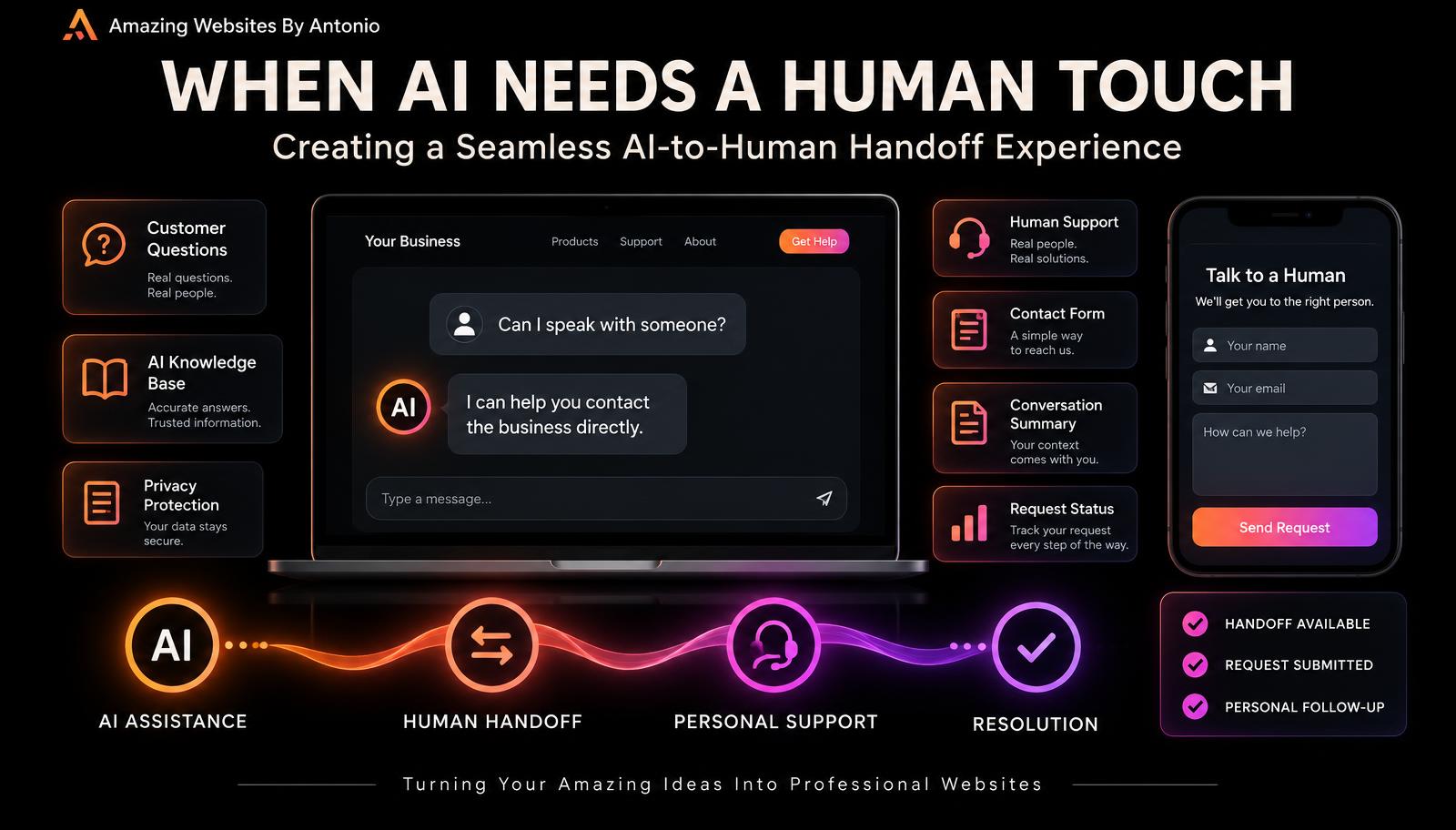
A human handoff is the process of helping someone move from automated assistance to personal support when AI cannot appropriately handle the request.
A good handoff shouldn't feel like starting over.
It should feel like the next helpful step.
Whether you operate a solo business or manage a larger team, a thoughtful handoff process can improve communication, reduce confusion, and help customers feel supported.
Let's explore 50 ways to build an AI-to-human handoff system that works.
PART 1: UNDERSTAND THE PURPOSE OF HUMAN HANDOFFS
1. Understand What a Human Handoff Is
A human handoff happens when an AI assistant directs or transfers a customer to a person who can provide further assistance.
This may involve live chat, email, a Contact form, a support ticket, or an appointment.
2. Recognize That AI Has Limitations
AI assistants can be useful, but they may misunderstand questions, lack current information, or produce inaccurate responses.
They shouldn't pretend to know everything.
3. Keep Human Support Part of Your Strategy
Automation should help customers reach solutions.
It shouldn't prevent them from contacting your business.
4. Define What Requires Personal Assistance
Identify situations your assistant should not attempt to resolve independently.
Examples include unusual project requirements, billing disputes, sensitive information, and complex complaints.
5. Design the Handoff Around the Customer
Ask:
What does the customer need right now?
What information should they receive?
What is the simplest way to connect them with the business?
PART 2: IDENTIFY WHEN A HANDOFF IS NEEDED
6. Recognize Direct Requests for Human Support
If a visitor says:
"I want to speak with someone."
The assistant should help them do that.
7. Recognize Repeated Unsuccessful Answers
If the assistant cannot resolve a question after reasonable attempts, offer an alternative.
Don't create an endless loop.
8. Recognize Complex Service Questions
Some customers need a personalized explanation that goes beyond published service information.
9. Escalate Sensitive Requests
Billing disputes, account concerns, privacy questions, and other sensitive issues may require specialized handling.
10. Recognize Frustration
If someone says:
"This isn't helping."
The assistant should acknowledge the problem and provide a practical next step.
PART 3: MAKE THE TRANSITION EASY
11. Offer a Clear Human Support Option
Use understandable labels such as:
Contact the Business
Request Personal Assistance
Send My Question
Speak With Support
Only display options that are actually available.
12. Don't Hide the Contact Page
Customers should be able to find your contact information without interacting with AI.
13. Avoid Making Customers Repeat Everything
Where supported and authorized, provide a short conversation summary with the customer's permission.
14. Keep the Process Short
Avoid requiring customers to complete a lengthy questionnaire just to request assistance.
15. Explain the Next Step
Tell visitors whether they are opening a form, sending an email, creating a support request, or connecting to live chat.
PART 4: CREATE CUSTOMER-FRIENDLY HANDOFF MESSAGES
16. Acknowledge the Request
Example:
"I can help you contact the business directly."
17. Be Clear About Availability
Don't promise that a person is online unless that's confirmed.
18. Avoid False Promises
Don't invent response times or guarantee immediate support.
19. Use a Warm, Professional Tone
Be helpful without sounding overly scripted.
20. Confirm When a Request Is Actually Submitted
Only say a message has been received after the submission succeeds.
PART 5: CHOOSE THE RIGHT HANDOFF METHOD
21. Contact Form Handoff
A Contact form can be useful when live assistance isn't available.
22. Email Handoff
Provide the approved business email address or a clearly labeled email option.
23. Live Chat Handoff
If your business offers staffed live chat, customers may be transferred when a person is available.
24. Appointment-Based Handoff
For complex projects, a consultation request may be appropriate.
25. Support Ticket Handoff
A ticket system can help organize requests and track their status.
Choose methods that match your actual business capabilities.
PART 6: DESIGN THE HANDOFF FORM
26. Ask for Essential Information
A basic form might request:
Name.
Email.
Reason for contacting.
Message.
Avoid collecting unnecessary details.
27. Offer a Clear Reason for Contact
Possible categories include:
Service Question
Project Inquiry
Technical Issue
Billing Question
General Support
Other
28. Make Conversation Summaries Optional When Appropriate
Ask whether the visitor wants to include relevant conversation details.
29. Explain How Information Will Be Used
Provide accurate privacy information about the handoff process.
30. Make the Form Accessible
Use clear labels, helpful error messages, and keyboard-friendly controls.
PART 7: CREATE A RESPONSIBLE CONVERSATION SUMMARY
31. Summarize the Customer's Goal
Example:
"Customer wants information about a website redesign."
32. Include Relevant Questions
Record the questions the customer wants answered.
33. Identify What Remains Unresolved
Clearly explain why personal assistance is needed.
34. Avoid Unnecessary Personal Details
Include only information relevant to the support request.
35. Let Customers Review Important Details
Where practical, allow visitors to confirm or edit the summary before submission.
PART 8: ORGANIZE REQUESTS BEHIND THE SCENES
36. Create a Central Request Queue
Keep customer handoff requests in an organized location.
37. Assign a Status
Useful statuses include:
NEW
IN REVIEW
AWAITING CUSTOMER
RESOLVED
CLOSED
38. Assign Responsibility
For a solo business, the business owner may review and respond to incoming requests.
For a team, assign the appropriate person.
39. Prioritize Important Issues
A broken payment workflow may need faster attention than a general informational question.
40. Prevent Duplicate Requests
Where practical, identify repeat submissions without accidentally merging unrelated customer concerns.
PART 9: FOLLOW UP PROFESSIONALLY
41. Send a Confirmation Message
Once a request is successfully submitted, confirm receipt.
42. Explain Response Expectations
Use accurate response windows if your business has established them.
43. Respond With Context
Review the customer's question and any authorized summary before replying.
44. Keep Communication Clear
Answer the question directly and explain relevant next steps.
45. Close the Loop
When the issue is resolved, update its status and provide appropriate confirmation.
PART 10: TEST AND IMPROVE YOUR HANDOFF SYSTEM
46. Test Direct Human Requests
Type:
"I need to talk to a person."
Verify that the assistant offers the correct contact option.
47. Test Unanswered Questions
Ask something outside the knowledge base.
Check whether the assistant acknowledges uncertainty and offers appropriate help.
48. Test Form and Integration Failures
Confirm that customers receive accurate feedback if a submission fails.
49. Review Handoff Performance
Track relevant measures such as:
Successful submissions.
Unresolved questions.
Response times.
Repeated issues.
Customer feedback.
50. Keep Improving the Process
Use what you learn to update:
AI responses.
Knowledge base articles.
Handoff rules.
Contact forms.
Support workflows.
The goal is a better customer experience.
COPY-READY AI-TO-HUMAN HANDOFF MESSAGE TEMPLATES
TEMPLATE 1 — CUSTOMER REQUESTS A PERSON
"I can help you contact the business directly. Would you like to open the Contact form and send your question?"
TEMPLATE 2 — AI DOESN'T KNOW THE ANSWER
"I don't have confirmed information about that. Rather than give you an inaccurate answer, I can help you contact the business for clarification."
TEMPLATE 3 — CUSTOMER IS FRUSTRATED
"I'm sorry I haven't been able to help with your question. You can contact the business directly so your request can receive personal attention."
TEMPLATE 4 — COMPLEX PROJECT QUESTION
"Your project may need a more detailed discussion. You can submit a project inquiry with your goals and requirements so the business can review your request."
TEMPLATE 5 — SENSITIVE ACCOUNT OR BILLING ISSUE
"This request may require personal assistance. For your privacy, please use the business's approved support channel rather than sharing sensitive payment or account information in this chat."
TEMPLATE 6 — HUMAN SUPPORT ISN'T LIVE
"Live assistance isn't available through this chat. You can submit your question using the Contact form."
TEMPLATE 7 — OPTIONAL CONVERSATION SUMMARY
"Would you like to include a short summary of this conversation with your request? You can review the information before submitting it."
TEMPLATE 8 — SUCCESSFUL SUBMISSION
"Thank you! Your message has been submitted successfully. The business can now review your request."
Only display this message after successful submission.
TEMPLATE 9 — SUBMISSION FAILED
"Your message couldn't be submitted. Please try again or use another available contact method."
TEMPLATE 10 — HANDOFF CLOSING MESSAGE
"Thank you for reaching out. I hope the next step helps you get the information you need."
AI-TO-HUMAN HANDOFF WORKFLOW
CUSTOMER ASKS A QUESTION
↓
AI REVIEWS THE REQUEST
↓
CAN AI ANSWER ACCURATELY AND APPROPRIATELY?
YES → Provide the answer and a helpful next step.
NO → Offer personal assistance.
↓
CUSTOMER CHOOSES A CONTACT METHOD
↓
COLLECT ONLY NECESSARY INFORMATION
↓
OPTIONAL APPROVED CONVERSATION SUMMARY
↓
SUBMIT REQUEST
↓
CONFIRM SUCCESSFUL SUBMISSION
↓
REVIEW AND RESPOND
↓
RESOLVE AND DOCUMENT
↓
IMPROVE THE SYSTEM
YOUR 30-DAY IMPLEMENTATION PLAN
WEEK 1 — DEFINE HANDOFF RULES
Identify requests that require human assistance.
Choose available contact methods.
Define escalation triggers.
WEEK 2 — BUILD THE HANDOFF EXPERIENCE
Create customer-friendly messages.
Configure forms or support workflows.
Add appropriate privacy information.
WEEK 3 — TEST EVERYTHING
Test direct requests for human support.
Test unanswered questions.
Test form submissions.
Test mobile accessibility.
Test failures.
WEEK 4 — REVIEW AND IMPROVE
Review submitted requests.
Identify repeated issues.
Improve AI knowledge base content.
Refine handoff messages and workflows.
AI-TO-HUMAN HANDOFF CHECKLIST
- ☐ Customers can request human assistance.
- ☐ The Contact page is easy to find.
- ☐ AI limitations are clearly communicated.
- ☐ The assistant doesn't invent answers.
- ☐ The assistant doesn't promise unavailable live support.
- ☐ Handoff messages are clear.
- ☐ Contact forms are accessible.
- ☐ Only necessary information is collected.
- ☐ Conversation summaries are handled responsibly.
- ☐ Successful submissions are confirmed accurately.
- ☐ Failed submissions have useful fallback instructions.
- ☐ Incoming requests are organized.
- ☐ Follow-up responsibilities are clear.
- ☐ Customer issues can be tracked.
- ☐ The process is reviewed regularly.
FINAL THOUGHTS
Artificial intelligence can help businesses communicate more efficiently.
But AI shouldn't become a barrier between customers and the people who can help them.
Sometimes customers need information.
Sometimes they need guidance.
And sometimes they need a real conversation.
A thoughtful human handoff system makes those transitions easier.
GOOD AUTOMATION KNOWS WHEN TO HELP.
GREAT CUSTOMER SERVICE KNOWS WHEN TO HAND OFF.
Build an assistant that answers questions accurately.
Recognizes its limitations.
Respects customer privacy.
Provides clear next steps.
And makes personal assistance accessible.
AI ASSISTANCE → HUMAN CONNECTION → BETTER CUSTOMER EXPERIENCE
Because technology should support relationships, not replace the importance of human understanding.
Amazing Websites By Antonio
Turning Your Amazing Ideas Into Professional Websites