How to Create an AI Website Recovery Checklist That Gets Your Business Back on Track After an Outage
A Practical Guide to Restoring Website Access, Testing Essential Features, and Safely Returning to Business After Technical Problems
Imagine opening your business website one morning.
Yesterday, everything was running smoothly.
Your homepage was working.
Your AI website assistant was answering customer questions.
Your Contact form was receiving inquiries.
And visitors were exploring your services.
But today, something unexpected happens.
Your website stops loading.
Customers cannot access your pages.
Your AI assistant becomes unavailable.
And important business functions may be interrupted.
What happens next?
How do you restore your website?
How do you know whether everything is working again?
And how can you prevent the same problem from happening repeatedly?
THAT'S WHERE AN AI WEBSITE RECOVERY CHECKLIST COMES IN.
A website recovery checklist is a structured guide for restoring essential functionality after an outage or serious technical disruption.
It helps you organize recovery activities, verify important systems, and determine when your website is ready to serve customers again.
For AI-powered websites, recovery involves more than checking whether the homepage loads.
You may also need to verify AI responses, customer inquiries, integrations, access controls, and automations.
The good news?
YOU DON'T NEED A LARGE TECHNICAL TEAM TO PREPARE A USEFUL RECOVERY CHECKLIST.
Even a solo entrepreneur can create a practical recovery plan.
In Blog #116, we're exploring 50 strategies to help you restore your website responsibly and return to normal operations with greater confidence.
PART 1: UNDERSTAND WEBSITE RECOVERY
1. Know What Website Recovery Means
Website recovery involves restoring affected services and verifying that they work safely after an interruption.
2. Understand That Availability Isn't the Same as Recovery
A homepage may load even while important forms, integrations, or AI features remain broken.
3. Identify Your Most Important Website Functions
Determine which features customers rely on most.
4. Know Your Recovery Responsibilities
Understand which actions you can perform and which require support from your website platform or service providers.
5. Prepare Before an Outage Happens
A documented checklist is easier to follow during a disruption than an improvised plan.
PART 2: ASSESS THE OUTAGE
6. Confirm the Problem
Check whether the website is unavailable or whether only certain features are affected.
7. Determine the Scope
Identify whether the issue affects one page, the entire website, or an external integration.
8. Record Important Times
Document when the problem was discovered and the earliest known time it occurred.
9. Identify Potential Customer Impact
Consider whether visitors are unable to access information, submit inquiries, or complete important tasks.
10. Assign an Appropriate Severity
Prioritize issues based on impact, urgency, and potential security or privacy risks.
PART 3: PROTECT YOUR WEBSITE BEFORE RESTORING IT
11. Check for Security Concerns
Determine whether the outage may involve unauthorized access or other suspicious activity.
12. Preserve Relevant Evidence
Keep appropriate logs, timestamps, and error information securely.
13. Protect Customer Information
Avoid exposing private inquiries or sensitive data during troubleshooting.
14. Avoid Unverified Recovery Methods
Use documented procedures and trusted provider guidance.
15. Know When to Seek Specialized Help
Suspected security compromises, data exposure, or complex infrastructure failures may require qualified technical assistance.
PART 4: RESTORE BASIC WEBSITE ACCESS
16. Check Your Website Platform's Status
Determine whether the hosting or website provider is experiencing a service disruption.
17. Review Domain and DNS Configuration
When relevant, verify that domain settings are correct before making changes.
18. Check Recent Website Updates
Determine whether a recent change contributed to the outage.
19. Use Supported Restoration Options
Follow your platform's documented backup, version history, or recovery procedures.
20. Confirm Website Accessibility
Verify that important pages load correctly after restoration.
PART 5: RECOVER AI ASSISTANT FUNCTIONALITY
21. Confirm the AI Assistant Loads
Check whether visitors can open and interact with the assistant.
22. Test Common Questions
Ask representative questions about your business.
23. Verify Knowledge Base Accuracy
Confirm that restored AI configurations use current approved information.
24. Check Human Support Handoffs
Verify that the assistant can direct customers to appropriate contact options.
25. Review AI Safety and Privacy Behavior
Ensure the assistant does not expose private information or invent unsupported business promises.
PART 6: RESTORE CUSTOMER CONTACT WORKFLOWS
26. Test Your Contact Form
Submit safe test information and verify that the form works.
27. Confirm Private Inquiry Storage
Check that submissions are saved in the intended private location.
28. Verify Email Notifications
Confirm that expected notifications are being delivered.
29. Test Customer Confirmation Messages
Make sure visitors receive accurate confirmation only when their submission succeeds.
30. Review Potentially Missed Inquiries
Investigate whether submissions were lost, delayed, or duplicated during the outage.
Do not assume missing records can always be recovered.
PART 7: VERIFY IMPORTANT INTEGRATIONS
31. Check Payment Workflows
Where applicable, verify payment integrations using supported test methods.
Avoid unnecessary live charges.
32. Check Email Integrations
Confirm that connected email services are functioning as intended.
33. Review Automation Workflows
Check that automations have resumed appropriately and aren't creating duplicate actions.
34. Verify External Service Connections
Review relevant permissions and integration status.
35. Confirm Data Consistency
Look for duplicate, missing, or incomplete records that may have resulted from interrupted workflows.
PART 8: TEST THE CUSTOMER EXPERIENCE
36. Review Important Website Pages
Check the homepage, Services, About, Contact, and other essential pages.
37. Test Navigation
Confirm that menus, buttons, and links work.
38. Review Mobile Display
Check that important content is visible and usable on smaller screens.
39. Review Accessibility
Verify that essential features remain usable through appropriate accessibility methods.
40. Test Complete Customer Journeys
For example, move from viewing a service to submitting an inquiry and receiving confirmation.
PART 9: CONFIRM RECOVERY READINESS
41. Create Recovery Acceptance Criteria
Define the conditions that must be satisfied before declaring recovery complete.
42. Record Test Results
Document what passed, failed, or remains untested.
43. Review Outstanding Issues
Identify any unresolved problems and their impact.
44. Make a Recovery Decision
Choose whether to resume normal operations, continue restricted operations, or keep recovery work underway.
45. Verify the Live Website
Confirm that the actual published website works—not just a preview or administrative dashboard.
PART 10: MONITOR AND PREVENT FUTURE OUTAGES
46. Monitor After Restoration
Watch important systems for recurring problems.
47. Document the Outage
Record what happened, how it was resolved, and any remaining concerns.
48. Review the Root Cause
Identify contributing factors when evidence supports a conclusion.
49. Improve Backup and Recovery Preparation
Review whether existing recovery capabilities meet your business needs.
50. Update Your Recovery Checklist
Use lessons learned to improve future recovery procedures.
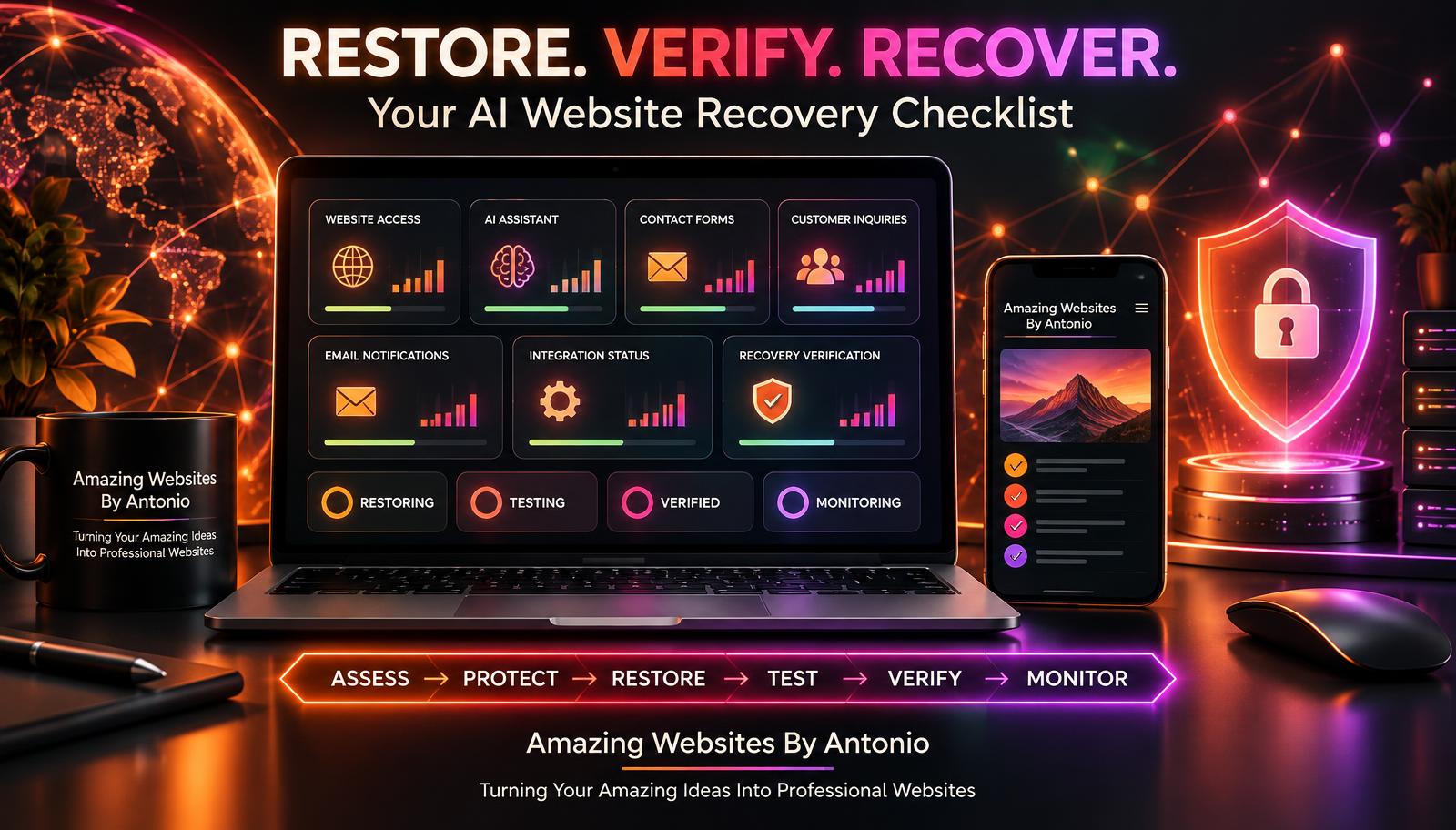
ASSESS → PROTECT → RESTORE → TEST → VERIFY → MONITOR → IMPROVE
THE AI WEBSITE RECOVERY PRIORITY FRAMEWORK
Not every website feature needs to be restored in the same order.
A practical recovery plan should focus on business impact, customer needs, and risk.
| Recovery Priority | Website Function | Why It Matters |
|---|---|---|
| Critical | Security and customer data protection | Prevents further harm |
| High | Website availability | Restores access to essential information |
| High | Contact and inquiry workflows | Helps customers reach the business |
| High | Payment functions, when applicable | Supports essential transactions |
| Medium | AI assistant functionality | Restores automated customer guidance |
| Medium | Analytics and routine automations | Supports monitoring and operations |
| Lower | Decorative or nonessential features | Can often wait until core services are stable |
These priorities are illustrative. A feature's actual importance depends on the business and the incident.
COMPLETE AI WEBSITE RECOVERY CHECKLIST
SECTION 1 — INITIAL ASSESSMENT
- ☐ The outage has been confirmed.
- ☐ Affected systems have been identified.
- ☐ The incident severity has been assessed.
- ☐ Customer impact has been considered.
- ☐ Important dates and times have been recorded.
- ☐ Relevant providers have been contacted when necessary.
SECTION 2 — SECURITY AND DATA PROTECTION
- ☐ Potential security concerns have been reviewed.
- ☐ Customer information remains appropriately protected.
- ☐ Relevant evidence has been preserved securely.
- ☐ Unauthorized access has been investigated where appropriate.
- ☐ Recovery actions follow trusted procedures.
SECTION 3 — WEBSITE RESTORATION
- ☐ Website provider status has been checked.
- ☐ Relevant domain settings have been reviewed.
- ☐ Recent changes have been investigated.
- ☐ Supported recovery options have been used appropriately.
- ☐ Important pages load successfully.
- ☐ The correct website version is available.
SECTION 4 — AI ASSISTANT RECOVERY
- ☐ The AI assistant opens correctly.
- ☐ Common questions have been tested.
- ☐ Approved business information is accurate.
- ☐ Unsupported promises are avoided.
- ☐ Human handoffs work.
- ☐ Privacy-sensitive behavior has been reviewed.
SECTION 5 — CUSTOMER INQUIRIES
- ☐ Contact forms submit successfully.
- ☐ Test inquiries are stored privately.
- ☐ Email notifications arrive as expected.
- ☐ Customer confirmation messages work.
- ☐ Potential missing or duplicate submissions have been investigated.
- ☐ Test records have been cleaned up appropriately.
SECTION 6 — INTEGRATIONS AND AUTOMATIONS
- ☐ Relevant payment workflows have been checked safely.
- ☐ Email integrations work.
- ☐ Automation workflows have been reviewed.
- ☐ External service connections are functioning.
- ☐ Unexpected duplicate actions have been investigated.
SECTION 7 — CUSTOMER EXPERIENCE
- ☐ Important pages display correctly.
- ☐ Navigation works.
- ☐ Buttons and links work.
- ☐ Mobile usability has been reviewed.
- ☐ Accessibility checks have been completed.
- ☐ Essential customer journeys have been tested.
SECTION 8 — FINAL RECOVERY APPROVAL
- ☐ Required recovery tests have passed.
- ☐ Remaining issues have been evaluated.
- ☐ Critical risks have been addressed.
- ☐ The live website has been verified.
- ☐ The recovery decision has been documented.
- ☐ Post-recovery monitoring is planned.
COPY-READY AI WEBSITE RECOVERY VERIFICATION REPORT
BUSINESS NAME:
[Enter Business Name]
INCIDENT ID:
[Enter Incident Identifier]
OUTAGE DESCRIPTION:
[Describe the Problem]
DATE DISCOVERED:
[Enter Date]
RECOVERY DATE:
[Enter Date]
PREPARED BY:
[Enter Name]
SECTION 1 — INCIDENT SUMMARY
AFFECTED WEBSITE FEATURES:
[List Features]
KNOWN CUSTOMER IMPACT:
[Describe Impact]
SUSPECTED OR CONFIRMED CAUSE:
[Enter Details or Unknown]
SECTION 2 — RESTORATION ACTIONS
ACTIONS TAKEN:
[List Actions]
RECOVERY METHOD USED:
[Describe Method]
SERVICE PROVIDERS INVOLVED:
[List Providers]
SECTION 3 — WEBSITE VERIFICATION
Website Accessible:
Pass / Fail / Not Tested
Important Pages Working:
Pass / Fail / Not Tested
Navigation Working:
Pass / Fail / Not Tested
Mobile Functionality:
Pass / Fail / Not Tested
Accessibility Review:
Pass / Fail / Not Tested
SECTION 4 — AI ASSISTANT VERIFICATION
Assistant Available:
Pass / Fail / Not Tested
Answer Accuracy:
Pass / Fail / Not Tested
Knowledge Base Current:
Pass / Fail / Not Tested
Human Handoff:
Pass / Fail / Not Tested
SECTION 5 — CUSTOMER INQUIRIES
Contact Form:
Pass / Fail / Not Tested
Private Inquiry Storage:
Pass / Fail / Not Tested
Email Notifications:
Pass / Fail / Not Tested
Confirmation Messages:
Pass / Fail / Not Tested
Missing or Duplicate Inquiry Review:
Completed / Pending / Not Applicable
SECTION 6 — INTEGRATIONS
Payment Workflow:
Pass / Fail / Not Applicable / Not Tested
Email Integration:
Pass / Fail / Not Applicable / Not Tested
Automations:
Pass / Fail / Not Applicable / Not Tested
Other Integrations:
[Enter Details]
SECTION 7 — RECOVERY DECISION
FINAL STATUS:
Fully Restored / Partially Restored / Recovery in Progress
OUTSTANDING ISSUES:
[List Issues]
REMAINING RISKS:
[Describe Risks]
APPROVED BY:
[Enter Name]
APPROVAL DATE:
[Enter Date]
NEXT MONITORING REVIEW:
[Enter Date]
EXAMPLE WEBSITE RECOVERY SCENARIO
The following example is fictional.
Situation: Website Unavailable After an Update
A business owner publishes a website update.
Shortly afterward, visitors report that the website is not loading correctly.
Step 1 — Confirm the Outage
The owner checks the published website and verifies that important pages are unavailable.
Step 2 — Assess the Impact
The outage prevents customers from accessing services and submitting inquiries.
Step 3 — Investigate the Cause
The owner reviews recent changes and checks the website provider's status.
Step 4 — Restore Functionality
The owner follows the platform's supported recovery procedure.
Step 5 — Test Essential Features
The owner verifies:
- Website access
- Navigation
- Contact forms
- Private inquiry storage
- Email notifications
- AI assistant responses
- Mobile functionality
Step 6 — Review Recovery Results
The owner documents the results and identifies any remaining problems.
Step 7 — Monitor the Website
The owner continues checking important functions to confirm that the problem does not recur.
LESSON:
A successful recovery requires more than seeing the homepage load again.
It requires verifying the customer experience.
YOUR 30-DAY WEBSITE RECOVERY PREPARATION PLAN
WEEK 1 — IDENTIFY ESSENTIAL SERVICES
- List your most important website features.
- Identify relevant providers and integrations.
- Determine which services customers depend on.
- Document recovery responsibilities.
- Identify alternative contact methods.
GOAL: Understand what must be restored first.
WEEK 2 — REVIEW RECOVERY CAPABILITIES
- Check available backup features.
- Review version history options.
- Document provider support resources.
- Identify security recovery procedures.
- Create a recovery checklist.
GOAL: Prepare a realistic recovery process.
WEEK 3 — PRACTICE A RECOVERY SCENARIO
- Choose a fictional outage scenario.
- Walk through the recovery checklist.
- Review the verification report.
- Identify missing information.
- Improve the recovery process.
Use a safe tabletop exercise rather than intentionally disrupting the live website.
GOAL: Practice the process without affecting customers.
WEEK 4 — REFINE AND MAINTAIN
- Review the completed checklist.
- Update important contacts.
- Improve monitoring procedures.
- Identify recovery limitations.
- Schedule periodic reviews.
GOAL: Create a sustainable website recovery plan.
THE AI WEBSITE RECOVERY FRAMEWORK
ASSESS
Understand what happened.
↓
PROTECT
Prevent further harm and safeguard information.
↓
RESTORE
Recover essential website functionality.
↓
TEST
Check affected features and customer workflows.
↓
VERIFY
Confirm the live website meets recovery requirements.
↓
APPROVE
Decide whether normal operations can resume.
↓
MONITOR
Watch for recurring issues.
↓
IMPROVE
Strengthen future recovery preparation.
FINAL THOUGHTS
Website outages can be frustrating.
They can interrupt customer inquiries.
Prevent visitors from accessing important information.
And temporarily disrupt business operations.
But preparation makes a difference.
A recovery checklist helps you stay organized when something unexpected happens.
It reminds you to protect customer information.
Restore essential functions.
Test important features.
Verify integrations.
And make thoughtful decisions about returning to normal operations.
GETTING YOUR WEBSITE BACK ONLINE IS IMPORTANT.
MAKING SURE IT WORKS CORRECTLY IS JUST AS IMPORTANT.
You don't need a complicated recovery system to begin.
Start by identifying your essential services.
Understand your website platform's recovery options.
Create a checklist.
Practice a safe recovery scenario.
And improve the process over time.
Because a dependable website isn't one that never experiences problems.
IT'S ONE THAT HAS A PLAN FOR RECOVERING WHEN PROBLEMS OCCUR.
PREPARE WITH PURPOSE.
RESTORE WITH CARE.
VERIFY WITH CONFIDENCE.
KEEP BUILDING BETTER WEBSITES.
Amazing Websites By Antonio
Turning Your Amazing Ideas Into Professional Websites