“I don't like that color.”
“That button should be bigger.”
“I think you need another page.”
“I couldn't find your services.”
“I wasn't sure how to contact you.”
“Your website looks great!”
“I don't understand what this means.”
Customer feedback can be incredibly valuable.
It can help you discover:
Confusing information.
Missing answers.
Usability problems.
Customer questions.
Trust concerns.
New opportunities.
But there's also a challenge.
Not every opinion should automatically become a website change.
If you redesign your website every time one person makes a suggestion, your website can quickly lose:
Focus.
Consistency.
Strategy.
Brand identity.
And purpose.
The goal isn't to ignore feedback.
The goal is to learn how to evaluate it.
Use this process:
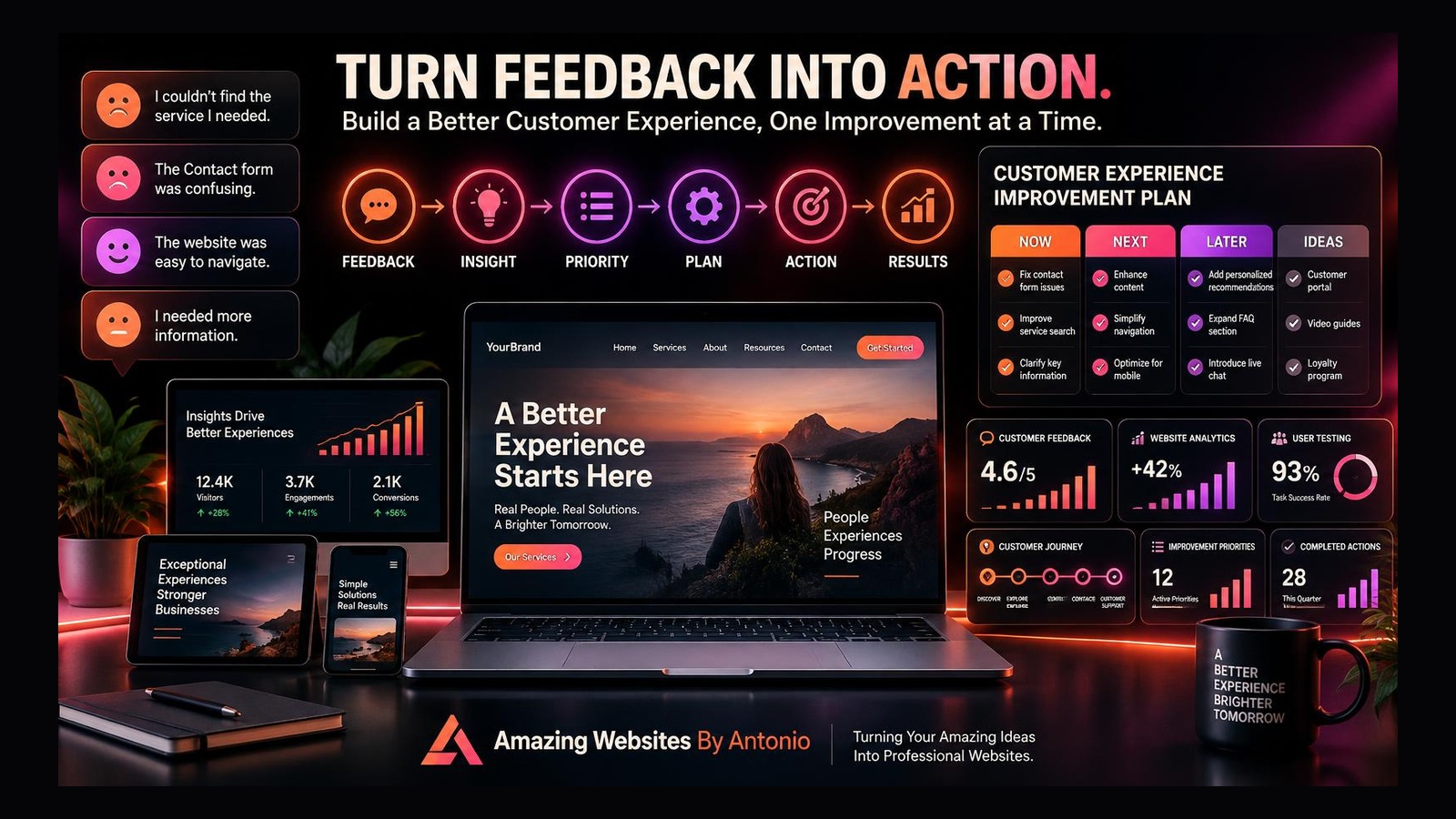
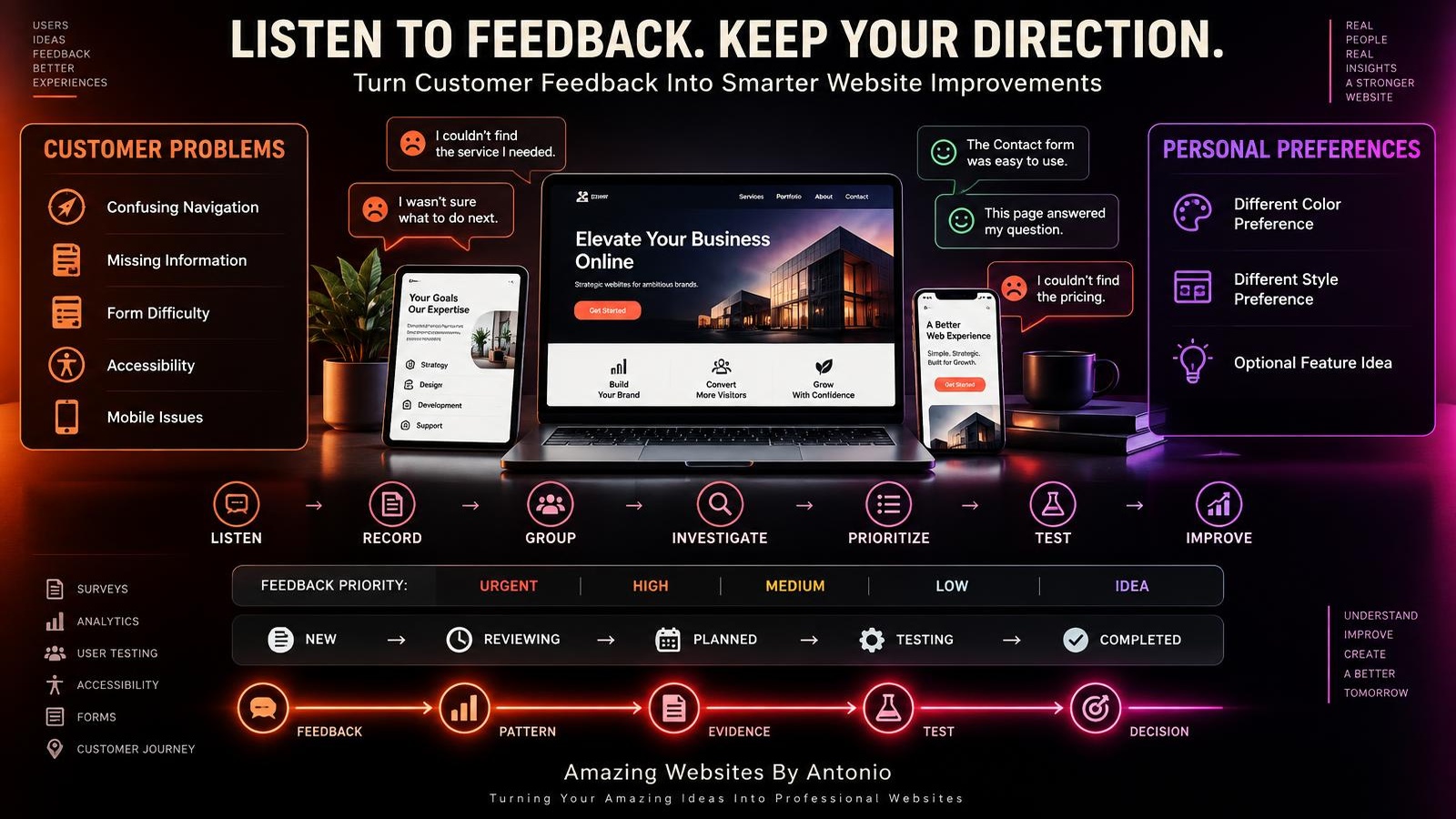
LISTEN → RECORD → GROUP → INVESTIGATE → PRIORITIZE → TEST → IMPROVE
Let's break it down.
1. Welcome Customer Feedback
Customers experience your website differently than you do.
You already know:
Where everything is.
What every service means.
What each button does.
Where the Contact page is.
A first-time visitor doesn't.
That's why outside feedback can reveal things you may not notice.
2. Make Feedback Easy to Share
Customers shouldn't have to search for a way to give useful feedback.
Depending on your business, feedback might come through:
- Contact forms
- Surveys
- Customer conversations
- Project follow-ups
- Support messages
- Social media
- Testimonials
- User testing
Create appropriate opportunities for people to share their experience.
3. Ask Specific Questions
Instead of only asking:
“What do you think of our website?”
ask:
“Was it easy to find the service you needed?”
“Was anything confusing?”
“Did you know what to do next?”
“Was there any information you expected but couldn't find?”
“Was the Contact form easy to use?”
“Did the website work well on your phone?”
Specific questions often create more useful answers.
4. Don't Ask Only Whether Someone Likes the Design
“I like it.”
and:
“I don't like it.”
can be useful reactions.
But they don't always tell you whether the website works.
Ask about tasks and understanding.
Could they find the service?
Could they understand the offer?
Could they contact the business?
Could they complete the intended action?
Function matters alongside appearance.
5. Record Feedback in One Place
Don't let feedback disappear inside:
Emails.
Text messages.
Social messages.
Meeting notes.
Your memory.
Create one feedback log.
For example:
WEBSITE FEEDBACK LOG
DATE:
________________
SOURCE:
________________
PAGE:
________________
FEEDBACK:
________________
CATEGORY:
________________
PRIORITY:
________________
ACTION:
________________
STATUS:
________________
Now feedback becomes easier to review.
6. Organize Feedback by Category
Categories might include:
- CONTENT
- NAVIGATION
- DESIGN
- MOBILE
- FORMS
- SERVICES
- PRICING
- ACCESSIBILITY
- PERFORMANCE
- CONTACT
- PORTFOLIO
- FAQ
- TRUST
This helps you identify patterns.
7. Separate Preferences From Problems
Consider:
“I prefer green instead of purple.”
That's primarily a preference.
Now consider:
“I couldn't read the text because there wasn't enough contrast.”
That's a usability and accessibility concern.
Both are feedback.
But they shouldn't automatically receive the same priority.
8. Look for Repeated Patterns
One person says:
“I couldn't find the Services page.”
Interesting.
Five customers say:
“I couldn't find the Services page.”
Now you may have a pattern worth investigating.
Repeated feedback can signal a larger issue.
9. Don't Wait for Ten People to Report a Serious Problem
Patterns matter, but some issues deserve attention immediately.
Examples:
- Checkout doesn't work
- Contact form fails
- Important information is incorrect
- Navigation is broken
- A serious accessibility barrier exists
- Booking doesn't work
The severity of the issue matters too.
10. Consider Who Provided the Feedback
Feedback from your target customer may be especially relevant to the customer experience you're trying to create.
That doesn't mean feedback from everyone else is worthless.
But context matters.
Ask:
Is this person part of the intended audience?
Were they trying to complete a relevant task?
What experience led to the feedback?
11. Ask What the Person Was Trying to Do
Suppose someone says:
“The website is confusing.”
Ask:
“What were you trying to find?”
Maybe they were trying to:
Find pricing.
Book an appointment.
Compare services.
Read testimonials.
Contact the business.
Knowing the task helps you understand the problem.
12. Distinguish the Problem From the Suggested Solution
A customer might say:
“You should add another menu.”
But the underlying problem may be:
“I couldn't find your services.”
The customer's suggested solution is:
Add another menu.
The real problem is:
Important information was difficult to find.
Focus first on understanding the problem.
There may be a better solution.
13. Ask “Why?” Carefully
If someone says:
“I didn't trust this page.”
You might ask:
“What made you feel unsure?”
Maybe:
Pricing was unclear.
There were no examples.
There were no testimonials.
The page looked outdated.
The process wasn't explained.
Understanding why makes feedback more useful.
14. Compare Feedback With Analytics
Suppose customers say:
“The Contact form feels too long.”
Analytics also suggest that many visitors reach the form but don't complete it.
Now you have two different forms of evidence pointing toward the same area.
That's worth investigating.
15. Compare Feedback With User Testing
Suppose customers say:
“I couldn't find the portfolio.”
Then during user testing, people also struggle to locate it.
The pattern becomes stronger.
Combine evidence when possible.
16. Compare Feedback With Business Goals
Not every suggestion supports the business.
Someone might suggest:
“Add ten more pages.”
But your goal may be to simplify the customer journey.
Ask:
Does this suggestion support:
The customer?
The website goal?
The business goal?
The brand?
If not, it may not belong on the roadmap.
17. Protect Your Brand Identity
Customers can help identify problems.
But they shouldn't necessarily redesign your entire brand.
For example:
One person prefers blue.
Another prefers green.
Another prefers red.
You don't need to change your brand colors every week.
Brand consistency matters.
18. Don't Design by Committee
When too many unrelated opinions control a website, the result can become inconsistent.
One person wants:
More text.
Another wants:
Less text.
One wants:
More animation.
Another wants:
No animation.
You can't satisfy every preference.
Use strategy to guide the final decision.
19. Identify High-Impact Feedback
High-impact feedback may involve:
- Broken functionality
- Customer confusion
- Accessibility
- Important missing information
- Difficulty contacting the business
- Difficulty purchasing
- Difficulty booking
- Trust concerns
- Major mobile problems
These deserve stronger consideration.
20. Identify Lower-Priority Feedback
Lower-priority feedback may include:
- Minor personal style preferences
- Suggestions unrelated to customer goals
- Features only one person wants
- Changes that add complexity without clear value
Record them if useful.
They don't need immediate action.
21. Create Feedback Priority Levels
You can use:
- URGENT
- HIGH
- MEDIUM
- LOW
- IDEA
For example:
URGENT:
Contact form broken.
HIGH:
Customers repeatedly can't find Services.
MEDIUM:
FAQ needs another common question.
LOW:
One person prefers a different button style.
IDEA:
Interactive project-planning tool.
Now feedback becomes manageable.
22. Add Feedback to Your Website Roadmap
Remember:
NOW → NEXT → LATER → IDEAS
Feedback can feed directly into this roadmap.
For example:
NOW
Fix Contact form.
NEXT
Improve service navigation.
LATER
Expand FAQ.
IDEAS
Create interactive project tool.
This prevents every suggestion from becoming an emergency.
23. Create a “Needs Investigation” Category
Sometimes feedback is interesting but unclear.
For example:
“The homepage feels overwhelming.”
Don't immediately redesign it.
Add:
NEEDS INVESTIGATION
Then review:
Analytics.
User testing.
Page structure.
Mobile layout.
Content.
Customer journey.
Investigate before changing.
24. Don't Delete Something Simply Because One Person Didn't Use It
A visitor may not use your FAQ.
That doesn't mean nobody finds it useful.
A visitor may not read your About page.
That doesn't mean it has no purpose.
Evaluate features based on their intended role and broader evidence.
25. Don't Add Something Simply Because One Person Requested It
Someone asks:
“Can you add a customer portal?”
Before building it, ask:
How many customers need it?
What problem would it solve?
How much would it cost to maintain?
Would a simpler solution work?
Is it aligned with the business?
Ideas need evaluation.
26. Watch for Repeated Questions
Repeated customer questions can become website improvements.
If people repeatedly ask:
“What happens after I contact you?”
Create a process section.
If people ask:
“Which service is right for me?”
Improve the Services page or FAQ.
If people ask:
“Do you offer this?”
Clarify the service information.
Questions are valuable feedback.
27. Use Sales Conversations as Website Feedback
What questions come up before someone becomes a customer?
Those questions may reveal missing website content.
Your sales conversations can help improve:
Service pages.
Pricing explanations.
FAQs.
Portfolio.
Case studies.
Calls to action.
28. Use Support Questions as Website Feedback
What questions appear after someone becomes a customer?
Maybe the website could better explain:
Next steps.
Timelines.
Policies.
Access.
Processes.
Resources.
Support questions can reveal content opportunities.
29. Use Testimonials as Positive Feedback
Feedback isn't only about problems.
Testimonials can show what customers value.
Maybe customers repeatedly praise:
Communication.
Creativity.
Speed.
Professionalism.
Ease of use.
Personal attention.
Those patterns can help you understand your strengths.
30. Don't Turn Testimonials Into Claims You Can't Support
Use authentic customer feedback with appropriate permission.
Don't invent testimonials.
Don't exaggerate what someone said.
Trust matters.
31. Pay Attention to Silence
Sometimes customers don't complain.
They simply leave.
That's why feedback alone isn't enough.
Combine it with:
Analytics.
Testing.
Website reviews.
Performance monitoring.
Customer behavior.
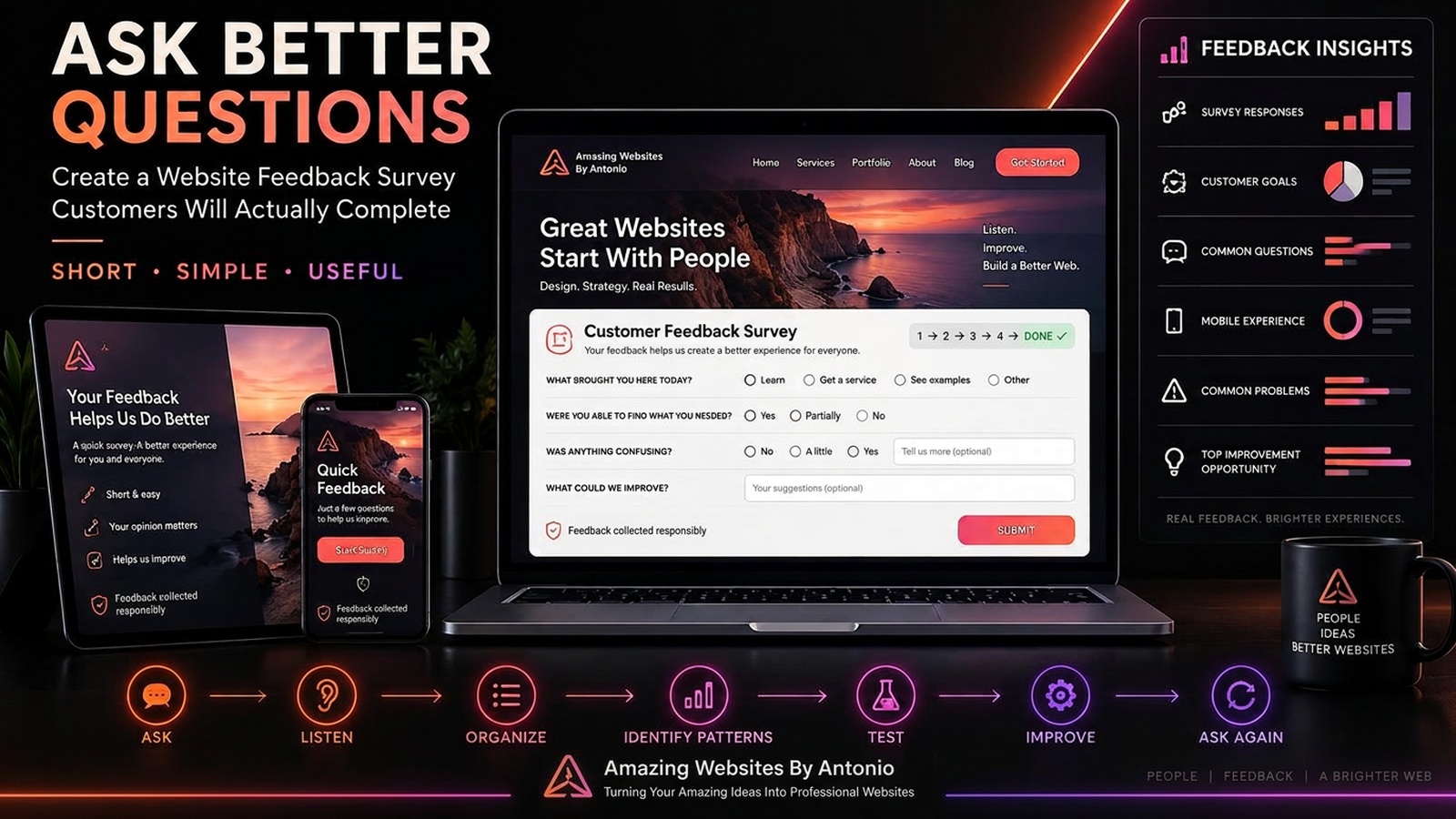
32. Create a Short Feedback Survey
A simple survey might ask:
- What were you trying to do on our website?
- Were you able to do it?
- Was anything difficult to find?
- Was anything confusing?
- What information was missing?
- How was the mobile experience?
- Is there one thing we could improve?
Keep it focused.
33. Don't Make the Survey Exhausting
If the survey takes longer than the website visit, people may abandon it.
Ask only questions that can help you learn something useful.
34. Review Feedback Monthly
During your monthly website maintenance routine, review:
New feedback.
Repeated themes.
Open issues.
Resolved issues.
New opportunities.
Then decide whether anything should move onto your improvement roadmap.
35. Create a Feedback Summary
For example:
MONTHLY WEBSITE FEEDBACK SUMMARY
TOTAL FEEDBACK ITEMS:
12
POSITIVE:
5
USABILITY:
3
CONTENT:
2
MOBILE:
1
NEW IDEA:
1
MOST COMMON ISSUE:
Finding the right service
TOP ACTION:
Improve Services navigation
Now feedback becomes easier to understand.
36. Connect Feedback to Testing
Don't automatically implement every suggestion.
When appropriate:
FEEDBACK
↓
QUESTION
↓
HYPOTHESIS
↓
TEST
↓
MEASURE
↓
DECIDE
For example:
FEEDBACK:
“The Contact form feels too long.”
QUESTION:
Would fewer required fields make the inquiry process easier?
TEST:
Simplify the form.
MEASURE:
Review form completion and lead quality.
DECIDE:
Keep, revise, or reverse.
37. Test Solutions, Not Just Opinions
A customer may correctly identify a problem but suggest the wrong solution.
Test the solution before assuming it works.
38. Explain Why You Don't Implement Every Request
If you're working with clients or a team, you may need to explain:
“We recorded the suggestion, but we're not implementing it yet because we need more evidence.”
or:
“This suggestion conflicts with the primary customer journey.”
Thoughtful decision-making isn't ignoring feedback.
39. Thank People for Useful Feedback
When appropriate, let people know their input is appreciated.
They took time to help you understand their experience.
You don't have to promise to make every requested change.
40. Close the Loop When Possible
If a customer identifies an important problem and you fix it, you may choose to let them know.
For example:
“Thank you for pointing that out. We've improved that section.”
This can show that feedback is taken seriously.
41. Track Resolved Feedback
Create statuses such as:
- NEW
- REVIEWING
- PLANNED
- TESTING
- COMPLETED
- NO ACTION
This helps prevent feedback from disappearing.
42. Document Why You Chose “No Action”
“No action” doesn't mean the feedback was worthless.
Record why.
For example:
NO ACTION
Reason:
Single preference that conflicts with established brand identity.
Or:
NO ACTION
Reason:
Requested feature would add significant complexity without supporting current business goals.
This creates a record of thoughtful decisions.
43. Revisit Old Feedback
A suggestion that wasn't useful six months ago may become relevant later.
Business needs change.
Technology changes.
Customer behavior changes.
Review older ideas occasionally.
44. Don't Let Feedback Destroy Simplicity
Customers may ask for:
More pages.
More buttons.
More options.
More features.
More information.
Sometimes the best experience requires less.
Every addition should earn its place.
45. Don't Let Feedback Stop Innovation
Customer feedback is valuable, but customers can't always request something they've never imagined.
Continue using:
Creativity.
Strategy.
Professional judgment.
Testing.
Innovation.
Feedback is one input—not the entire strategy.
46. Use AI to Organize Feedback Carefully
AI can help:
Summarize comments.
Group common themes.
Identify repeated questions.
Organize categories.
Create draft action items.
But human judgment should determine what changes are appropriate.
Also handle customer information responsibly and follow applicable privacy requirements.
47. Protect Customer Privacy
Don't publish someone's feedback, name, photo, or video without appropriate permission.
Keep private contact information private.
If you collect feedback through forms or analytics, understand what information is being collected and why.
48. Create a Feedback-to-Action System
Use this process:
COLLECT
↓
RECORD
↓
CATEGORIZE
↓
IDENTIFY PATTERNS
↓
INVESTIGATE
↓
PRIORITIZE
↓
TEST
↓
IMPLEMENT
↓
MEASURE
↓
REVIEW
Now customer feedback becomes part of your website strategy.
49. Remember That the Customer Experience Is the Goal
The goal isn't:
Make every customer agree with every design choice.
The goal is:
Help customers understand.
Help customers navigate.
Help customers trust.
Help customers complete important actions.
Help customers have a better experience.
50. Listen Without Losing Direction
This is the balance.
LISTEN TO CUSTOMERS.
But don't let every opinion control the website.
LOOK FOR PATTERNS.
INVESTIGATE PROBLEMS.
PROTECT THE BRAND.
FOLLOW BUSINESS GOALS.
TEST IMPORTANT CHANGES.
MEASURE RESULTS.
Then keep learning.
Customer Feedback Decision Framework
FEEDBACK RECEIVED
↓
WHAT WAS THE PERSON TRYING TO DO?
↓
IS THIS A PREFERENCE OR A PROBLEM?
↓
IS IT REPEATED?
↓
HOW SERIOUS IS IT?
↓
DOES OTHER EVIDENCE SUPPORT IT?
↓
DOES IT AFFECT CUSTOMER OR BUSINESS GOALS?
↓
SHOULD WE INVESTIGATE?
↓
SHOULD WE TEST A SOLUTION?
↓
WHAT DID WE LEARN?
↓
KEEP / IMPROVE / RETEST / NO ACTION
Final Thoughts
Customer feedback is powerful.
But feedback works best when it's combined with strategy.
Listen carefully.
Record what people say.
Look for patterns.
Separate personal preferences from real usability problems.
Compare feedback with analytics and testing.
Prioritize what matters.
Protect your brand identity.
Test meaningful improvements.
And don't be afraid to say:
“That's a useful idea, but it isn't the right priority right now.”
A professional website isn't controlled by every opinion.
It's informed by feedback and guided by purpose.
LISTEN → LEARN → INVESTIGATE → TEST → IMPROVE
Because the goal isn't to build a website that pleases every opinion.
It's to build a website that serves its customers and supports the business.
Amazing Websites By Antonio
Turning Your Amazing Ideas Into Professional Websites