Skip to content
Amazing Websites By Antonio logoAmazing Websites By Antonio
HomeServicesPortfolioJingle Studio
Resources
Contact
All articles
🤖 AI Solutions & Website Innovation

How to Build an AI Knowledge Base That Helps Your Website Answer Customer Questions Accurately

Turning Business Information Into Smarter, More Reliable Customer Support

Antonio Humann Oct 13, 2026 10 min read Share on LinkedInShare on YouTube
How to Build an AI Knowledge Base That Helps Your Website Answer Customer Questions Accurately

Turning Business Information Into Smarter, More Reliable Customer Support

Imagine visiting a business website.

You have a question.

Maybe you want to know what services the business offers.

Maybe you're wondering how to get started.

Maybe you need information about pricing, appointments, or project timelines.

Instead of searching through multiple pages, you ask the website's AI assistant.

And within moments, you receive a clear, helpful answer.

Sounds convenient, right?

But here's an important question:

HOW DOES THE AI ASSISTANT KNOW WHAT TO SAY?

An AI assistant needs reliable information.

Without it, the assistant may provide incomplete, outdated, or incorrect answers.

That's where an AI knowledge base becomes valuable.

An AI knowledge base is an organized collection of approved business information that an AI-powered system can use to help answer questions.

It might contain service descriptions, frequently asked questions, policies, business details, and customer support instructions.

But building a knowledge base isn't simply about uploading a pile of documents.

It's about creating a reliable information system.

Let's explore 50 practical ways to build one.


PART 1: UNDERSTAND THE PURPOSE OF AN AI KNOWLEDGE BASE

1. Understand What a Knowledge Base Is

A knowledge base is a structured collection of information.

For a business website, it can include:

  • Services
  • FAQs
  • Policies
  • Contact information
  • Processes
  • Product information
  • Support instructions

The purpose is to make approved information easier to find and use.

2. Understand How AI Uses Information

Some AI assistants can retrieve relevant information from connected documents or databases when answering questions.

This approach is often called retrieval-augmented generation, or RAG.

However, connecting a knowledge base does not guarantee that every answer will be correct.

The system still needs testing and appropriate safeguards.

3. Start With Customer Needs

Before creating documents, identify what customers regularly ask.

For example:

What services do you offer?

How do I get started?

What is included?

How do I contact you?

How long does the process take?

These questions provide a useful starting point.

4. Define the Knowledge Base's Purpose

Decide what your system should support.

Possibilities include:

Customer support.

Service guidance.

Product questions.

Booking information.

Internal team assistance.

Start with a clear purpose rather than trying to support everything immediately.

5. Set Realistic Expectations

A knowledge base can improve access to information.

But it cannot automatically fix unclear policies, missing information, or unreliable AI behavior.

Quality still matters.


PART 2: COLLECT YOUR BUSINESS INFORMATION

6. Gather Your Official Business Details

Collect accurate information about your business.

Include:

Business name.

Official website.

Approved contact methods.

Business hours, if applicable.

Service areas, if relevant.

7. Document Every Service

For each service, explain:

What it is.

Who it helps.

What it includes.

What it doesn't include.

How customers get started.

8. Document Your Service Process

Customers often want to understand what happens next.

Create a simple process such as:

INQUIRY → CONSULTATION → PROPOSAL → APPROVAL → PROJECT → DELIVERY

Adapt the process to your actual business.

9. Document Pricing Information Carefully

If your business publishes prices, maintain approved pricing information.

Include relevant limitations or conditions.

Don't let an AI assistant invent quotes, discounts, or guarantees.

10. Collect Frequently Asked Questions

Gather questions from:

Contact forms.

Customer emails.

Sales conversations.

Support requests.

Website surveys.

Use real recurring questions to guide your FAQ content.


PART 3: ORGANIZE THE KNOWLEDGE BASE

11. Create Clear Categories

Organize information into categories such as:

ABOUT THE BUSINESS

SERVICES

PRICING

PROJECT PROCESS

BOOKING

POLICIES

CONTACT

TECHNICAL SUPPORT

12. Give Every Article a Descriptive Title

Instead of:

Document 17

Use:

How to Request a Website Design Consultation

Clear titles make information easier to maintain and retrieve.

13. Keep Each Article Focused

A single article should answer a clear question or explain a related topic.

Avoid combining unrelated policies, services, and instructions into one enormous document.

14. Use Consistent Formatting

A helpful article structure is:

TITLE

QUESTION

ANSWER

IMPORTANT DETAILS

RELATED INFORMATION

LAST REVIEWED

15. Create One Authoritative Source for Each Policy

Avoid keeping several conflicting versions of the same information.

When a policy changes, update the approved source and any connected copies.


PART 4: WRITE ANSWERS THAT ARE EASY TO UNDERSTAND

16. Use Plain Language

Write answers for customers rather than technical experts.

17. Answer the Main Question First

If someone asks how to contact the business, provide the approved contact method directly.

Then include useful additional details.

18. Keep Answers Concise

Avoid unnecessary paragraphs when a short answer will do.

19. Include Helpful Next Steps

For example:

To request a website consultation, complete the Contact form and provide a brief description of your project.

Only include steps that reflect your actual process.

20. Avoid Unsupported Claims

Don't include promises such as:

Guaranteed sales.

Guaranteed search rankings.

Guaranteed customer growth.

Use accurate descriptions and appropriate expectations.


PART 5: PREPARE CONTENT FOR AI RETRIEVAL

21. Use Clear Headings

Descriptive headings help organize information and may support more effective retrieval.

22. Include Common Question Variations

Customers may ask the same thing in different ways.

For example:

How do I start?

How can I request a project?

Where do I submit an inquiry?

Your content should make the answer discoverable across these variations.

23. Keep Important Facts Together

An article about a service should contain the essential facts needed to explain it.

24. Avoid Contradictory Information

Review documents for conflicting details about pricing, services, policies, and timelines.

25. Add Useful Metadata

Where your system supports it, include:

Article category.

Service.

Owner.

Version.

Review date.

Publication status.

These details can support maintenance and governance.


PART 6: CREATE RULES FOR RELIABLE ANSWERS

26. Use Approved Sources

Configure your assistant, where supported, to prioritize current, approved business information.

27. Teach the Assistant to Acknowledge Uncertainty

When information is missing, the assistant should say so.

A useful response might be:

“I don't have confirmed information about that. Please contact the business for assistance.”

28. Avoid Inventing Information

An assistant should not fabricate:

Prices.

Policies.

Appointment availability.

Refund decisions.

Project guarantees.

Business credentials.

29. Create a Human Escalation Process

Some questions need personal assistance.

Provide a clear way to contact the business.

30. Define Sensitive Topics

Identify requests that should receive additional care or human review.

Examples include payment disputes, personal account information, sensitive customer details, and unusual service requests.


PART 7: PROTECT PRIVACY AND SECURITY

31. Separate Public and Internal Information

Public-facing assistants should not automatically have access to private internal business records.

32. Limit Access Permissions

Give tools and users only the access necessary for their responsibilities.

33. Protect Customer Information

Don't upload sensitive customer details into an AI system without understanding how that information will be handled.

34. Review Provider Data Practices

Understand relevant retention, security, training-use, and access policies.

35. Plan for Incorrect or Unsafe Responses

Establish a process to identify problematic answers, investigate causes, and correct the system.


PART 8: TEST YOUR AI KNOWLEDGE BASE

36. Create a Test Question List

Start with common questions such as:

What services do you offer?

How can I contact you?

How do I start a project?

What is included in a service?

What happens after submitting an inquiry?

37. Test Different Wording

Ask the same question in several ways.

For example:

How do I reach you?

Where can I contact the business?

How do I send a message?

38. Test Missing Information

Ask about something not covered in the knowledge base.

The assistant should avoid inventing an answer.

39. Test Outdated Information

After changing a policy, verify that the assistant uses the current version rather than an old copy.

40. Review Answers Manually

Evaluate:

Accuracy.

Clarity.

Completeness.

Appropriate uncertainty.

Privacy.

Correct next steps.


PART 9: MAINTAIN THE KNOWLEDGE BASE

41. Assign Responsibility

Decide who approves and updates information.

For a solo business, that may be the business owner.

42. Establish a Review Schedule

Review important content regularly.

High-change information may need more frequent updates.

43. Track Changes

Record what changed, when it changed, and why.

44. Monitor Unanswered Questions

Questions the assistant cannot answer may reveal gaps in your content.

45. Improve Based on Evidence

Use customer feedback and testing to refine articles.

Don't expand the knowledge base simply to increase its size.


PART 10: TURN THE KNOWLEDGE BASE INTO A BUSINESS ASSET

46. Connect Related Website Pages

Link helpful knowledge articles to relevant services, FAQs, and contact options.

47. Reuse Approved Information

A well-maintained knowledge base can support website FAQs, onboarding guides, internal reference materials, and customer support.

48. Measure Useful Outcomes

Consider:

Answer accuracy.

Successful task completion.

Unanswered questions.

Customer satisfaction.

Appropriate escalations.

Time saved.

49. Start Small and Expand Carefully

Begin with the most important 10–20 customer questions.

Test the system.

Improve it.

Then expand when needed.

50. Keep the Human Connection

An AI knowledge base should make information easier to access.

It should not make customers feel abandoned when they need help.

The best systems combine reliable information, useful technology, and appropriate human support.


COPY-READY AI KNOWLEDGE BASE ARTICLE TEMPLATE

ARTICLE TITLE:

[Enter a clear title]

CATEGORY:

[Services / Pricing / Contact / Policies / Support]

CUSTOMER QUESTION:

[What question does this article answer?]

APPROVED ANSWER:

[Write the accurate answer using plain language.]

IMPORTANT DETAILS:

[Include relevant conditions, limitations, or requirements.]

NEXT STEP:

[Explain what the customer should do next.]

RELATED ARTICLES:

[List relevant resources.]

INFORMATION OWNER:

[Person responsible for maintaining the answer.]

STATUS:

Draft / Approved / Needs Review / Archived

LAST REVIEWED:

[Date]

NEXT REVIEW:

[Date]


EXAMPLE: WEBSITE DESIGN SERVICE QUESTION

ARTICLE TITLE:

How to Request a Website Design Project

CATEGORY:

Services

CUSTOMER QUESTION:

How can I get started with a website design project?

EXAMPLE ANSWER:

If you're interested in creating or improving a professional website, begin by contacting the business and sharing some information about your goals.

Helpful details may include:

  • Your business name
  • The type of website you need
  • Your goals
  • Features you're interested in
  • Your preferred timeline

The business can then review your inquiry and explain the appropriate next steps.

IMPORTANT:

This is an illustrative template. Customize it to match your actual services, intake process, and commitments before publishing.


YOUR 30-DAY AI KNOWLEDGE BASE IMPLEMENTATION PLAN

WEEK 1 — COLLECT INFORMATION

Gather approved business details, service descriptions, policies, and frequently asked questions.

Identify missing or conflicting information.

WEEK 2 — ORGANIZE AND WRITE

Create categories.

Draft concise articles.

Review accuracy.

Assign article owners and review dates.

WEEK 3 — CONFIGURE AND TEST

Connect the approved content to your chosen tool, if appropriate.

Test common questions, alternate wording, missing information, and human escalation.

WEEK 4 — REVIEW AND IMPROVE

Correct inaccurate answers.

Update confusing articles.

Review privacy and access settings.

Decide whether the system is ready for wider use.


THE AI KNOWLEDGE BASE SUCCESS FRAMEWORK

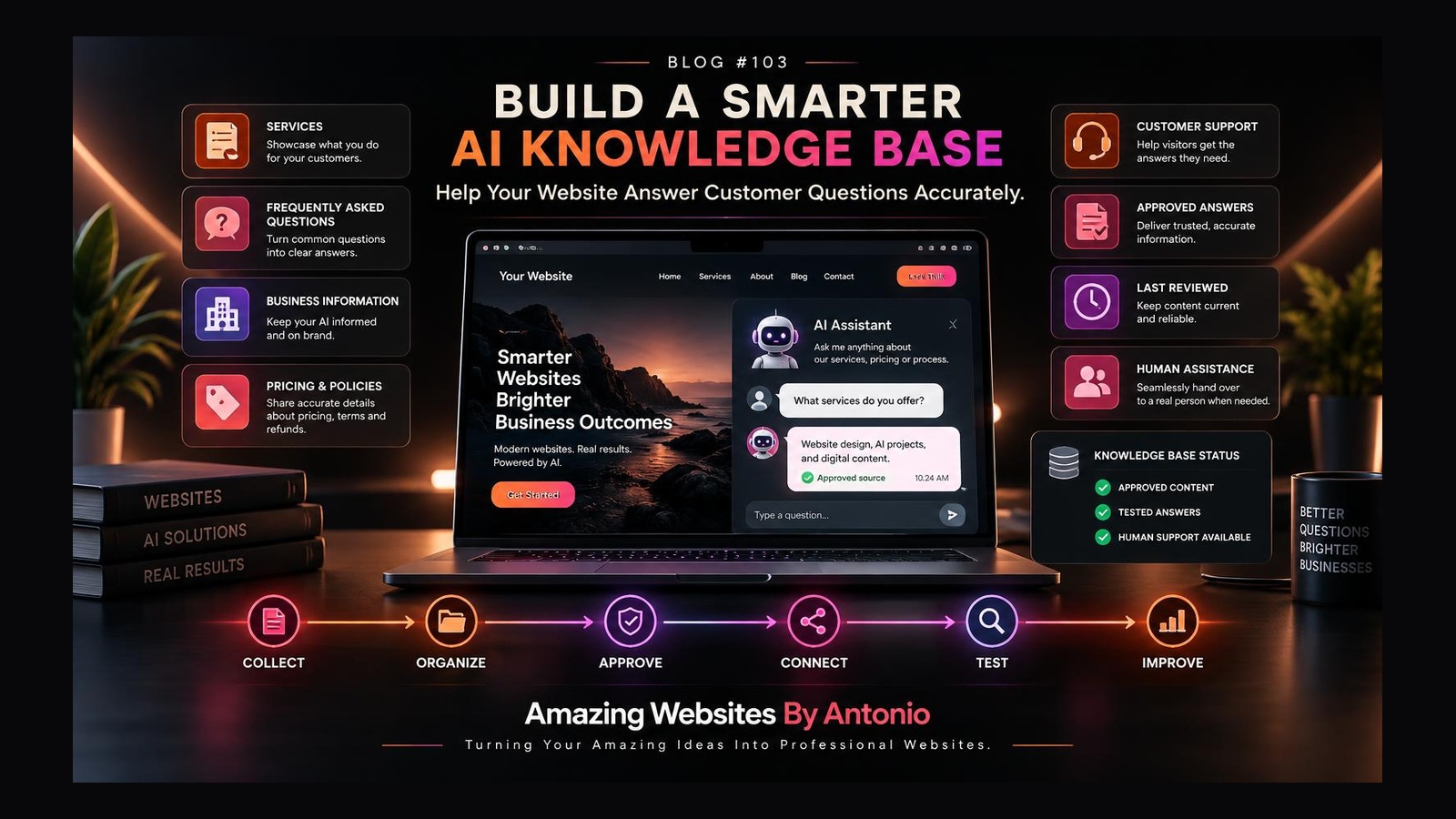
COLLECT

Gather reliable business information.

↓

ORGANIZE

Create categories and focused articles.

↓

APPROVE

Verify accuracy and publication status.

↓

CONNECT

Make approved information available to appropriate tools.

↓

TEST

Evaluate answers and failure cases.

↓

MONITOR

Identify unanswered questions and mistakes.

↓

UPDATE

Keep information current.

↓

IMPROVE

Refine the customer experience.


FINAL THOUGHTS

An AI assistant can be impressive.

But impressive technology isn't enough.

The information behind it needs to be reliable.

Organized.

Accurate.

Current.

Appropriate.

And useful.

A strong AI knowledge base helps create that foundation.

You don't need hundreds of documents to begin.

Start with your most important customer questions.

Write clear answers.

Verify the information.

Test the results.

And keep improving.

BETTER INFORMATION → BETTER ANSWERS → BETTER CUSTOMER EXPERIENCES

Remember:

Artificial intelligence should help your business communicate more effectively.

It should never replace the importance of accuracy, trust, and human connection.

ORGANIZE YOUR KNOWLEDGE.

BUILD WITH PURPOSE.

ANSWER WITH ACCURACY.

GROW WITH CONFIDENCE.

Amazing Websites By Antonio

Turning Your Amazing Ideas Into Professional Websites
Share this article
Facebook Twitter LinkedInYouTube
Previous
How to Make Your Business Website AI-Ready Without Overcomplicating It
Next
How to Design an AI Website Assistant That Feels Helpful Instead of Frustrating
Continue your learning

Recommended for you

Smart picks based on this article's category, related topics, and what's trending on Amazing Websites By Antonio.

How to Make Your Business Website AI-Ready Without Overcomplicating It
🤖 AI Solutions & Website Innovation

How to Make Your Business Website AI-Ready Without Overcomplicating It

A practical guide to preparing your business website for the future of AI—with 50 ways to improve clarity, structure, reliability, privacy, and customer experience without adding unnecessary complexity.

Oct 11, 2026 10 min read
Continue reading
How to Create a Website FAQ Page That Answers Questions and Helps Customers Buy With Confidence
🤝 Website Strategy & Customer Experience

How to Create a Website FAQ Page That Answers Questions and Helps Customers Buy With Confidence

A strong FAQ page doesn't just answer questions—it reduces uncertainty, builds trust, saves time, and helps customers feel confident about taking the next step. Here are practical ways to create one.

Sep 5, 2026 6 min read
Continue reading
Why Professional Website Design Is an Investment
🌐 Website Design

Why Professional Website Design Is an Investment

Many business owners view a website as an expense, but a professional website should be considered an investment. A well-designed website can help attract customers, build trust, generate leads, and support long-term business growth. Unlike many forms of advertising that stop producing results once the campaign ends, a professional website continues working for your business around the clock.

Jun 24, 2026 2 min read
Continue reading

Popular this week

Most read
How to Prioritize AI Website Improvements Without Wasting Time or Money
Oct 17, 2026 · 9 min read
Recently updated
How to Create an AI Website Assistant Improvement Dashboard That Turns Data Into Action
Oct 16, 2026 · 9 min read
Editor's pick
How to Measure Whether Your AI Website Assistant Is Actually Helping Customers
Oct 15, 2026 · 10 min read

Explore more categories

🤝AI Solutions & Customer Experience

Helpful AI website assistants, accurate customer support, accessible conversations, privacy, and thoughtful human handoffs.

💡AI Solutions & Business Growth

Prioritizing AI investments, managing budgets, and choosing website improvements that deliver real business value.

📊AI Solutions & Website Analytics

AI assistant dashboards, performance metrics, customer question insights, and turning website data into practical improvements.

🤖AI Solutions & Website Innovation

AI-ready websites, responsible AI solutions, thoughtful automation, and practical website innovation.

🤖AI for Business

AI, ChatGPT, automation, agents, prompts, and productivity for small businesses.

🧠Artificial Intelligence & Business Growth

How AI helps small businesses save time, reduce costs, improve productivity, and grow smarter.

🌐Website Design

Planning, homepages, landing pages, responsive design, UX, and best practices.

🧭Website Design & User Experience

Website design, user experience, accessibility, and creating websites that are intuitive and easy to use.

🎯Website Design & Conversion Strategy

Calls to action, landing pages, conversion optimization, and turning website visitors into customers.

⚡Website Performance & Business Growth

Website speed, performance optimization, conversions, and how a faster site drives business growth.

🌐Website Design & Business Growth

Website design, contact pages, landing pages, and business-focused web strategies that turn visitors into customers.

📊Website Strategy & Business Growth

Website analytics, strategy, planning, and data-informed decisions that help businesses grow online.

🚀Website Innovation & Business Growth

Future-ready websites, digital innovation, thoughtful AI, automation, and technology that supports business growth.

🎨Website Strategy & Branding

How website strategy, brand identity, and messaging work together to create a consistent customer experience.

🏆Website Strategy & Personal Branding

Building trust and credibility by showcasing expertise, experience, authentic stories, and professional value online.

🤝Website Strategy & Customer Experience

Building website trust, credibility, and customer confidence through strategic design, clear messaging, and thoughtful user experiences.

🤝Website Strategy & Client Experience

Client intake, onboarding, communication, and project processes that create a smooth, confident experience from first contact to launch.

🚀Client Experience & Business Growth

Client onboarding, welcome experiences, and building strong customer relationships that help businesses grow.

📋Client Experience & Project Management

Client communication, project updates, feedback, approvals, and keeping website projects organized from kickoff to launch.

🗂️Website Strategy & Project Management

Project planning, launch checklists, testing, approvals, and organizing website builds from start to launch.

🧰Website Strategy & Maintenance

Post-launch care, monitoring, backups, security, updates, and keeping a live website healthy and growing.

🧰Website Maintenance & Business Growth

Monthly maintenance routines, health checks, updates, monitoring, and ongoing care that keeps a website working for the business.

🧭Website Strategy & User Experience

Website engagement, user experience, navigation, and creating websites that guide visitors naturally without overwhelming them.

🎯Website Strategy & Lead Generation

Contact pages, lead capture, inquiry forms, and turning website visitors into qualified business leads.

🔍SEO & Digital Marketing

Search engine optimization, keyword strategy, and digital marketing foundations that help businesses get found online.

📊Website Analytics & Business Growth

Website metrics, analytics, conversions, and using data to make smarter business decisions and grow online.

🎨Branding

Brand identity, logos, colors, typography, strategy, and consistency.

🎨Branding & Business

Brand building, business identity, growth strategy, and customer experience for small businesses.

💎Branding & Business Growth

Brand messaging, value propositions, positioning, and differentiation that help businesses stand out and grow.

🎨Branding & Website Strategy

How brand storytelling, identity, and website strategy work together to create a memorable customer experience.

🤝Branding & Customer Connection

Founder stories, authentic messaging, and human-centered branding that help businesses build meaningful customer relationships.

📈Digital Marketing

Marketing, social, email, content, ads, and lead generation.

📈Digital Marketing & Business Growth

Digital marketing, social media, SEO, content strategy, and growth tactics that help businesses attract and convert customers.

🧲Lead Generation & Business Growth

Lead magnets, email capture, conversion strategy, and turning website visitors into loyal customers.

🤝Lead Generation & Customer Relationships

Lead follow-up, nurturing, communication, and building lasting customer relationships.

🚀Small Business Growth

Entrepreneurship, productivity, customer experience, and success stories.

🤝Customer Experience & Business Growth

Customer relationships, loyalty, communication, community building, and experiences that drive business growth.

🤝Customer Experience & Website Strategy

Customer feedback, usability, testing, and purposeful website improvements guided by customer needs and business goals.

🔒Website Security & Business Technology

Website security best practices, cybersecurity tips, technology safety, and protecting your business online.

📝Content Marketing & Business Growth

Content marketing strategy, blog writing, website copy, and valuable content that attracts, engages, and converts customers.

✍️Writing & Digital Content

Website copy, blog writing, content strategy, messaging, and storytelling that connects with your audience.

🛠️Resources & Guides

Tutorials, how-to's, checklists, beginner guides, and FAQs.

📚 Resource Center

Guides, templates, checklists, and tutorials for every stage.

Search another article

Looking for something specific? Search across every blog post and resource.

Get new articles by email

Subscribe for new blogs, AI resources, website tips, and platform updates.

Turning Your Amazing Ideas Into Professional Websites.

Keep exploring

Continue Your Learning

Learning doesn't stop with one article. Explore more resources, practical tools, and educational guides designed to help you build your skills, strengthen your business, and grow with confidence.

🤖 AI Learning Hub

Continue building your AI knowledge with beginner-friendly lessons, practical examples, and structured learning paths.

Explore the AI Learning Hub

💬 Prompt Library

Browse our growing collection of AI prompts for websites, marketing, branding, business, productivity, and content creation.

Open the Prompt Library

📚 Resource Center

Discover guides, templates, checklists, tutorials, and practical resources to support your digital journey.

Browse Resources

📝 Read Another Blog

  • How to Make Your Business Website AI-Ready Without Overcomplicating It
    Oct 11, 2026 · 10 min read
View All Blog Articles

🛠️ Interactive Tools

Continue learning with hands-on tools: Website Health Check, Where Should I Start? Quiz, and the Interactive Resource Finder.

Try the Interactive Tools

🌐 Professional Services

Need personalized support? Learn how Amazing Websites By Antonio can help with website design, branding, AI guidance, SEO, and digital strategy.

View Services

Every Step Forward Matters

Whether you're learning about AI, improving your website, strengthening your brand, or exploring new digital tools, every article you read brings you one step closer to achieving your goals. Our mission is to make learning practical, approachable, and valuable for everyone.

Stay Connected

Receive updates whenever we publish new educational articles, learning resources, and platform improvements.

Thank you for learning with Amazing Websites By Antonio. We're committed to helping entrepreneurs, nonprofits, creators, and small businesses continue learning, building, and growing with confidence.

Turning Your Amazing Ideas Into Professional Websites.

Amazing Websites By Antonio Logo

Amazing Websites By Antonio

Creating Professional Websites, AI Solutions, and Digital Experiences That Help Businesses Thrive.

Turning Your Amazing Ideas Into Professional Websites!

Amazing Websites By Antonio exists to empower entrepreneurs, creators, educators, students, nonprofits, and small business owners through practical education, innovative technology, professional website solutions, and a supportive learning community.

My mission is to help people transform ideas into opportunities by providing the knowledge, tools, resources, and confidence they need to succeed in today’s digital world.

Whether you’re building your first website, exploring artificial intelligence, strengthening your brand, growing your business, or learning new digital skills, I’m here to support every step of your journey.

Together, I hope to create a future where learning is accessible, innovation serves people, and success is built through curiosity, creativity, collaboration, and continuous growth.

Explore

  • Academy
  • AI Learning Hub
  • Learning Journeys
  • Educational Blog
  • Prompt Library
  • Smart Resource Center
  • Business Growth Suite
  • Community Platform
  • Marketplace & Creator Hub
  • Innovation Lab

Professional Services

  • Website Design
  • Website Audits
  • Branding Strategy
  • SEO Guidance
  • AI Consulting
  • Prompt Engineering
  • Digital Content Creation
  • Business Growth Planning

Contact Me

Follow my journey as I continue building new educational resources, innovative tools, and opportunities that empower people to learn, create, build, grow, and succeed.

antonio.humann@gmail.com605-212-7171Listen to "Your Vision Starts Here"
Send a Message
All pages & resources
HomeLetter From FounderSuccess CenterSmart Resource CenterBusiness Growth SuiteCommunityEcosystemInnovation LabGlobal NetworkV3.1Command CenterAcademyComplete VisionMaster Vision 2040CharterSignature LineMarketplaceMedia CenterBrand ExperienceHall of SuccessLegacy CenterConstitutionImpact ReportJourney CenterExcellence BlueprintDashboardSearchMy MissionMy VisionStart HereLearning JourneysWhere Should I Start?Resource FinderWebsite Health CheckVersion 2.0 RoadmapRoadmapLaunch Priority DashboardServicesCustom Jingle StudioBrand IdentityManifestoPortfolioSuccess StoriesTestimonialsCredentialsBlogComic StudioFree ResourcesResource CenterAI Learning HubPrompt LibraryNewsletterContactAI ProjectsWriting & Digital ContentDownload CenterFeedbackAchievementsVersion 3.0Version 3.0 ReviewWhat's NewFrequently Asked Questions
© 2026 Amazing Websites By Antonio. All Rights Reserved.Helping People Build Brighter Digital Futures.