A Practical Guide to Verifying Migrated Records, Testing AI Assistants, Checking Automations, Documenting Migration Errors, and Confirming That Your New Website Systems Are Ready for Business
Imagine you've just completed an important migration for your professional business website.
Maybe you've moved your Contact form to a new platform.
Transferred customer inquiry records.
Updated your AI assistant.
Rebuilt an automation.
Changed an integration.
Or introduced a more efficient system to support your growing business.
You've planned the migration.
Prepared your data.
Mapped your information.
Configured the new platform.
Completed the transfer.
And activated your replacement workflow.
What an exciting accomplishment!
But here's an important question:
HOW DO YOU KNOW WHETHER EVERYTHING TRANSFERRED CORRECTLY?
Did all required customer records arrive?
Were the names, email addresses, messages, and dates preserved accurately?
Did your AI assistant retain the approved knowledge it needs?
Are your automations still performing the correct actions?
Can customers submit inquiries?
Are notifications reaching the correct destination?
And is the new system ready for everyday business operations?
These questions are important because a completed migration doesn't automatically mean a successful migration.
That's where an AI website migration validation report becomes valuable.
AN AI WEBSITE MIGRATION VALIDATION REPORT IS A STRUCTURED DOCUMENT THAT RECORDS THE RESULTS OF DATA RECONCILIATION, FUNCTIONAL TESTING, INTEGRATION CHECKS, AND BUSINESS ACCEPTANCE CRITERIA AFTER A WEBSITE FEATURE OR SYSTEM MIGRATION.
It helps you move beyond assuming that the transfer worked.
Instead, you examine the evidence.
Compare the source and destination.
Verify important records.
Test customer workflows.
Evaluate AI assistant responses.
Review connected automations.
Document unexpected problems.
And determine whether the new system meets your business requirements.
For AI-powered websites, migration validation may involve:
- Contact form submissions
- Customer inquiry records
- AI knowledge sources
- AI assistant responses
- Website navigation
- Mobile functionality
- Email notifications
- Automations
- Third-party integrations
- Customer databases
- Website settings
- Access permissions
- Data retention requirements
- Business continuity
The good news?
YOU DON'T NEED A LARGE TECHNOLOGY TEAM TO CREATE A PROFESSIONAL MIGRATION VALIDATION REPORT.
Even a solo entrepreneur can use a structured checklist, spreadsheet, and testing process to verify important website migrations.
In Blog #138, we're exploring 50 practical strategies to help you confirm that your data and website features transferred correctly.
PART 1: UNDERSTAND MIGRATION VALIDATION
1. Know What Migration Validation Means
Migration validation evaluates whether transferred information and replacement functionality meet the defined requirements of the new system.
2. Understand Why Validation Matters
A migration can appear complete even when records are missing, fields are incorrect, or important workflows fail.
3. Separate Migration Execution From Validation
Execution involves transferring information and activating the replacement.
Validation checks whether the results are acceptable.
4. Recognize Data and Functional Validation
Data validation checks the transferred information.
Functional validation checks whether the new website features and workflows behave as required.
5. Include Validation in Your Migration Plan
Define validation requirements before the migration begins.
PART 2: REVIEW MIGRATION REQUIREMENTS
6. Locate the Original Migration Plan
Review the approved scope, requirements, and expected outcomes.
7. Identify Required Data
Determine which records and fields were supposed to transfer.
8. Review Data Mapping Rules
Confirm how information should move from source fields to destination fields.
9. Identify Critical Business Workflows
List the customer and operational processes that must continue functioning.
10. Confirm Acceptance Criteria
Establish the conditions required before the migration can be accepted.
PART 3: RECONCILE MIGRATED RECORDS
11. Compare Source and Destination Record Counts
Check whether the expected number of records arrived.
12. Review Missing Records
Investigate records that did not appear in the destination.
13. Identify Duplicate Records
Look for unintended duplicate entries.
14. Validate Important Record Values
Check that critical information matches the source or approved transformation rules.
15. Document Reconciliation Results
Record discrepancies, explanations, corrective actions, and unresolved issues.
PART 4: VALIDATE DATA MAPPING AND QUALITY
16. Check Required Fields
Confirm that essential information is present.
17. Verify Field Types and Formats
Review dates, numbers, text fields, and other relevant formats.
18. Validate Field Transformations
Confirm that mapped or converted values follow approved rules.
19. Review Relationships Between Records
Check whether related information remains correctly connected.
20. Evaluate Data Quality
Identify unexpected changes, incomplete information, or formatting problems.
PART 5: VERIFY WEBSITE FUNCTIONALITY
21. Test the Migrated Feature
Confirm that the replacement performs its intended function.
22. Review Important Navigation
Check links and buttons affected by the migration.
23. Test Contact Form Submissions
Use safe test data to confirm submission behavior.
24. Review Mobile Functionality
Check important workflows on representative screen sizes and devices.
25. Evaluate Accessibility Requirements
Verify applicable keyboard, labeling, focus, and usability requirements.
PART 6: VALIDATE AI ASSISTANTS
26. Review Approved AI Knowledge Sources
Confirm that required knowledge content is available and current.
27. Test Representative Customer Questions
Use a defined question set to evaluate important responses.
28. Compare Answers With Approved Information
Identify incorrect, outdated, or unsupported responses.
29. Test Human Handoff
Confirm that the assistant can direct customers to an appropriate contact method.
30. Document AI Migration Limitations
Record differences in capabilities, behavior, or configuration between platforms.
PART 7: VERIFY AUTOMATIONS AND INTEGRATIONS
31. Review Automation Triggers
Confirm that expected events activate the appropriate workflows.
32. Verify Automation Actions
Check whether the intended actions are completed correctly.
33. Test Notification Delivery
Confirm that required messages reach their intended destinations.
34. Review Integration Permissions
Verify that connections have appropriate access without unnecessary privileges.
35. Check for Duplicate or Missing Workflow Events
Investigate unexpected repeated actions or incomplete processing.
PART 8: DOCUMENT TESTING EVIDENCE
36. Assign a Validation Report Identifier
Create a unique reference for the review.
37. Record Test Cases
Document what was tested and the expected outcome.
38. Capture Actual Results
Record the observed outcome of each test.
39. Preserve Appropriate Evidence
Retain useful logs or records while protecting private information.
40. Classify Validation Findings
Use consistent labels for passes, failures, incomplete tests, and unresolved issues.
PART 9: MAKE A MIGRATION ACCEPTANCE DECISION
41. Compare Results With Acceptance Criteria
Determine whether the migration meets its required conditions.
42. Review Outstanding Errors
Identify problems that remain unresolved.
43. Evaluate Business Impact
Consider whether issues affect customers, data integrity, security, or important operations.
44. Choose an Appropriate Decision
Accept, conditionally accept where permitted, continue remediation, or activate the recovery plan when necessary.
45. Record Final Approval
Document the decision, reviewer, date, and supporting reasons.
PART 10: STABILIZE AND CLOSE THE MIGRATION
46. Monitor the New System
Observe relevant performance and workflow results after the cutover.
47. Resolve Remaining Issues
Track corrective actions through completion.
48. Confirm Old System Retirement Readiness
Verify that important dependencies and retention obligations have been addressed before discontinuing the source system.
49. Document Lessons Learned
Identify opportunities to improve future migrations.
50. Update Website Management Records
Record the accepted system configuration, responsible owner, and future review requirements.
REVIEW → RECONCILE → VALIDATE → TEST → DOCUMENT → ACCEPT → MONITOR → CLOSE
MIGRATION COMPLETE VS. MIGRATION VALIDATED
These statuses represent different milestones.
| Migration Complete | Migration Validated |
|---|---|
| Data transfer has finished | Required data has been checked |
| New feature is activated | Feature meets defined requirements |
| Import process reports success | Reconciliation supports completeness and accuracy |
| Integrations are configured | Integrations pass required tests |
| New system is available | Business acceptance criteria are satisfied |
IMPORTANT:
A successful import notification is not enough to establish that every record transferred correctly.
Migration validation requires evidence appropriate to the business requirements and risks.
HOW TO RECONCILE MIGRATED WEBSITE RECORDS
Data reconciliation compares the information expected from the source system with what appears in the destination.
FICTIONAL EXAMPLE
A business owner migrates 500 customer inquiry records.
The destination initially contains 498 records.
| Reconciliation Metric | Example Result |
|---|---|
| Expected Source Records | 500 |
| Destination Records | 498 |
| Missing Records | 2 |
| Unexpected Duplicates | 0 |
| Initial Count Match | No |
The owner investigates the two missing records.
After correcting the transfer, the destination contains all 500 expected records.
However, record counts alone are not sufficient.
The owner also checks critical fields and record identifiers to verify that the correct information transferred.
LESSON:
Matching record counts can support completeness checks, but they don't guarantee that every value is accurate.
YOUR WEBSITE DATA VALIDATION MATRIX
| Data Element | Validation Requirement | Example Check |
|---|---|---|
| Customer Name | Correctly mapped | Compare source and destination |
| Email Address | Accurate and complete | Check values and formatting |
| Business Name | Preserved when required | Review mapped fields |
| Service Requested | Correct category | Verify transformation rules |
| Customer Message | Complete text | Compare relevant content |
| Submission Date | Correct date and time | Review timestamp conversion |
| Inquiry Status | Correct workflow state | Verify status mapping |
| Legacy Record ID | Traceable to source | Check reference identifier |
IMPORTANT:
If date and time values are converted between time zones, validate the conversion using the approved rules.
If a destination field has different allowed values, document and verify the transformation.
HOW TO VALIDATE AN AI ASSISTANT AFTER MIGRATION
Moving an AI assistant to another platform may change how it behaves.
Even when the same knowledge content is transferred, responses may differ.
Create a representative test set.
EXAMPLE AI ASSISTANT TEST MATRIX
| Test Category | Expected Outcome |
|---|---|
| Business Services | Accurate approved service information |
| Contact Information | Correct contact instructions |
| Service Availability | No unsupported claims |
| Pricing Questions | Approved pricing or appropriate referral |
| Unsupported Questions | Clear acknowledgment of limitations |
| Human Handoff | Correct direction to human assistance |
| Privacy-Sensitive Requests | Appropriate protection of private information |
| Ambiguous Questions | Clarification when necessary |
For important AI features, include critical failure conditions.
A high overall test score should not override a serious failure involving private information or misleading customer instructions.
HOW TO VALIDATE AUTOMATIONS AFTER MIGRATION
Automation testing should cover the complete workflow.
FICTIONAL CONTACT FORM AUTOMATION
CUSTOMER SUBMITS FORM
↓
SUBMISSION IS VALIDATED
↓
INQUIRY IS STORED
↓
NOTIFICATION IS GENERATED
↓
BUSINESS OWNER RECEIVES NOTIFICATION
↓
INQUIRY IS AVAILABLE FOR FOLLOW-UP
Check each step separately.
If the notification arrives but the inquiry record is missing, the workflow has not fully met its requirements.
If the record is stored but two notifications are generated unexpectedly, investigate the duplicate event.
VERIFY THE COMPLETE WORKFLOW, NOT JUST ONE SUCCESSFUL ACTION.
YOUR MIGRATION VALIDATION STATUS MATRIX
Use consistent statuses to make findings easier to understand.
| Status | Meaning |
|---|---|
| Pass | Acceptance criteria met |
| Fail | Acceptance criteria not met |
| Needs Review | Result requires further investigation |
| Not Tested | Required test has not been completed |
| Not Applicable | Test does not apply |
| Blocked | Testing cannot proceed because of a dependency |
A validation report should clearly distinguish between failed tests and tests that have not yet been performed.
YOUR MIGRATION ACCEPTANCE DECISION MATRIX
| Finding | Suggested Decision |
|---|---|
| All critical criteria met, required testing complete | Accept |
| Minor documented issues within approved tolerance | Conditional Acceptance, if permitted |
| Important data discrepancies remain | Continue Remediation |
| Critical customer workflow failure | Do Not Accept |
| Serious security or privacy concern | Escalate and protect affected systems |
| New system cannot support essential operations | Evaluate Recovery or Rollback |
IMPORTANT:
Conditional acceptance should never be used to bypass critical data integrity, security, privacy, or business continuity requirements.
YOUR MIGRATION VALIDATION READINESS SCORECARD
Assign each applicable category:
- 2 points: Requirement met
- 1 point: Partially met or additional evidence needed
- 0 points: Requirement not met
| Validation Category | Maximum Points |
|---|---|
| Migration Scope Reviewed | 2 |
| Record Reconciliation Completed | 2 |
| Critical Field Values Validated | 2 |
| Data Transformations Verified | 2 |
| Website Functionality Tested | 2 |
| Contact Workflows Tested | 2 |
| AI Assistant Tested, if applicable | 2 |
| Automations and Integrations Tested | 2 |
| Security and Privacy Reviewed | 2 |
| Acceptance Evidence Documented | 2 |
| Total | 20 |
For nonapplicable categories, adjust the maximum score.
IMPORTANT:
This scorecard is an organizational aid, not proof that the migration is safe.
Every critical requirement must be evaluated independently.
YOUR AI WEBSITE MIGRATION VALIDATION DASHBOARD
A validation dashboard helps you organize testing and outstanding issues.
Consider tracking:
- Records expected
- Records transferred
- Records reconciled
- Critical field checks completed
- Test cases passed
- Test cases failed
- Tests awaiting review
- AI assistant tests completed
- Automation tests completed
- Outstanding critical issues
- Acceptance status
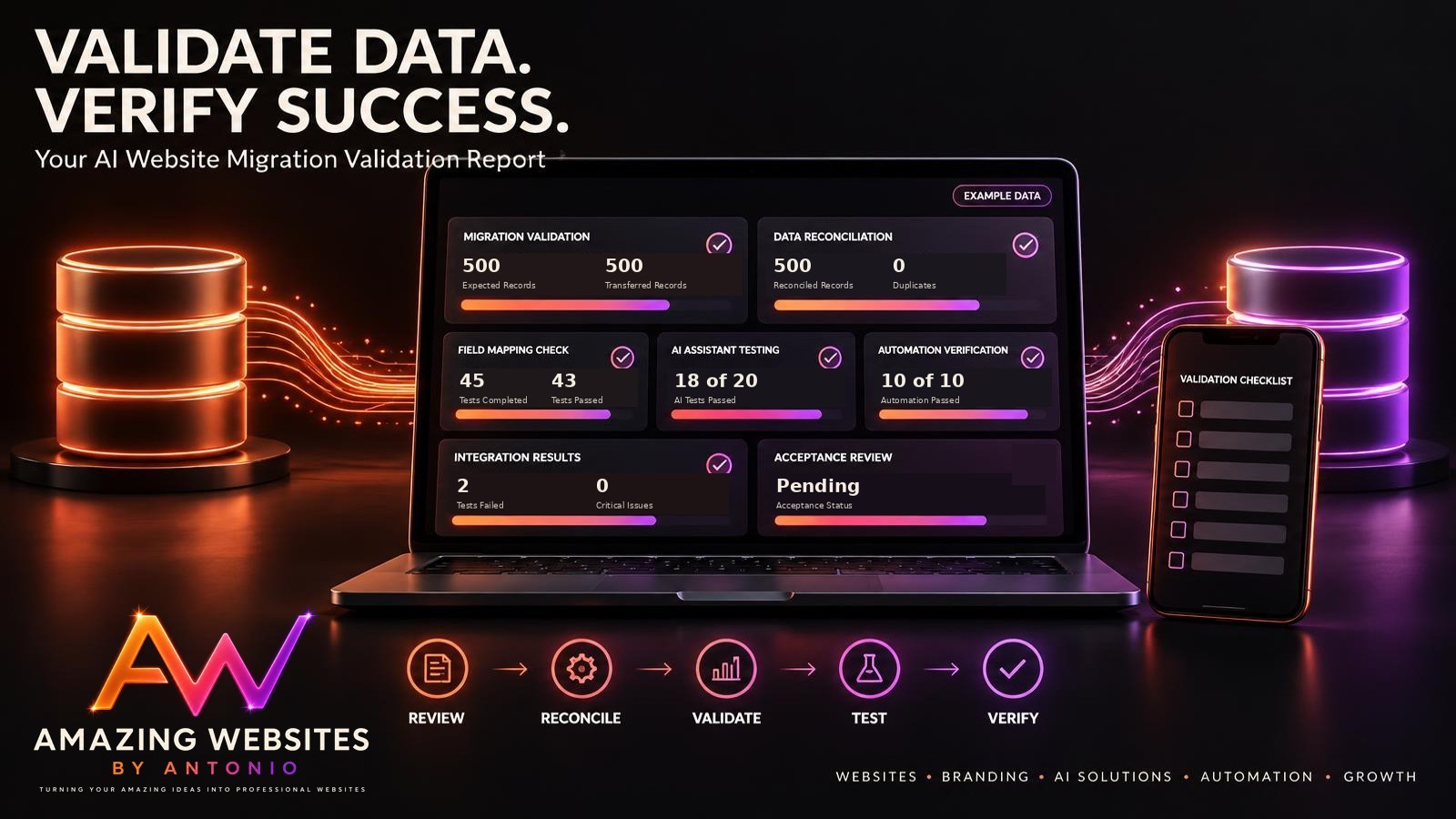
FICTIONAL DASHBOARD EXAMPLE
| Metric | Example |
|---|---|
| Expected Records | 500 |
| Transferred Records | 500 |
| Reconciled Records | 500 |
| Test Cases Completed | 45 |
| Test Cases Passed | 43 |
| Test Cases Failed | 2 |
| AI Assistant Tests Passed | 18 of 20 |
| Automation Tests Passed | 10 of 10 |
| Outstanding Critical Issues | 0 |
| Acceptance Status | Pending Review |
These figures are fictional.
The migration remains pending review because the failed tests still require evaluation.
COMPLETE AI WEBSITE MIGRATION VALIDATION CHECKLIST
SECTION 1 — REQUIREMENTS REVIEW
- Approved migration plan is available.
- Migration scope is confirmed.
- Required data is identified.
- Data mapping rules are reviewed.
- Acceptance criteria are documented.
SECTION 2 — DATA RECONCILIATION
- Source and destination counts are compared.
- Missing records are investigated.
- Duplicate records are reviewed.
- Critical values are validated.
- Reconciliation findings are documented.
SECTION 3 — DATA QUALITY
- Required fields are checked.
- Field formats are verified.
- Data transformations are tested.
- Record relationships are reviewed.
- Unexpected data changes are investigated.
SECTION 4 — WEBSITE FUNCTIONALITY
- Migrated feature is tested.
- Important navigation is checked.
- Contact Form workflow is verified.
- Relevant mobile experiences are tested.
- Accessibility requirements are evaluated.
SECTION 5 — AI ASSISTANT
- Required knowledge sources are available.
- Representative questions are tested.
- Answers are compared with approved information.
- Human handoff is verified.
- Important AI limitations are documented.
SECTION 6 — AUTOMATIONS AND INTEGRATIONS
- Triggers are tested.
- Expected actions are verified.
- Notifications are checked.
- Integration permissions are reviewed.
- Duplicate and missing events are investigated.
SECTION 7 — EVIDENCE
- Validation report ID is assigned.
- Test cases are recorded.
- Actual results are documented.
- Appropriate evidence is retained.
- Sensitive information is protected.
SECTION 8 — ACCEPTANCE
- Results are compared with acceptance criteria.
- Outstanding errors are reviewed.
- Business impact is evaluated.
- Acceptance decision is documented.
- Responsible reviewer is identified.
SECTION 9 — STABILIZATION
- New system monitoring is established.
- Remaining issues are tracked.
- Old system dependencies are reviewed.
- Lessons learned are documented.
- Website management records are updated.
COPY-READY AI WEBSITE MIGRATION VALIDATION REPORT TEMPLATE
BUSINESS NAME:
[Enter Business Name]
WEBSITE:
[Enter Website Address]
VALIDATION REPORT ID:
[Enter Identifier]
RELATED MIGRATION PLAN ID:
[Enter Identifier]
REPORT DATE:
[Enter Date]
PREPARED BY:
[Enter Name]
SECTION 1 — MIGRATION OVERVIEW
MIGRATED FEATURE:
[Enter Feature]
SOURCE SYSTEM:
[Enter System]
DESTINATION SYSTEM:
[Enter System]
MIGRATION DATE:
[Enter Date]
BUSINESS PURPOSE:
[Describe Purpose]
SECTION 2 — VALIDATION REQUIREMENTS
APPROVED MIGRATION SCOPE:
[Describe Scope]
REQUIRED DATA:
[List Required Data]
CRITICAL WORKFLOWS:
[List Workflows]
ACCEPTANCE CRITERIA:
[List Criteria]
VALIDATION METHOD:
[Describe Method]
SECTION 3 — DATA RECONCILIATION
SOURCE RECORD COUNT:
[Enter Number]
EXPECTED DESTINATION RECORD COUNT:
[Enter Number]
ACTUAL DESTINATION RECORD COUNT:
[Enter Number]
MISSING RECORDS:
[Enter Number]
UNEXPECTED DUPLICATES:
[Enter Number]
RECONCILIATION FINDINGS:
[Describe Findings]
SECTION 4 — DATA MAPPING VALIDATION
FIELDS REVIEWED:
[List Fields]
TRANSFORMATIONS VERIFIED:
[List Transformations]
CRITICAL FIELD RESULTS:
[Enter Results]
DATA QUALITY ISSUES:
[List Issues]
CORRECTIVE ACTIONS:
[List Actions]
SECTION 5 — WEBSITE FUNCTIONALITY
FEATURE FUNCTIONALITY RESULT:
Pass / Fail / Needs Review / Not Tested
NAVIGATION RESULT:
[Enter Result]
CONTACT FORM RESULT:
[Enter Result]
MOBILE RESULT:
[Enter Result]
ACCESSIBILITY RESULT:
[Enter Result]
SECTION 6 — AI ASSISTANT VALIDATION
AI FEATURE INVOLVED:
Yes / No
KNOWLEDGE SOURCES VERIFIED:
[Enter Result]
TEST QUESTIONS COMPLETED:
[Enter Number]
TEST QUESTIONS PASSED:
[Enter Number]
IMPORTANT AI FAILURES:
[List Failures]
HUMAN HANDOFF RESULT:
[Enter Result]
SECTION 7 — AUTOMATION AND INTEGRATION VALIDATION
AUTOMATIONS TESTED:
[List Automations]
TRIGGER RESULTS:
[Enter Results]
ACTION RESULTS:
[Enter Results]
NOTIFICATION RESULTS:
[Enter Results]
DUPLICATE OR MISSING EVENTS:
[List Findings]
SECTION 8 — EVIDENCE AND ISSUES
TEST EVIDENCE REFERENCES:
[List Safe References]
FAILED TESTS:
[List Failures]
OUTSTANDING ISSUES:
[List Issues]
ISSUE SEVERITY:
Critical / High / Medium / Low
REMEDIATION ACTIONS:
[List Actions]
SECTION 9 — ACCEPTANCE DECISION
CRITICAL REQUIREMENTS MET:
Yes / No / Not Verified
FINAL DECISION:
Accepted / Conditionally Accepted / Remediation Required / Rejected / Pending
DECISION REASON:
[Explain Decision]
REVIEWED BY:
[Enter Name]
DECISION DATE:
[Enter Date]
SECTION 10 — STABILIZATION AND CLOSURE
MONITORING PERIOD:
[Enter Period]
POST-MIGRATION FINDINGS:
[List Findings]
REMAINING ACTIONS:
[List Actions]
ACTION OWNER:
[Enter Name]
OLD SYSTEM RETIREMENT STATUS:
Pending / Approved / Completed / Not Applicable
LESSONS LEARNED:
[List Lessons]
NEXT REVIEW DATE:
[Enter Date]
EXAMPLE AI WEBSITE MIGRATION VALIDATION SCENARIO
The following scenario is fictional.
Situation: A Business Owner Validates a Contact Form Migration
A business owner has migrated an existing Contact form and historical customer inquiry records to a new system.
The new workflow has been activated.
Now the owner wants to confirm that the migration was successful.
Step 1 — Review the Migration Plan
The owner identifies the required records, fields, and customer workflows.
Step 2 — Compare Record Counts
The source contains 250 expected inquiry records.
The destination initially contains 249.
Step 3 — Investigate the Missing Record
The owner discovers that one record was excluded because of a field mapping problem.
Step 4 — Correct the Mapping
The owner updates the approved mapping process and transfers the missing record.
Step 5 — Reconcile the Records
The destination now contains 250 records.
The owner also compares important record identifiers and values.
Step 6 — Test the Contact Form
The owner submits safe test inquiries and confirms that the form accepts valid submissions.
Step 7 — Verify Inquiry Storage
The owner checks whether test submissions appear in the intended private inquiry location.
Step 8 — Test Email Notifications
The owner confirms that the notification workflow produces the expected messages.
Step 9 — Review Final Acceptance Criteria
The owner evaluates data reconciliation, functionality, privacy requirements, and outstanding issues.
Step 10 — Document the Decision
The migration validation report records the evidence and final decision.
LESSON:
A migration is not successful simply because the transfer process finishes.
A successful migration requires evidence that important information and business workflows were preserved correctly.
YOUR 30-DAY AI WEBSITE MIGRATION VALIDATION IMPLEMENTATION PLAN
WEEK 1 — REVIEW AND PREPARE
- Review the migration plan.
- Confirm acceptance criteria.
- Identify critical records and fields.
- Prepare reconciliation procedures.
- Create validation test cases.
GOAL: Establish what must be checked before the migration can be accepted.
WEEK 2 — RECONCILE AND VALIDATE DATA
- Compare source and destination records.
- Investigate missing information.
- Review duplicates.
- Validate field mappings.
- Document data quality findings.
GOAL: Confirm that required information transferred accurately.
WEEK 3 — TEST FEATURES AND WORKFLOWS
- Test the migrated website feature.
- Verify Contact Form submissions.
- Review AI assistant responses.
- Test automations and notifications.
- Evaluate mobile and accessibility requirements.
GOAL: Confirm that important functionality works as intended.
WEEK 4 — ACCEPT AND STABILIZE
- Review outstanding issues.
- Compare results with acceptance criteria.
- Record the acceptance decision.
- Establish post-migration monitoring.
- Update website management documentation.
GOAL: Complete the migration review and support reliable ongoing operations.
THE AI WEBSITE MIGRATION VALIDATION FRAMEWORK
REVIEW
Understand the approved migration requirements.
↓
RECONCILE
Compare expected and transferred information.
↓
VALIDATE
Check field mappings, data quality, and important records.
↓
TEST
Verify website features, AI assistants, and automations.
↓
DOCUMENT
Record evidence, failures, and corrective actions.
↓
ACCEPT
Determine whether the migration meets its required criteria.
↓
MONITOR
Observe the new system after the transition.
↓
CLOSE
Document completion and update management records.
FINAL THOUGHTS
Creating a professional business website is an exciting accomplishment.
It represents your creativity.
Your services.
Your brand.
And your commitment to helping customers.
But as your business grows, your technology needs may change.
You may introduce better tools.
Move important customer information.
Upgrade your AI assistant.
Replace outdated automations.
Or connect new platforms to improve your business operations.
These transitions can create exciting opportunities.
But it's important to make sure that your information and workflows move correctly.
That's why an AI website migration validation report matters.
It helps you compare expected and transferred records.
Verify important information.
Test customer workflows.
Evaluate AI assistant behavior.
Review automations.
Document problems.
And make informed acceptance decisions.
A COMPLETED MIGRATION DOESN'T AUTOMATICALLY MEAN A SUCCESSFUL MIGRATION.
A SUCCESSFUL MIGRATION REQUIRES EVIDENCE THAT IMPORTANT DATA AND FUNCTIONALITY WERE PRESERVED CORRECTLY.
Start with clear requirements.
Reconcile your information.
Test your features.
Document your findings.
And verify the results.
Because professional website management isn't just about moving to better technology.
IT'S ABOUT MAKING SURE THAT BETTER TECHNOLOGY CONTINUES TO SUPPORT YOUR CUSTOMERS AND BUSINESS.
RECONCILE YOUR DATA.
VALIDATE YOUR FEATURES.
VERIFY YOUR RESULTS.
KEEP BUILDING BETTER WEBSITES.
Amazing Websites By Antonio
Turning Your Amazing Ideas Into Professional Websites