A Practical Guide to Identifying Website Risks, Protecting Customer Experiences, and Building a More Reliable AI-Powered Business
Imagine spending months building your business website.
You've designed your homepage.
Created your service descriptions.
Added your portfolio.
Connected your Contact forms.
Built an AI website assistant.
And established automations to help your business operate more efficiently.
Everything seems to be working beautifully.
But here's an important question:
WHAT COULD GO WRONG IN THE FUTURE, EVEN IF YOUR WEBSITE IS WORKING TODAY?
Maybe a Contact form could stop delivering inquiries.
Maybe your AI assistant could provide outdated pricing information.
Maybe a website update could break an important button.
Maybe an integration could lose its connection.
Or perhaps a security issue could put private customer information at risk.
These situations haven't necessarily happened.
But identifying them ahead of time can help you prepare.
THAT'S WHERE AN AI WEBSITE RISK ASSESSMENT COMES IN.
A risk assessment is a structured process for identifying potential problems, evaluating their likelihood and impact, and deciding which preventive actions deserve attention.
It doesn't predict the future perfectly.
And it doesn't eliminate every possible technical problem.
Instead, it helps you make more informed decisions.
For AI-powered websites, risk assessment is especially valuable because your business may depend on several connected systems.
Your website platform.
Your AI assistant.
Your customer inquiry database.
Your email service.
Your payment provider.
Your automations.
And your domain and hosting services.
The good news?
YOU DON'T NEED A LARGE TECHNOLOGY TEAM TO BEGIN MANAGING WEBSITE RISKS.
Even a solo entrepreneur can create a practical risk assessment.
In Blog #121, we're exploring 50 strategies to help you identify, evaluate, prioritize, and reduce risks affecting your business website.
PART 1: UNDERSTAND WEBSITE RISK ASSESSMENT
1. Know What a Website Risk Is
A website risk is a potential event or condition that could negatively affect your website, customers, information, or business operations.
2. Understand Risk Assessment
Risk assessment helps you identify potential problems and evaluate their significance.
3. Recognize That Risk Is Not the Same as an Incident
A risk is something that could happen.
An incident is something that has happened or is happening.
4. Understand That Prevention Isn't Guaranteed
Risk management can reduce the likelihood or impact of problems, but it cannot eliminate all uncertainty.
5. Make Risk Assessment an Ongoing Process
Review risks as your website, business, and technology change.
PART 2: IDENTIFY TECHNICAL WEBSITE RISKS
6. Website Availability Risks
Consider what could happen if your website platform or hosting provider becomes unavailable.
7. Broken Navigation Risks
Identify important menus, buttons, and links that customers depend on.
8. Contact Form Failure Risks
Consider the consequences of failed submissions or missing inquiry notifications.
9. Website Update Risks
Review how publishing changes might affect existing functionality.
10. External Integration Risks
Identify services that could fail independently of your website.
PART 3: IDENTIFY AI ASSISTANT RISKS
11. Incorrect Information
An AI assistant may provide inaccurate answers about services, policies, or business details.
12. Outdated Knowledge Sources
Old information can lead to responses that no longer match your business.
13. Unsupported Promises
An assistant might imply that a service, deadline, price, or result is guaranteed when it isn't.
14. Poor Human Handoffs
Customers may become frustrated if the assistant cannot direct them to appropriate support.
15. Privacy and Prompt Injection Risks
AI systems may encounter attempts to manipulate their instructions or expose information.
Use appropriate access controls, data minimization, trusted-source handling, and testing to reduce these risks.
PART 4: IDENTIFY SECURITY AND PRIVACY RISKS
16. Unauthorized Account Access
Review the protections around important administrative accounts.
17. Customer Data Exposure
Identify where private customer information is collected, stored, and accessed.
18. Excessive Access Permissions
Review whether connected tools and accounts have more access than necessary.
19. Insecure Integrations
Understand how external services connect and exchange information.
20. Missing Security Updates
Determine which updates are handled by your providers and which remain your responsibility.
PART 5: IDENTIFY CUSTOMER EXPERIENCE RISKS
21. Confusing Navigation
Visitors may struggle to find important information.
22. Mobile Usability Problems
A feature that works on desktop may fail or become difficult to use on mobile.
23. Accessibility Barriers
Customers using assistive technologies may encounter unnecessary obstacles.
24. Misleading Website Content
Outdated or unclear descriptions can create confusion about your services.
25. Unreliable Customer Workflows
A broken booking, inquiry, or payment process can prevent customers from completing important actions.
PART 6: EVALUATE RISK LIKELIHOOD AND IMPACT
26. Estimate Likelihood
Consider how plausible a risk is based on evidence, system complexity, past incidents, and known weaknesses.
27. Evaluate Customer Impact
Determine how customers could be affected if the problem occurs.
28. Evaluate Business Impact
Consider potential disruption, lost opportunities, additional work, and reputational consequences.
29. Consider Existing Safeguards
Review controls that may reduce the likelihood or consequences of the risk.
30. Record Uncertainty
If information is missing, mark the assessment as uncertain rather than pretending to know the exact risk.
PART 7: PRIORITIZE RISKS
31. Create a Risk Rating System
Use a consistent method to compare potential problems.
32. Identify Critical Risks
Serious security, privacy, or customer safety concerns may require immediate attention.
33. Prioritize Essential Business Workflows
Pay special attention to risks affecting customer inquiries, payments, and important communications.
34. Separate Urgent Risks From Routine Improvements
A minor design issue usually shouldn't outrank a serious customer data protection concern.
35. Focus on Practical Prevention
Choose preventive actions that are appropriate to the risk and available resources.
PART 8: CREATE RISK REDUCTION ACTIONS
36. Strengthen Website Testing
Use quality assurance checks before publishing important updates.
37. Improve AI Assistant Accuracy
Review approved knowledge sources and test representative questions.
38. Protect Administrative Access
Use appropriate account security measures, including multifactor authentication where available.
39. Improve Monitoring and Alerts
Identify important failures that should trigger timely attention.
40. Prepare Recovery Procedures
Maintain appropriate incident response, business continuity, and disaster recovery plans.
PART 9: BUILD YOUR WEBSITE RISK REGISTER
41. Give Each Risk an Identifier
Use a simple ID such as RISK-001.
42. Describe the Risk Clearly
Explain what could happen and which systems could be affected.
43. Record Likelihood and Impact
Use consistent ratings and explain important assumptions.
44. Assign a Risk Owner
Identify who is responsible for reviewing and managing the risk.
45. Track Corrective Actions
Record planned safeguards, progress, and follow-up dates.
PART 10: REVIEW AND IMPROVE RISK MANAGEMENT
46. Review Risks Regularly
Reassess important risks according to their severity and business relevance.
47. Review After Major Changes
New AI features, integrations, or website workflows may introduce additional risks.
48. Learn From Actual Incidents
Use confirmed incidents and customer feedback to improve future assessments.
49. Update Risk Ratings
Adjust assessments when new evidence or safeguards change the situation.
50. Make Risk Awareness Part of Business Growth
As your business expands, strengthen your risk management approach to match its needs.
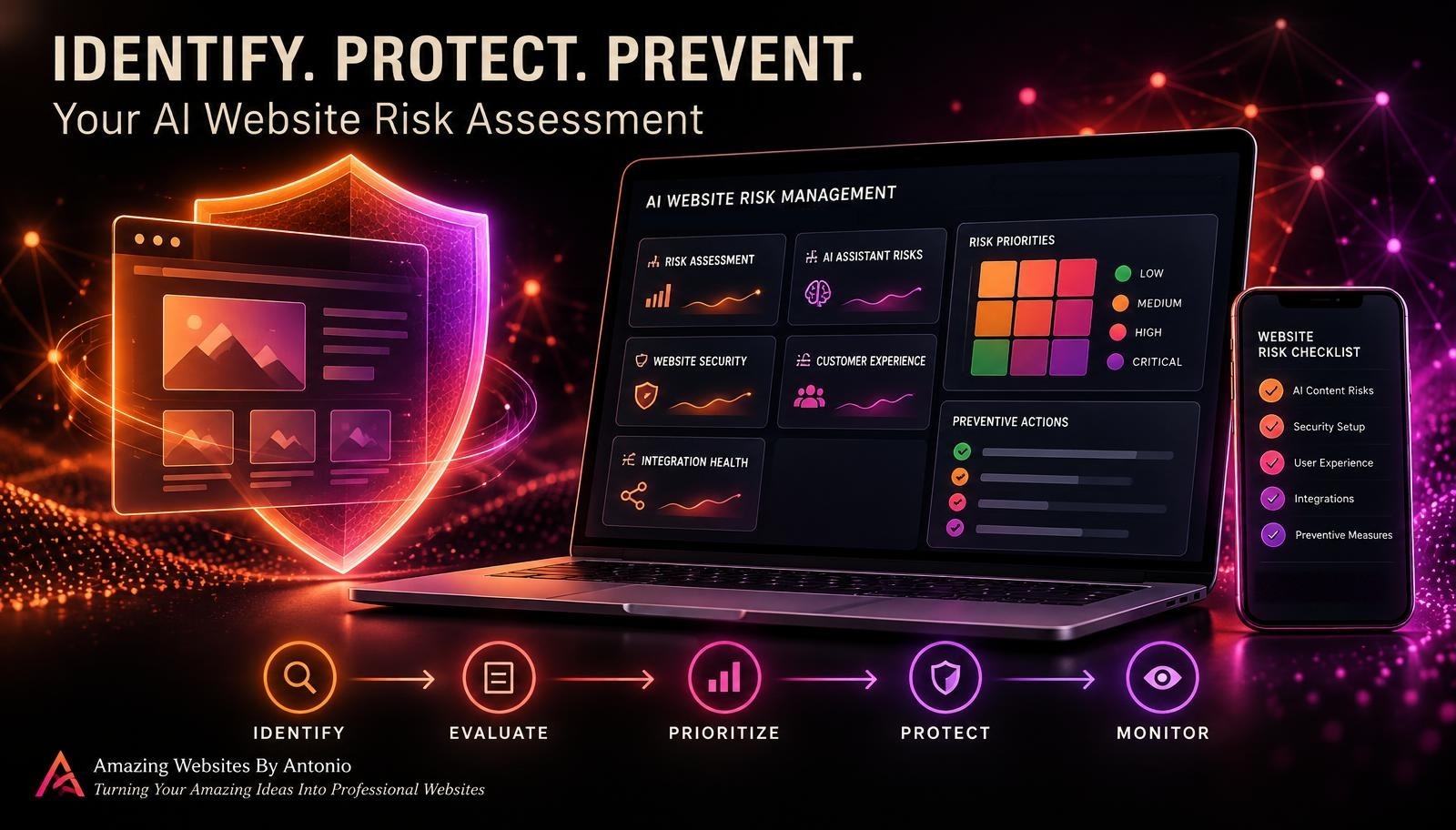
IDENTIFY → EVALUATE → PRIORITIZE → PROTECT → MONITOR → REVIEW → IMPROVE
YOUR AI WEBSITE RISK ASSESSMENT MATRIX
A simple risk matrix can help organize potential problems.
| Likelihood | Low Impact | Medium Impact | High Impact |
|---|---|---|---|
| High | Medium Priority | High Priority | Critical Priority |
| Medium | Low Priority | Medium Priority | High Priority |
| Low | Low Priority | Low Priority | Medium Priority |
This matrix is an illustrative planning tool, not a substitute for professional security or legal risk assessment.
Some risks—especially serious privacy, security, or safety concerns—may require urgent action regardless of their calculated rating.
HOW TO CREATE A SIMPLE RISK SCORE
You can use a basic scoring method to compare ordinary website risks.
Step 1: Rate likelihood from 1 to 5.
1 = Very Unlikely
2 = Unlikely
3 = Possible
4 = Likely
5 = Very Likely
Step 2: Rate impact from 1 to 5.
1 = Minimal
2 = Minor
3 = Moderate
4 = Major
5 = Severe
Step 3: Multiply the two ratings.
Risk Score = Likelihood × Impact
For example:
Likelihood = 4
Impact = 5
Risk Score = 20
A possible interpretation:
| Score | Example Priority |
|---|---|
| 1–4 | Low |
| 5–9 | Medium |
| 10–16 | High |
| 17–25 | Critical |
These thresholds are illustrative and should be adapted to your business.
Important: This score is a prioritization aid, not a scientifically precise probability or an automatic decision rule. Critical security, privacy, and accessibility concerns should receive appropriate attention even when their numeric scores are low.
EXAMPLE AI WEBSITE RISK REGISTER
The following entries are fictional.
| Risk ID | Potential Risk | Likelihood | Impact | Score |
|---|---|---|---|---|
| RISK-001 | Contact form stops saving inquiries | 3 | 5 | 15 |
| RISK-002 | AI assistant provides outdated pricing | 4 | 4 | 16 |
| RISK-003 | Important mobile button becomes unusable | 3 | 3 | 9 |
| RISK-004 | Email integration disconnects | 3 | 4 | 12 |
| RISK-005 | Minor decorative spacing issue | 4 | 1 | 4 |
What should happen next?
The business owner should review the highest-impact risks, examine existing safeguards, and choose appropriate preventive actions.
For example, RISK-001 could lead to more reliable form monitoring and routine test submissions.
RISK-002 could lead to improved AI knowledge base review and pricing verification procedures.
The purpose isn't simply to calculate numbers.
THE PURPOSE IS TO TURN RISK INFORMATION INTO ACTION.
COMPLETE AI WEBSITE RISK ASSESSMENT CHECKLIST
SECTION 1 — WEBSITE INVENTORY
- ☐ Important website pages are identified.
- ☐ Essential customer workflows are documented.
- ☐ AI assistant dependencies are listed.
- ☐ External integrations are identified.
- ☐ Critical business records are documented.
SECTION 2 — TECHNICAL RISKS
- ☐ Website availability risks are reviewed.
- ☐ Important navigation risks are considered.
- ☐ Contact form failure risks are assessed.
- ☐ Website update risks are documented.
- ☐ Integration dependencies are reviewed.
SECTION 3 — AI ASSISTANT RISKS
- ☐ Incorrect response risks are considered.
- ☐ Knowledge base accuracy is reviewed.
- ☐ Unsupported promises are addressed.
- ☐ Human handoff procedures are evaluated.
- ☐ AI privacy and manipulation risks are reviewed.
SECTION 4 — SECURITY AND PRIVACY
- ☐ Administrative access is protected.
- ☐ Customer data handling is reviewed.
- ☐ Permissions are appropriate.
- ☐ External service access is evaluated.
- ☐ Important security responsibilities are understood.
SECTION 5 — CUSTOMER EXPERIENCE
- ☐ Navigation usability is reviewed.
- ☐ Mobile usability is considered.
- ☐ Accessibility risks are assessed.
- ☐ Important content accuracy is reviewed.
- ☐ Essential customer journeys are evaluated.
SECTION 6 — RISK EVALUATION
- ☐ Likelihood is assessed.
- ☐ Impact is assessed.
- ☐ Existing safeguards are documented.
- ☐ Uncertainty is recorded.
- ☐ Risk priorities are established.
SECTION 7 — RISK REDUCTION
- ☐ Preventive actions are identified.
- ☐ Important risks have responsible owners.
- ☐ Corrective actions have target dates.
- ☐ Monitoring requirements are considered.
- ☐ Recovery procedures are available where needed.
SECTION 8 — ONGOING REVIEW
- ☐ A risk register is maintained.
- ☐ Important risks are reviewed regularly.
- ☐ New risks are added after major changes.
- ☐ Completed safeguards are verified.
- ☐ Remaining risks are documented.
COPY-READY AI WEBSITE RISK ASSESSMENT TEMPLATE
BUSINESS NAME:
[Enter Business Name]
WEBSITE:
[Enter Website Address]
ASSESSMENT DATE:
[Enter Date]
PREPARED BY:
[Enter Name]
NEXT REVIEW DATE:
[Enter Date]
SECTION 1 — RISK IDENTIFICATION
RISK ID:
[Enter Identifier]
RISK TITLE:
[Enter Title]
RISK CATEGORY:
Technical / AI Assistant / Security / Privacy / Customer Experience / Integration / Other
DESCRIPTION:
[Describe What Could Go Wrong]
AFFECTED SYSTEMS:
[List Systems]
SECTION 2 — RISK EVALUATION
LIKELIHOOD RATING:
[1–5]
IMPACT RATING:
[1–5]
RISK SCORE:
[Likelihood × Impact]
PRIORITY:
Low / Medium / High / Critical
ASSESSMENT CONFIDENCE:
High / Medium / Low
EVIDENCE OR ASSUMPTIONS:
[Enter Details]
SECTION 3 — EXISTING SAFEGUARDS
CURRENT PREVENTIVE CONTROLS:
[List Controls]
CURRENT DETECTION METHODS:
[List Methods]
CURRENT RECOVERY OPTIONS:
[List Options]
SECTION 4 — RISK REDUCTION PLAN
RECOMMENDED ACTION:
[Describe Action]
RESPONSIBLE PERSON:
[Enter Name]
TARGET COMPLETION DATE:
[Enter Date]
REQUIRED RESOURCES:
[List Resources]
SECTION 5 — IMPLEMENTATION STATUS
STATUS:
Not Started / In Progress / Implemented / Needs Review
VERIFICATION METHOD:
[Describe How the Safeguard Will Be Tested]
VERIFICATION RESULT:
Pass / Fail / Not Tested
SECTION 6 — REMAINING RISK
RESIDUAL RISK DESCRIPTION:
[Describe Remaining Risk]
RESIDUAL LIKELIHOOD:
[1–5 or Unknown]
RESIDUAL IMPACT:
[1–5 or Unknown]
FURTHER ACTION REQUIRED:
Yes / No / Under Review
SECTION 7 — FINAL REVIEW
REVIEWED BY:
[Enter Name]
REVIEW DATE:
[Enter Date]
NEXT REVIEW DATE:
[Enter Date]
ADDITIONAL NOTES:
[Enter Details]
EXAMPLE AI WEBSITE RISK ASSESSMENT SCENARIO
The following scenario is fictional.
Situation: AI Assistant May Provide Outdated Service Pricing
A business owner uses an AI assistant to answer customer questions about services.
The owner recently updated service pricing.
However, the assistant's knowledge source may still contain older information.
Step 1 — Identify the Risk
The assistant could provide outdated pricing information.
Step 2 — Evaluate the Impact
Customers might receive incorrect expectations about service costs.
Step 3 — Review Existing Safeguards
The owner checks whether pricing information is reviewed before website updates are published.
Step 4 — Choose Preventive Actions
The owner updates the approved pricing source and establishes a process for reviewing AI responses after pricing changes.
Step 5 — Test the Safeguard
The owner asks representative pricing questions and verifies the responses against current approved information.
Step 6 — Document the Results
The owner records the test outcomes in the risk register.
Step 7 — Schedule Future Reviews
The owner adds AI pricing verification to the website's update checklist.
LESSON:
A risk assessment becomes valuable when it leads to practical improvements.
YOUR 30-DAY AI WEBSITE RISK ASSESSMENT PLAN
WEEK 1 — IDENTIFY RISKS
- List important website systems.
- Identify critical customer workflows.
- Review AI assistant dependencies.
- Document technical and security concerns.
- Create an initial risk register.
GOAL: Understand what could affect your website.
WEEK 2 — EVALUATE RISKS
- Assess likelihood.
- Assess customer impact.
- Assess business impact.
- Review existing safeguards.
- Assign preliminary priorities.
GOAL: Identify which risks deserve the most attention.
WEEK 3 — PLAN PREVENTION
- Choose practical safeguards.
- Assign responsible owners.
- Establish target dates.
- Identify monitoring requirements.
- Document recovery options.
GOAL: Turn risk findings into preventive actions.
WEEK 4 — IMPLEMENT AND REVIEW
- Implement selected safeguards.
- Test changes safely.
- Update risk ratings where justified.
- Document remaining concerns.
- Schedule future risk reviews.
GOAL: Establish an ongoing risk management routine.
THE AI WEBSITE RISK MANAGEMENT FRAMEWORK
IDENTIFY
Recognize potential technical, AI, security, and customer experience problems.
↓
EVALUATE
Consider likelihood, impact, and uncertainty.
↓
PRIORITIZE
Focus on the risks that matter most.
↓
PROTECT
Implement appropriate preventive safeguards.
↓
MONITOR
Watch for warning signs and changing conditions.
↓
REVIEW
Reassess risks after changes or incidents.
↓
IMPROVE
Strengthen the website over time.
FINAL THOUGHTS
Building a professional website is an exciting achievement.
It allows customers to discover your services.
Explore your brand.
Contact your business.
And interact with helpful digital tools.
But running a website also involves responsibility.
Technology can change.
Integrations can fail.
AI assistants can make mistakes.
And unexpected problems can affect the customer experience.
That's why risk assessment matters.
It helps you think ahead.
Recognize potential weaknesses.
Protect important information.
Prioritize improvements.
And make better decisions about your website.
YOU CAN'T PREDICT EVERY WEBSITE PROBLEM.
BUT YOU CAN IDENTIFY MANY RISKS BEFORE THEY TURN INTO SERIOUS INCIDENTS.
Start with your most important website functions.
Review potential technical and AI-related risks.
Consider customer and business impact.
Document your findings.
Choose practical safeguards.
And revisit your assessment as your website grows.
Because a professional website isn't just one that looks beautiful.
IT'S ONE THAT IS MANAGED WITH CARE, PREPARATION, AND PURPOSE.
IDENTIFY THE RISKS.
PROTECT WHAT MATTERS.
PREVENT WHAT YOU CAN.
KEEP BUILDING BETTER WEBSITES.
Amazing Websites By Antonio
Turning Your Amazing Ideas Into Professional Websites