A Practical Guide to Organizing Monthly, Quarterly, and Annual Recovery Tests for Your AI-Powered Business Website
Imagine creating a disaster recovery plan for your business website.
You've identified your important website pages.
Reviewed your backups.
Documented your AI assistant settings.
Prepared alternative customer contact methods.
And created a checklist for responding to unexpected technical problems.
That's excellent preparation!
But here's an important question:
WHEN WAS THE LAST TIME YOU TESTED YOUR RECOVERY PLAN?
A recovery plan may look complete on paper.
But if you haven't reviewed or practiced it recently, you may discover problems when you need it most.
Perhaps a recovery procedure has changed.
A service provider has updated its platform.
A new AI assistant feature has been added.
Or an important integration now works differently.
That's why recovery testing shouldn't be a one-time activity.
RECOVERY READINESS IS SOMETHING YOU MAINTAIN, NOT SOMETHING YOU CHECK OFF ONCE AND FORGET.
A recovery testing schedule helps you organize regular reviews and safe exercises so you can identify weaknesses before a serious disruption occurs.
For AI-powered websites, testing may involve website restoration, customer inquiries, AI assistant configurations, email integrations, payment workflows, and important business records.
The good news?
You don't need a large technical team to create a useful schedule.
Even a solo entrepreneur can establish a practical routine.
In Blog #120, we're exploring 50 strategies to help you build a recovery testing schedule that keeps your digital business prepared throughout the year.
PART 1: UNDERSTAND RECOVERY TESTING
1. Know What Recovery Testing Means
Recovery testing evaluates whether documented procedures can restore important systems and business functions after a disruption.
2. Understand Why Testing Matters
Testing helps identify missing instructions, unavailable resources, outdated information, and unexpected recovery problems.
3. Recognize the Difference Between Planning and Testing
Planning describes what should happen.
Testing checks whether the plan can work as expected.
4. Use Different Types of Recovery Exercises
Recovery exercises can include document reviews, tabletop scenarios, backup checks, and technical restoration tests.
5. Make Safety a Priority
Recovery testing should not unnecessarily disrupt your live website or expose customer information.
PART 2: IDENTIFY WHAT NEEDS TESTING
6. Review Your Website's Critical Functions
Identify important pages, forms, and customer workflows.
7. Identify AI Assistant Dependencies
Determine which AI settings, knowledge sources, and integrations may need restoration.
8. Review Customer Inquiry Systems
Understand how private submissions are stored and recovered.
9. Identify External Integrations
List relevant email, payment, automation, and other connected services.
10. Review Important Business Records
Identify records that are necessary to resume essential operations.
PART 3: CREATE A MONTHLY RECOVERY REVIEW
11. Review Your Recovery Documentation
Check that important instructions remain current.
12. Verify Backup Availability
Confirm that expected backups or saved versions are available where supported.
13. Review Provider Information
Check that important support and account recovery information remains accurate.
14. Check Essential Customer Workflows
Use safe test data to verify forms, notifications, and other important functions.
15. Document Monthly Findings
Record completed checks, failed checks, and follow-up actions.
PART 4: CREATE A QUARTERLY TESTING ROUTINE
16. Conduct a Tabletop Recovery Exercise
Walk through a fictional disruption and describe the actions you would take.
17. Review Recovery Priorities
Confirm that critical business functions are still prioritized appropriately.
18. Practice Alternative Communication
Verify that backup contact methods are available and usable.
19. Test Restoration Where Supported
Use an isolated or staging environment when appropriate.
20. Review Test Results
Document gaps and improve your recovery procedures.
PART 5: CREATE AN ANNUAL RECOVERY REVIEW
21. Review Your Complete Disaster Recovery Plan
Examine whether the plan still reflects your business and technology.
22. Review Recovery Objectives
Reassess recovery time and data-loss targets based on business needs.
23. Evaluate Provider Dependencies
Determine whether your website relies on new or changed services.
24. Review Security and Privacy Requirements
Check whether recovery procedures continue to protect sensitive information.
25. Update the Next Year's Testing Schedule
Use the results of your annual review to plan future exercises.
PART 6: TEST AI WEBSITE COMPONENTS
26. Verify AI Assistant Configuration
Review important instructions, settings, and supported recovery procedures.
27. Check Knowledge Base Recovery
Confirm that approved business information can be restored or reconstructed.
28. Test Common Customer Questions
Verify that the assistant provides accurate answers after recovery.
29. Review Human Handoff Procedures
Make sure customers can reach a person when AI assistance is unavailable.
30. Check AI Privacy Behavior
Verify that the assistant does not expose confidential information or make unsupported promises.
PART 7: TEST BUSINESS WORKFLOWS
31. Test Contact Form Submissions
Submit safe test inquiries and verify the full workflow.
32. Confirm Private Inquiry Storage
Check that submissions reach their intended private destination.
33. Review Email Notifications
Verify that expected notifications are delivered.
34. Check Payment Integrations Safely
Where applicable, use supported test modes or documented verification procedures rather than unnecessary live transactions.
35. Review Automation Recovery
Check that restored workflows do not unintentionally duplicate messages, submissions, or other actions.
PART 8: MEASURE RECOVERY READINESS
36. Track Completed Tests
Record which planned exercises were completed.
37. Track Successful Results
Identify tests that passed their documented acceptance criteria.
38. Record Failed or Incomplete Tests
Do not count an untested system as successfully verified.
39. Measure Recovery Duration When Appropriate
For actual restoration exercises, record how long recovery took and compare it with relevant objectives.
40. Review Outstanding Risks
Document unresolved gaps that may affect recovery readiness.
PART 9: MANAGE TESTING RESPONSIBILITIES
41. Assign a Testing Owner
Identify who is responsible for coordinating each review.
For a solo business, the owner may handle this role.
42. Create Calendar Reminders
Schedule recurring reviews to avoid forgetting important tests.
43. Prepare Testing Instructions
Document what needs to be checked and how results should be recorded.
44. Coordinate With Service Providers
Contact relevant providers when technical testing requires their support or approval.
45. Follow Up on Failed Tests
Assign corrective actions and retest after changes are made.
PART 10: BUILD A LONG-TERM RECOVERY CULTURE
46. Review Your Testing Results Over Time
Look for recurring weaknesses and improvements.
47. Update Tests After Major Changes
New website features, AI tools, and integrations may require additional exercises.
48. Improve Documentation
Keep recovery instructions understandable and accessible.
49. Adjust Your Testing Frequency
Higher-risk systems or rapidly changing workflows may need more frequent checks.
50. Make Preparedness an Ongoing Business Habit
Recovery testing should become part of maintaining a dependable digital business.
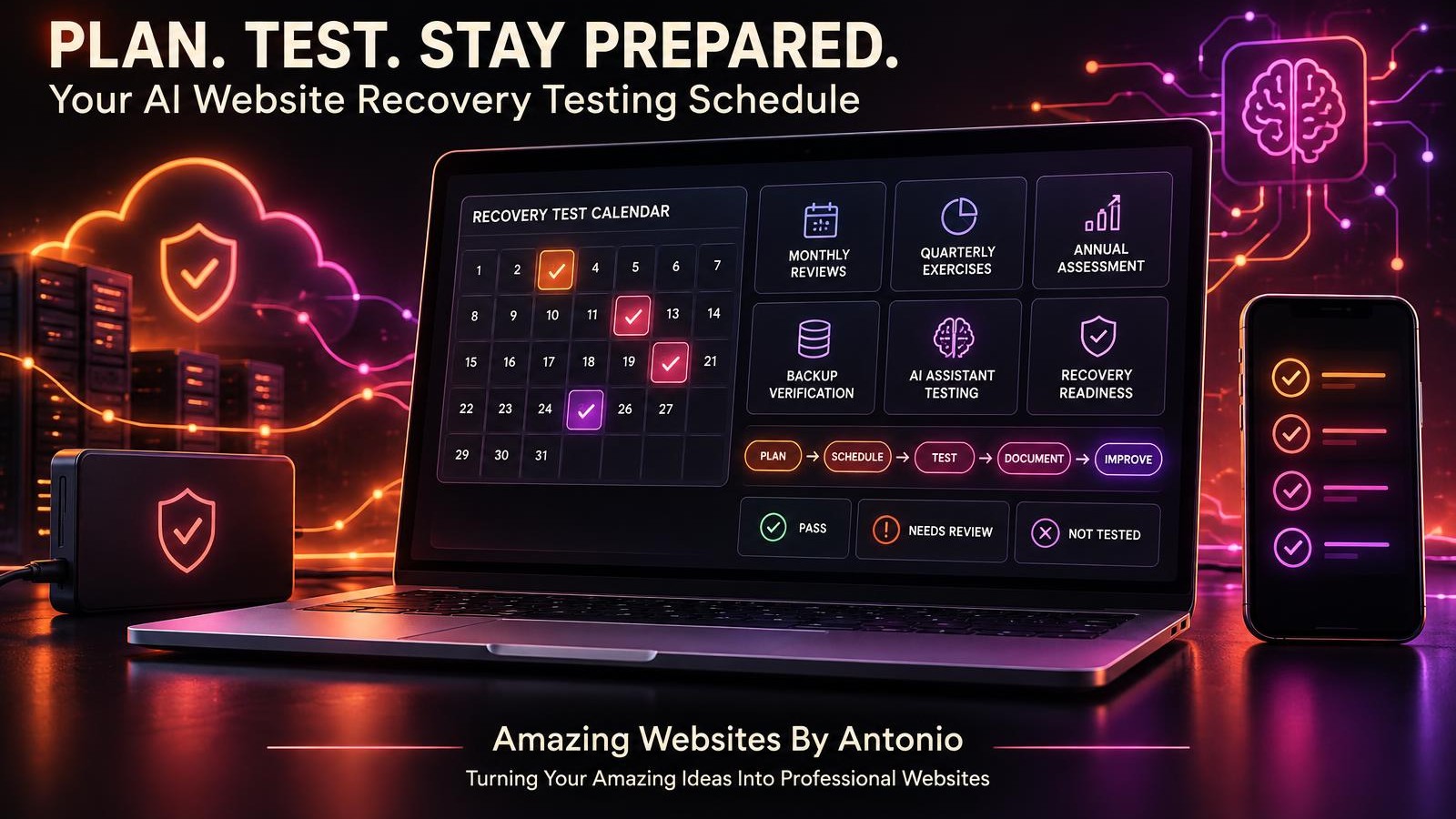
PLAN → SCHEDULE → TEST → DOCUMENT → CORRECT → RETEST → IMPROVE
YOUR AI WEBSITE RECOVERY TESTING CALENDAR
The following is an illustrative schedule. Adjust it based on your website platform, business needs, and recovery risks.
| Frequency | Testing Activity | Main Goal |
|---|---|---|
| Weekly, when appropriate | Review critical monitoring and backup failures | Detect obvious problems |
| Monthly | Check recovery documentation, backup status, and essential workflows | Maintain basic readiness |
| Quarterly | Run a tabletop exercise and supported restoration tests | Evaluate recovery procedures |
| Every six months | Review important dependencies and unresolved risks | Identify larger gaps |
| Annually | Review the complete disaster recovery strategy | Plan long-term improvements |
| After major changes | Test affected recovery procedures | Keep the plan current |
Important: A document review or tabletop exercise does not prove that a technical restoration will succeed. Technical recovery capabilities should be tested safely where supported.
YOUR 12-MONTH AI WEBSITE RECOVERY TESTING PLAN
JANUARY — RECOVERY PLAN REVIEW
Review your complete recovery documentation.
Update important contacts and system inventories.
FEBRUARY — BACKUP COVERAGE REVIEW
Check which important website components and records are protected.
MARCH — FIRST QUARTERLY EXERCISE
Practice a fictional website outage.
Review the response and recovery process.
APRIL — CUSTOMER INQUIRY TESTING
Verify Contact forms, private storage, and notification workflows.
MAY — AI ASSISTANT RECOVERY REVIEW
Check approved AI configurations, knowledge sources, and human handoff procedures.
JUNE — SECOND QUARTERLY EXERCISE
Practice a fictional AI service or integration disruption.
JULY — SECURITY AND ACCESS REVIEW
Review important account recovery methods and authorized access.
AUGUST — BUSINESS CONTINUITY REVIEW
Verify alternative customer communication and temporary operating procedures.
SEPTEMBER — THIRD QUARTERLY EXERCISE
Practice a major website recovery scenario.
Conduct a safe restoration test where supported.
OCTOBER — INTEGRATION RECOVERY REVIEW
Check recovery procedures for important external services.
NOVEMBER — RECOVERY READINESS ASSESSMENT
Review test results, unresolved risks, and recovery objectives.
DECEMBER — ANNUAL REVIEW AND FOURTH QUARTERLY EXERCISE
Complete an annual recovery plan review.
Practice a final tabletop scenario.
Prepare the following year's testing schedule.
COMPLETE AI WEBSITE RECOVERY TESTING CHECKLIST
SECTION 1 — TEST PLANNING
- ☐ Critical website systems are identified.
- ☐ Important customer workflows are documented.
- ☐ AI assistant dependencies are listed.
- ☐ Recovery priorities are defined.
- ☐ Testing responsibilities are assigned.
- ☐ A recurring schedule has been created.
SECTION 2 — TEST SAFETY
- ☐ Testing methods are appropriate for the platform.
- ☐ Live customer services are protected.
- ☐ Test data is used where possible.
- ☐ Sensitive customer information is protected.
- ☐ Relevant provider requirements are understood.
- ☐ Restoration tests use safe environments where supported.
SECTION 3 — MONTHLY VERIFICATION
- ☐ Recovery documentation is current.
- ☐ Backup availability has been checked.
- ☐ Backup coverage is understood.
- ☐ Important provider contacts are accurate.
- ☐ Essential customer workflows are verified.
- ☐ Results are documented.
SECTION 4 — QUARTERLY TESTING
- ☐ A tabletop exercise is completed.
- ☐ Recovery priorities are reviewed.
- ☐ Alternative contact methods are checked.
- ☐ Restoration procedures are tested where feasible.
- ☐ Failed checks are recorded.
- ☐ Corrective actions are assigned.
SECTION 5 — AI WEBSITE TESTING
- ☐ AI assistant recovery requirements are understood.
- ☐ Approved knowledge sources are available.
- ☐ Representative questions are tested.
- ☐ Human handoffs are verified.
- ☐ AI privacy behavior is reviewed.
- ☐ External AI dependencies are documented.
SECTION 6 — BUSINESS WORKFLOW TESTING
- ☐ Contact forms are tested.
- ☐ Private inquiry storage is verified.
- ☐ Email notifications are checked.
- ☐ Payment integrations are reviewed where applicable.
- ☐ Automations are checked for unintended duplicate actions.
- ☐ Important customer journeys are verified.
SECTION 7 — FINAL REVIEW
- ☐ Test results are documented.
- ☐ Failed tests are investigated.
- ☐ Untested areas are clearly identified.
- ☐ Recovery objectives are reviewed.
- ☐ Corrective actions have owners.
- ☐ Follow-up tests are scheduled.
- ☐ The next review date is recorded.
YOUR AI WEBSITE RECOVERY READINESS SCORECARD
A recovery readiness scorecard can help you organize your findings.
| Testing Category | Example Status |
|---|---|
| Recovery documentation | Pass |
| Backup availability | Pass |
| Backup restoration | Not Tested |
| Website access recovery | Pass |
| AI assistant recovery | Needs Review |
| Contact form recovery | Pass |
| Email integration recovery | Pass |
| Payment integration recovery | Not Applicable |
| Alternative communication | Pass |
| Security recovery procedures | Needs Review |
These results are fictional examples, not verified findings for any particular website.
Use four basic status categories:
PASS: The documented acceptance criteria were met.
FAIL: The test was completed but did not meet the acceptance criteria.
NOT TESTED: The test has not been completed.
NOT APPLICABLE: The category does not apply to the business.
You may also use NEEDS REVIEW for incomplete evidence or unresolved questions.
Important: A collection of passing checks does not guarantee complete recovery readiness. Critical failures, missing coverage, and untested systems still require attention.
COPY-READY AI WEBSITE RECOVERY TEST REPORT
BUSINESS NAME:
[Enter Business Name]
WEBSITE:
[Enter Website Address]
TEST DATE:
[Enter Date]
TEST OWNER:
[Enter Name]
TEST IDENTIFIER:
[Enter Identifier]
SECTION 1 — TEST OVERVIEW
Test Type:
Document Review / Tabletop Exercise / Backup Verification / Restoration Test / Workflow Test
Testing Environment:
[Enter Environment]
Systems Included:
[List Systems]
Testing Objective:
[Describe Objective]
SECTION 2 — SAFETY PREPARATION
Live Website Protected:
Yes / No / Not Applicable
Test Data Used:
Yes / No / Not Applicable
Sensitive Data Safeguards Reviewed:
Yes / No
Provider Requirements Reviewed:
Yes / No / Not Applicable
SECTION 3 — TEST EXECUTION
Planned Steps:
[List Steps]
Actual Steps Completed:
[List Steps]
Unexpected Problems:
[Describe Findings]
SECTION 4 — RESULTS
Website Recovery:
Pass / Fail / Not Tested / Not Applicable
Backup Restoration:
Pass / Fail / Not Tested / Not Applicable
AI Assistant Recovery:
Pass / Fail / Not Tested / Not Applicable
Contact Form Recovery:
Pass / Fail / Not Tested / Not Applicable
Email Notifications:
Pass / Fail / Not Tested / Not Applicable
Payment Integrations:
Pass / Fail / Not Tested / Not Applicable
Business Continuity:
Pass / Fail / Not Tested / Not Applicable
SECTION 5 — RECOVERY MEASUREMENTS
Recovery Time Objective:
[Enter Target or Not Defined]
Observed Recovery Duration:
[Enter Duration or Not Measured]
Recovery Point Objective:
[Enter Target or Not Defined]
Observed Data Recovery Point:
[Enter Finding or Not Measured]
SECTION 6 — ISSUES AND RISKS
Failed Checks:
[List Results]
Untested Areas:
[List Areas]
Known Limitations:
[List Limitations]
Potential Business Impact:
[Describe Impact]
SECTION 7 — CORRECTIVE ACTIONS
Required Action:
[Describe Action]
Priority:
Critical / High / Medium / Low
Responsible Person:
[Enter Name]
Target Completion Date:
[Enter Date]
Retest Date:
[Enter Date]
SECTION 8 — FINAL REVIEW
Overall Test Status:
Passed / Failed / Partially Completed / Not Completed
Recovery Readiness Assessment:
Ready for Tested Scope / Additional Work Required / Unknown
Reviewed By:
[Enter Name]
Next Scheduled Test:
[Enter Date]
EXAMPLE RECOVERY TESTING SCENARIO
The following scenario is fictional.
Situation: A Business Owner Practices a Website Recovery Exercise
A business owner has created a disaster recovery plan but wants to know whether the instructions are complete.
Instead of waiting for a real emergency, the owner schedules a quarterly tabletop exercise.
Step 1 — Choose the Scenario
The owner imagines that a major website update has caused important pages to become unavailable.
Step 2 — Review the Recovery Plan
The owner opens the documented recovery instructions.
Step 3 — Identify the First Actions
The owner checks which provider to contact and which information is needed.
Step 4 — Review Restoration Options
The owner examines the website platform's supported recovery procedures.
Step 5 — Identify Missing Information
The owner discovers that the recovery plan does not clearly explain how to verify email notifications after restoration.
Step 6 — Update the Checklist
A notification verification step is added.
Step 7 — Document the Exercise
The owner records the results and schedules a follow-up review.
LESSON:
Even a tabletop exercise can reveal important gaps before a real disruption occurs.
However, a tabletop exercise does not replace technical restoration testing.
YOUR 30-DAY RECOVERY TESTING IMPLEMENTATION PLAN
WEEK 1 — BUILD YOUR TESTING INVENTORY
- Identify important website systems.
- List critical customer workflows.
- Document AI assistant dependencies.
- Review available recovery options.
- Identify testing responsibilities.
GOAL: Understand what needs to be tested.
WEEK 2 — CREATE YOUR SCHEDULE
- Choose monthly review activities.
- Plan quarterly recovery exercises.
- Schedule an annual disaster recovery review.
- Create calendar reminders.
- Prepare a testing report template.
GOAL: Establish a repeatable schedule.
WEEK 3 — COMPLETE YOUR FIRST EXERCISE
- Select a fictional disruption.
- Review the recovery plan.
- Practice the response steps.
- Identify missing information.
- Record the results.
GOAL: Test your preparation safely.
WEEK 4 — IMPROVE YOUR PROCESS
- Review findings.
- Update recovery documentation.
- Assign corrective actions.
- Schedule necessary retests.
- Confirm future review dates.
GOAL: Turn recovery testing into an ongoing business routine.
THE AI WEBSITE RECOVERY TESTING FRAMEWORK
PLAN
Identify critical systems and recovery requirements.
↓
SCHEDULE
Choose appropriate testing frequencies.
↓
PREPARE
Select safe testing methods and environments.
↓
TEST
Conduct the planned review or recovery exercise.
↓
DOCUMENT
Record results, limitations, and observations.
↓
CORRECT
Address problems discovered during testing.
↓
RETEST
Verify that corrective actions work.
↓
IMPROVE
Update the plan and prepare for the next review.
FINAL THOUGHTS
A professional business website is more than a collection of pages.
It's a digital system that supports customer communication, business information, AI assistance, and important workflows.
Protecting that system requires preparation.
But preparation shouldn't stop after creating a disaster recovery plan.
Your website will continue changing.
New features may be added.
Service providers may update their platforms.
Customer workflows may evolve.
And new integrations may introduce additional dependencies.
That's why recovery testing matters.
It helps you discover problems before an emergency.
Keep important instructions current.
Understand recovery limitations.
And improve your ability to restore essential services.
A RECOVERY PLAN IS IMPORTANT.
A RECOVERY PLAN THAT YOU REGULARLY REVIEW AND TEST IS EVEN MORE VALUABLE.
Start with a simple schedule.
Review important systems monthly.
Practice realistic scenarios quarterly.
Evaluate your full recovery strategy annually.
And update your plan whenever major changes occur.
Because building a dependable digital business isn't only about creating a website that works today.
IT'S ABOUT PREPARING TO KEEP YOUR BUSINESS MOVING FORWARD TOMORROW.
PLAN WITH PURPOSE.
TEST WITH CARE.
IMPROVE WITH CONFIDENCE.
KEEP BUILDING BETTER WEBSITES.
Amazing Websites By Antonio
Turning Your Amazing Ideas Into Professional Websites