Offering several services can be a great way to grow your business. But there is one problem that can happen when customers arrive at your website:
They may not know which service they actually need.
A visitor might know that their business needs help, but they may not know whether they need a new website, a redesign, branding, automation, an AI solution, or something else.
When customers have too many choices without enough guidance, they can become confused. And when people are confused, they may leave instead of contacting you.
Your website shouldn't simply display your services. It should help customers make a decision.
Start With the Customer's Problem
Businesses often describe services using industry terminology.
Your customer may be thinking differently.
Instead of thinking:
"I need an AI automation solution."
They may be thinking:
"I'm spending too much time doing the same tasks every week."
Instead of:
"I need a website redesign."
They may be thinking:
"My website looks outdated and customers aren't contacting me."
That's why your service descriptions should connect each service to a recognizable customer problem.
For example:
- Website Design — Best for businesses that need a professional online presence or are starting with no website.
- Website Redesign — Best for businesses with an existing website that looks outdated, is difficult to use, or no longer represents their brand.
- Branding — Best for businesses that need a stronger and more consistent visual identity.
- AI Solutions — Best for businesses interested in using artificial intelligence to improve customer experiences or business processes.
- Automation — Best for businesses that want to reduce repetitive work and create more efficient workflows.
Now visitors aren't simply reading service names. They're identifying themselves in your descriptions.
Add a "Best For" Description
One of the easiest improvements you can make to service cards is adding two simple words:
Best For:
Under each service, explain who would benefit most.
This allows customers to scan the page and quickly recognize the option that fits their situation.
Use Service Comparison Cards
If you offer multiple services, comparison cards can make the decision much easier.
Each card could include:
Service Name → What It Solves → Best For → What's Included → Starting Price or Request a Quote → Learn More
Keep these cards visually consistent.
Customers should be able to compare services without reading several long paragraphs.
Don't Give Customers Too Many Decisions at Once
More options don't automatically create a better customer experience.
Imagine opening a menu with 100 choices and no categories. You might spend more time deciding than enjoying the experience.
Websites can create the same problem.
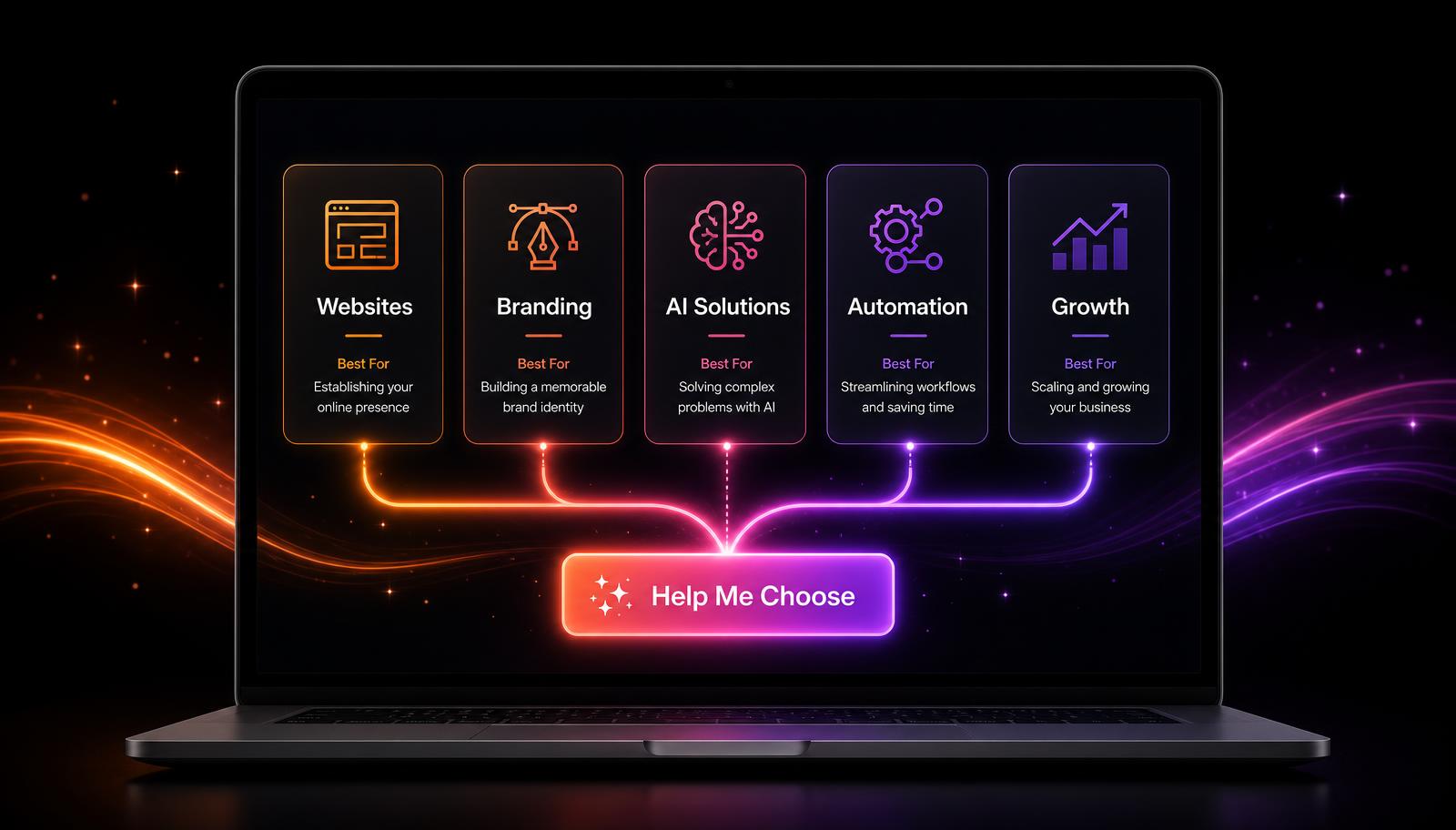
Organize related services into clear groups.
For Amazing Websites By Antonio, broader categories could include:
Websites • Branding • AI Solutions • Automation • Growth
Visitors can choose a category first and explore specific solutions afterward.
Create a "Which Service Is Right for Me?" Guide
This can make your website much more interactive.
Ask visitors a simple question:
What are you trying to accomplish?
Then provide choices such as:
- I need a website.
- My current website needs improvement.
- I need help with my brand.
- I want to automate repetitive work.
- I want to use AI in my business.
- I'm not sure what I need.
Based on their answer, your website can recommend the most appropriate next step.
Always Include "I'm Not Sure"
This option is important.
Customers shouldn't feel like they need to understand web development, branding, AI, or automation before contacting you.
An "I'm Not Sure What I Need" button could lead them to a short consultation form.
That changes the message from:
Figure it out yourself.
to:
Tell me what you're trying to accomplish, and I'll help you find the right solution.
That's a much more welcoming customer experience.
Recommend Solutions Instead of Just Selling Services
Customers usually aren't shopping for technical terminology.
They're looking for outcomes.
Instead of only saying:
AI Automation
explain the potential result:
Reduce repetitive tasks and create smarter workflows for your business.
Instead of only:
Website Design
try:
Build a professional online presence that clearly communicates what your business offers.
You're helping the customer understand why the service matters.
Use AI to Guide Customers
AI can eventually make service selection even easier.
A website assistant could ask:
"What would you like help with today?"
The visitor explains their problem in ordinary language.
The assistant could then direct them toward relevant services or the appropriate contact form.
The AI shouldn't pressure someone into buying. Its job should be to make the website easier to navigate and help visitors find relevant information.
Give Every Service a Clear Next Step
Once someone finds the service that fits their needs, don't leave them wondering what happens next.
Provide a clear call to action:
- Learn More
- Request a Consultation
- Tell Me About Your Project
- Get Started
- Help Me Choose
The next action should feel natural and easy.
Pro Tip
Visit your Services page and pretend you've never heard of your company before.
Ask yourself:
"If I knew I needed help with my business but didn't understand websites, branding, AI, or automation, would I know which button to click?"
If the answer is no, your service page may need more guidance—not more information.
Final Thought
A great service page doesn't make customers study your business.
It helps them recognize their problem, understand their options, and confidently choose their next step.
When your website makes decisions easier, you're not simply improving navigation.
You're creating a better customer experience.
Amazing Websites By Antonio
Turning Your Amazing Ideas Into Professional Websites