Have you ever visited a business website, liked what the company offered, but still didn't know exactly what to buy?
That happens more often than businesses realize.
Customers may understand your individual services, but they can still become overwhelmed when they have to figure out which services should go together.
That's where service packages can help.
Instead of making customers build their own solution piece by piece, your website can organize related services into clear packages designed around specific customer needs.
Here are some ways to create website service packages that make choosing and buying easier.
1. Start With the Customer's Goal
Don't create packages simply by grouping random services together. Start with what the customer is trying to accomplish.
For example, a new business owner may need:
- A professional website
- A logo
- Brand colors
- Basic digital branding
Instead of requiring that customer to purchase four separate services, you could create a package specifically for new businesses.
The package should answer:
- Who is this for?
- What problem does it solve?
- What does the customer receive?
- What should they do next?
When those answers are clear, customers can make decisions more confidently.
2. Give Each Package a Simple Name
Package names should be easy to understand. Avoid complicated terminology.
- Starter Package — For businesses establishing their first professional online presence.
- Growth Package — For businesses ready to strengthen their website, branding, and digital presence.
- AI Business Package — For businesses interested in using AI tools and automation to improve efficiency.
- Complete Brand Experience — For businesses that want websites, branding, digital tools, and creative services working together.
The name should give customers an immediate idea of what the package is designed to accomplish.
3. Clearly Show What's Included
Customers should never have to guess what they're purchasing. Under each package, provide a simple list of what's included.
Business Starter Package
Best for: New entrepreneurs and small businesses.
Includes:
- Professional website
- Basic brand identity
- Logo design
- Mobile-friendly design
- Contact form
- Social media links
- Basic website launch support
Then provide a clear button: Get Started.
This format is much easier to understand than making customers navigate several different service pages.
4. Use "Best For" Descriptions
Just like individual services, packages should tell visitors who they're designed for.
- Best for new businesses.
- Best for businesses that already have a website but need an upgrade.
- Best for entrepreneurs building a stronger brand.
- Best for businesses wanting to introduce AI and automation.
- Best for organizations that need several digital services working together.
These descriptions help customers recognize themselves in your offers.
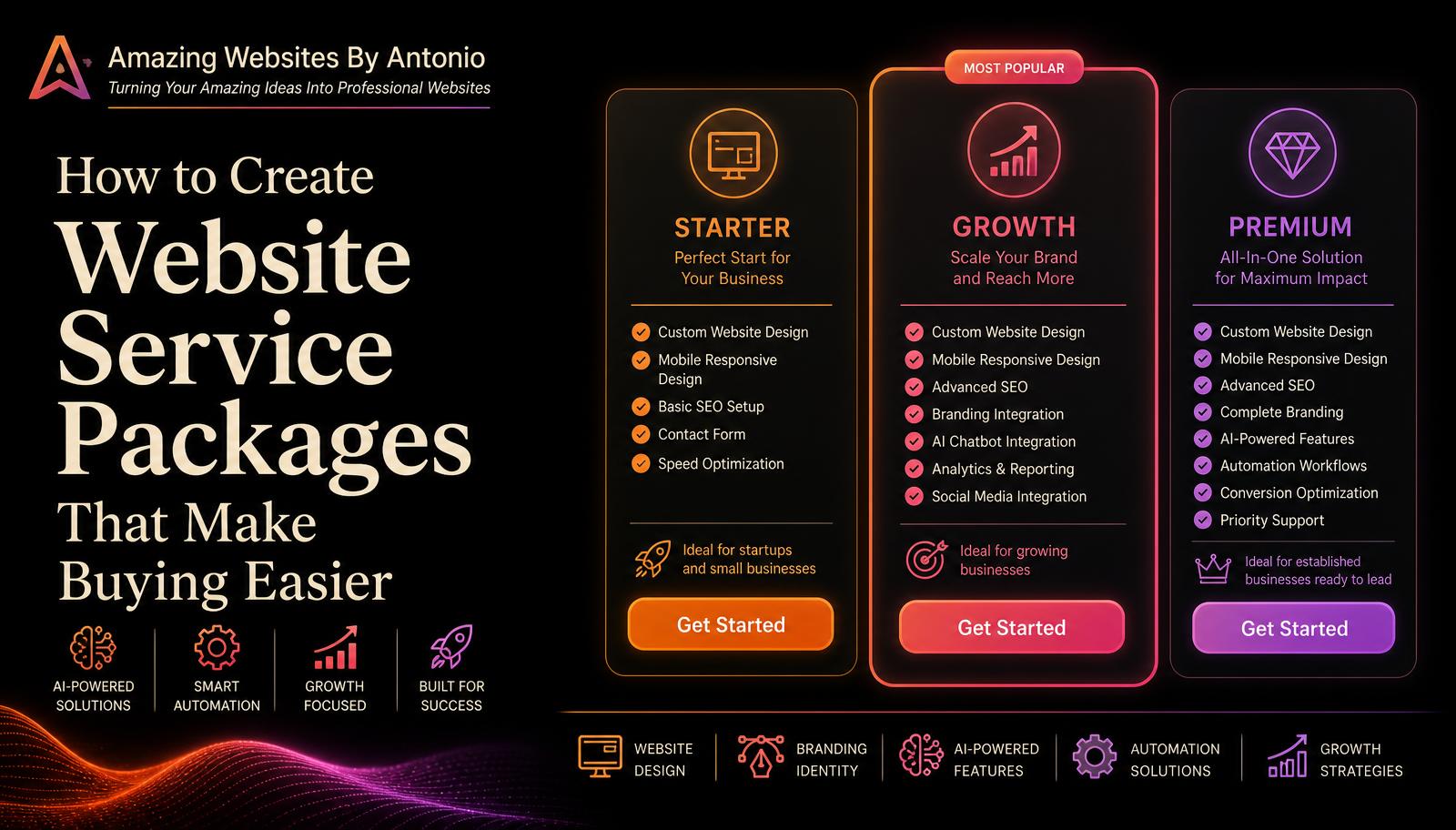
5. Create Three Clear Levels
Many businesses can benefit from offering three package levels.
- Starter — The essentials needed to get started.
- Growth — More features and services for a growing business.
- Premium — A more complete solution for businesses wanting a larger digital presence.
Three options give customers choices without overwhelming them.
The goal isn't to push everyone toward the most expensive option. The goal is to help each customer find the option that fits their needs.
6. Make Packages Easy to Compare
A comparison chart can be extremely useful. Imagine three columns: Starter | Growth | Premium. Then show which features are included in each package.
Customers can quickly compare:
- Number of website pages
- Branding services
- Logo design
- AI features
- Automation
- Website support
- Digital content
- Consultation
- Additional services
A visual comparison can answer many customer questions before they ever contact you.
7. Don't Put Everything Into Every Package
A package should provide value without becoming confusing. You don't need to include every service your business offers.
Keep each package focused on a particular type of customer or goal. Additional services can always be offered separately as add-ons.
Optional add-ons:
- Additional website pages
- Logo design
- AI chatbot
- Business automation
- Jingle or audio branding
- Additional digital content
- Ongoing website support
This gives customers flexibility while keeping the main packages simple.
8. Be Clear About Pricing
If you're comfortable displaying prices, package pricing can help customers understand their options before contacting you.
You could use: "Starting at $___", "From $___", "Custom Quote", or "Contact for Pricing".
The important thing is accuracy. Don't advertise a price that doesn't realistically represent what the customer will pay. If project requirements can vary significantly, "Starting At" or "Custom Quote" may be more appropriate.
9. Explain the Value
Don't focus only on the number of items included. Explain what the package helps accomplish.
Instead of: Includes website + logo + branding.
Try: Build a professional and consistent business presence with a website and visual identity designed to work together.
Customers aren't simply buying individual deliverables. They're buying an outcome.
10. Recommend a Package
Sometimes customers still won't know which option to choose. That's where your website can provide guidance.
Not sure which package is right for you? Tell us about your business, goals, and current challenges. Amazing Websites By Antonio can help you identify the service package that best fits what you're trying to accomplish.
[Help Me Choose]
This makes the website feel helpful instead of pushy.
11. Use AI to Guide Customers
AI can take package selection even further. Imagine a website visitor answering a few questions:
- Do you currently have a website?
- Do you already have a logo?
- Are you starting a new business?
- Do you need branding help?
- Are you interested in AI or automation?
- What is your main business goal?
Based on those answers, an AI-powered assistant could recommend a package or suggest contacting you for a customized solution.
This can turn a traditional pricing page into an interactive customer experience.
12. Don't Force Customers Into a Package
Packages should simplify buying — not restrict customers. Some projects won't fit neatly into Starter, Growth, or Premium.
That's why it's smart to include a Custom Solution option: Have a project that doesn't fit one of our standard packages? Tell us what you're trying to build, and we'll explore a solution designed around your specific needs.
This keeps your business flexible.
13. Give Every Package a Clear Next Step
Every package should end with a call to action:
- Choose This Package
- Get Started
- Request a Quote
- Schedule a Consultation
- Tell Us About Your Project
- Help Me Choose
Don't make customers find the Contact page after they've already decided. Put the next step directly in front of them.
Make Buying Feel Simple
Customers don't want to spend twenty minutes figuring out how your services fit together. They want clarity.
A well-designed service package can take someone from "I think I need several things" to "This package looks like it was made for my business."
That's a much easier buying experience.
Your packages should help customers understand:
- What they're getting.
- Why they need it.
- Who it's designed for.
- How it can help them.
- What they should do next.
Pro Tip
Look at your current services and ask yourself:
- Which services are commonly needed together?
- Which services would a brand-new business probably need?
- Which services would a growing business need?
- Which services could help an established business become more efficient?
Those answers could become the foundation for your first service packages.
Keep the packages simple. Keep the differences clear. Focus on customer goals. And make it easy to take the next step.
Amazing Websites By Antonio
Turning Your Amazing Ideas Into Professional Websites