Have you ever visited a website, found a service you were interested in, and then wondered:
“How much does this cost?”
You look around the website.
You click on Services.
You check the FAQ.
You scroll through the Contact page.
But you still can't find any information about pricing.
For some customers, that uncertainty can become a reason to leave.
A good pricing page doesn't have to reveal every possible project cost. Instead, it should help potential customers understand what they may be investing in, what they're receiving, and what happens next.
Here are some ways to create a website pricing page that builds trust.
Make Pricing Easy To Find
Customers shouldn't have to hunt for pricing information.
If pricing is an important part of your sales process, consider placing a clear Pricing or Packages link in your website navigation or services area.
Even if you provide custom quotes, you can still explain how your pricing works.
Transparency creates confidence.
Explain What The Customer Is Paying For
A price without context can look expensive.
Instead of simply writing:
Website Package — $___
Explain what the customer receives.
For example:
Professional Website Package
Designed for businesses that need a polished, professional online presence.
Includes:
- Custom website design
- Mobile-friendly layout
- Contact form
- Social media integration
- Basic SEO setup
- Website launch support
Now the customer sees more than a number.
They see value.
Use “Starting At” When Projects Vary
Not every website project costs the same amount.
One customer may need a simple website.
Another may need multiple pages, custom features, branding, AI tools, automation, or additional services.
That's where “Starting At” pricing can be useful.
For example:
Professional Website Design
Starting at $___
This gives customers a general idea of the investment while allowing you to provide a customized quote based on their project.
Explain Why Prices Can Vary
Don't leave customers wondering why their final quote may be different.
You can explain that pricing may depend on:
- Number of website pages
- Custom design requirements
- Branding needs
- E-commerce functionality
- AI integrations
- Automation
- Content creation
- Additional revisions
- Ongoing website support
When customers understand what affects the price, customized pricing feels more reasonable.
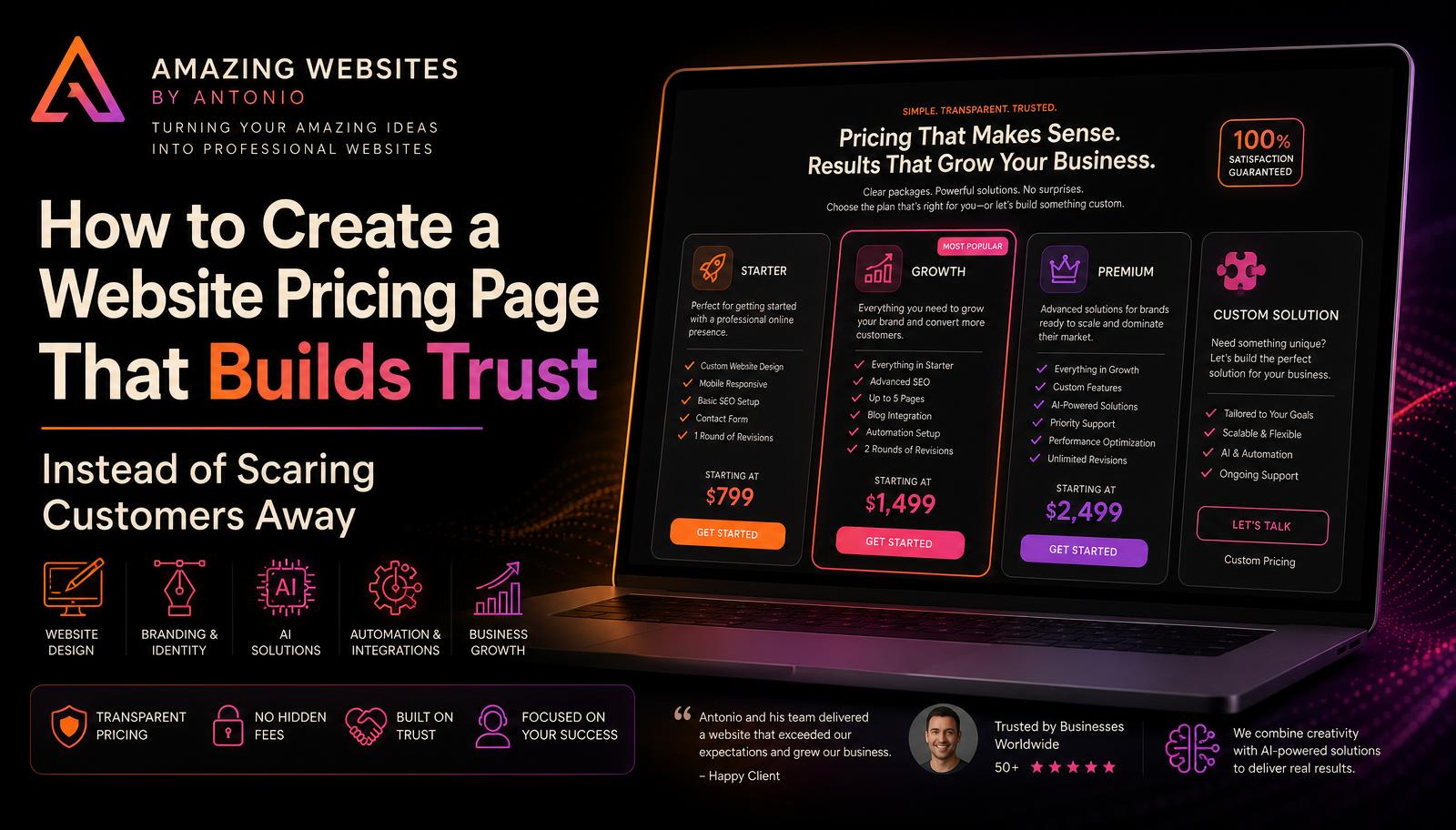
Show Packages Side By Side
If you offer multiple packages, make them easy to compare.
For example:
Starter
Best for new businesses needing the essentials.
Growth
Best for businesses ready to expand their professional online presence.
Premium
Best for businesses wanting a more complete website, branding, and digital solution.
Each package should clearly show:
Who it's for.
What's included.
The starting price.
The major differences.
The next step.
This helps customers choose based on their needs rather than simply picking the cheapest option.
Don't Hide Important Additional Costs
Trust can disappear quickly when customers discover unexpected charges.
If certain services aren't included in the base price, make that clear.
For example:
Additional website pages may be priced separately.
Domain registration may be separate.
Third-party subscriptions may require additional fees.
Advanced integrations may require a custom quote.
You don't necessarily need to list every possible charge.
But customers should understand the major factors that could change their total investment.
Use Plain Language
Pricing pages aren't the place for complicated industry terminology.
Your customer should be able to understand the page without being a website developer, designer, or AI expert.
Instead of technical descriptions, explain what each feature actually does for the customer's business.
Clarity builds trust.
Answer Common Pricing Questions
Your pricing page can include a short FAQ.
Questions might include:
Do I have to pay everything upfront?
Do you offer payment plans?
What happens if I need additional pages?
Are revisions included?
Does the price include my domain?
Are there monthly fees?
Can I upgrade my package later?
Can I request a custom package?
How long will my project take?
Answering these questions before a customer contacts you can make the sales conversation much easier.
Don't Compete Only On Price
The cheapest option isn't always the best option.
Your website should communicate why working with your business provides value.
For Amazing Websites By Antonio, that could include the combination of:
- Professional website design
- Branding
- AI solutions
- Automation
- Creative digital services
- Business-focused solutions
The goal isn't simply to say:
“Here's what it costs.”
The goal is to communicate:
“Here's what you're investing in.”
Give Customers A Custom Option
Some customers won't fit neatly into a package.
Give them another path.
Custom Solution
Have a project that doesn't fit one of our standard packages?
Tell us what you're trying to accomplish, and we'll discuss a solution designed around your specific needs.
[REQUEST A CUSTOM QUOTE]
This allows your pricing page to provide structure without limiting your services.
Make The Next Step Obvious
Once a customer finds a package they like, don't make them search for what to do next.
Give them a clear call to action.
Examples:
GET STARTED
REQUEST A QUOTE
SCHEDULE A CONSULTATION
CHOOSE THIS PACKAGE
TELL US ABOUT YOUR PROJECT
HELP ME CHOOSE
The easier the next step is, the less likely you are to lose an interested customer.
Use Ai To Make Pricing More Interactive
AI can help turn a traditional pricing page into a guided experience.
Imagine a visitor answering a few questions:
What type of business do you have?
Do you already have a website?
How many pages do you think you need?
Do you need branding?
Are you interested in AI or automation?
Do you need e-commerce?
Based on those answers, your website could recommend a service package or direct the visitor toward a custom consultation.
Instead of making customers figure everything out themselves, your website helps guide them.
Build Trust Before Asking For The Sale
Your pricing page can also include trust-building elements such as:
- Testimonials
- Portfolio examples
- Frequently asked questions
- Your process
- Satisfaction expectations
- Clear contact information
Pricing shouldn't exist in isolation.
Customers want to know they're dealing with a professional business before they spend their money.
Don't Be Afraid Of The Word “Investment”
For professional services, you're not simply selling an object.
You're helping someone build something for their business.
A professional website can help improve credibility, communicate services, generate leads, support customers, and strengthen a company's online presence.
That's why you may want to introduce your pricing with:
Your Investment
Choose the solution that best fits where your business is today and where you want it to go next.
This puts the conversation around value rather than price alone.
The Goal Is Clarity
A good pricing page should leave customers feeling informed—not pressured.
They should understand:
What you offer.
What they receive.
Approximately what it costs.
What could affect the final price.
Which option may be right for them.
What happens after they choose.
Pricing transparency doesn't mean every project must have one fixed price.
It means customers aren't left completely in the dark.
When your website communicates pricing clearly and professionally, you're doing more than showing numbers.
You're building trust before the customer ever contacts you.
Pro Tip
Open your current pricing or services page and pretend you've never seen your business before.
Give yourself 30 seconds.
Can you answer:
What can I buy?
Who is each option for?
What do I receive?
What might it cost?
What should I do next?
If any of those answers aren't clear, you've found an opportunity to improve the customer experience.
Amazing Websites By Antonio
Turning Your Amazing Ideas Into Professional Websites