You built your website.
You published helpful content.
You promoted your business.
And people are visiting.
That's great!
But now comes an important question:
What are those visitors actually doing?
Are they reading your blogs?
Are they exploring your services?
Are they leaving after viewing one page?
Are they finding you through search engines?
Are they clicking your calls to action?
Are they contacting you?
Without website analytics, you may be making decisions based largely on assumptions.
Analytics can help replace some of those assumptions with useful information.
And despite all the charts, graphs, percentages, and terminology you may have seen, website analytics doesn't have to be complicated.
Let's make it simple.
What Are Website Analytics?
Website analytics are information about how people interact with your website.
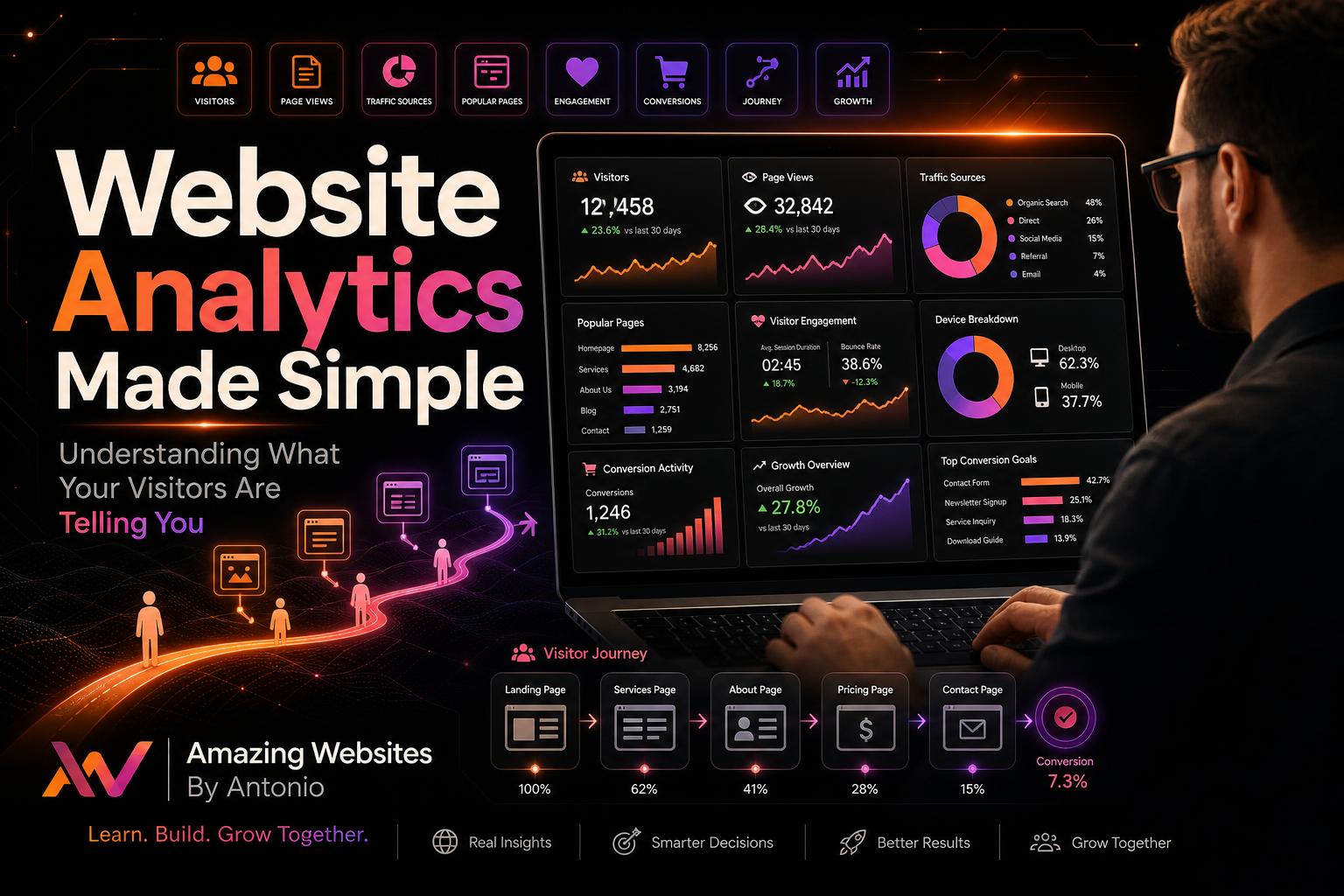
Depending on the analytics system you use, you may be able to learn things such as:
- How many people visit
- Which pages they view
- How visitors discover you
- What devices they use
- Which content gets attention
- Whether visitors complete important actions
Think of analytics as your website giving you feedback.
Your visitors are constantly telling you something through their behavior.
Analytics helps you listen.
Don't Become Obsessed With One Number
One of the first numbers business owners often look at is total website traffic.
More traffic sounds great.
But traffic alone doesn't tell the whole story.
Imagine:
Website A receives 10,000 visits and generates 5 inquiries.
Website B receives 1,000 visits and generates 40 inquiries.
Which website is performing better?
That depends on the business goals, but Website B may be attracting a smaller yet more relevant audience.
Don't only ask:
- “How many visitors did I get?”
Also ask:
- “Did those visitors accomplish something meaningful?”
Understand Where Your Visitors Come From
Analytics can help show how people discover your website.
Traffic may come from sources such as:
- Search engines
- Social media
- Direct visits
- Other websites
- Email campaigns
- Advertising
This information can help you understand which marketing efforts are bringing people to your website.
For example, if your blog starts attracting visitors through search, that may be a sign your educational content is creating long-term value.
Discover Your Most Popular Pages
Which pages attract the most attention?
It might be your:
- Homepage
- Services
- Portfolio
- Blog
- AI Learning Hub
- Contact page
- Specific educational article
Popular pages can tell you what your audience finds interesting.
If one particular blog consistently attracts visitors, consider creating more content around that subject.
Your audience may already be telling you:
- “We want to learn more about this.”
Listen to that signal.
Pay Attention to Landing Pages
A landing page isn't always a special advertising page.
In analytics, it can also refer to the page where someone's visit begins.
Many business owners assume everyone enters through the homepage.
They don't.
Someone searching online might enter directly through a blog article.
Another visitor may arrive through a service page.
Someone else may land on your portfolio.
That means important pages should make sense even when visitors haven't seen your homepage first.
Ask:
Does this page clearly tell a first-time visitor who we are and what they can do next?
Look at Engagement
Traffic tells you that someone arrived.
Engagement can help you understand what happened afterward.
Depending on your analytics setup, engagement information may include actions such as:
- Viewing additional pages
- Staying engaged with content
- Scrolling
- Clicking important links
- Watching videos
- Using interactive features
- Completing forms
Don't automatically assume a short visit is bad.
Someone may visit your contact page, find your phone number immediately, and leave because they got exactly what they needed.
Always interpret analytics in context.
Learn What Devices People Use
Your visitors may be browsing from:
- Smartphones
- Tablets
- Laptops
- Desktop computers
If a large portion of your audience uses mobile devices, your mobile experience deserves serious attention.
But even if mobile isn't the majority, every visitor should still receive a usable experience.
Analytics can help you prioritize testing based on how your audience actually accesses your website.
Track Important Actions
This is where analytics becomes especially valuable.
Don't only track visitors.
Track actions that matter to your business.
Depending on your goals, these might include:
- Contact form submissions
- Consultation requests
- Phone-number clicks
- Email clicks
- Purchases
- Newsletter sign-ups
- Resource downloads
- Account registrations
These actions are often called conversions.
A conversion doesn't always mean a sale.
It means someone completed an action you've identified as valuable.
Create Goals Before Reading the Data
Analytics becomes confusing when you don't know what you're looking for.
Before opening a dashboard, identify your goals.
For example:
Goal 1:
Get more people to discover your business.
Look at traffic sources and search visibility.
Goal 2:
Get more potential customers to contact you.
Look at contact-page activity and form submissions.
Goal 3:
Grow your educational resources.
Look at blog and learning-hub engagement.
Goal 4:
Increase sales.
Look at product activity, checkout behavior, and completed purchases where applicable.
Your goal determines which data matters.
Find Pages That Need Improvement
Analytics isn't only useful for finding what's working.
It can also reveal potential problems.
Imagine a service page receives plenty of visitors but almost nobody continues to your contact page.
That could be a signal to investigate.
Maybe:
- The service isn't explained clearly
- The CTA is weak
- Pricing expectations are unclear
- Trust signals are missing
- The page is difficult to use
- Visitors simply aren't the right audience
Analytics doesn't always tell you why something is happening.
It tells you where to start asking questions.
Compare Trends Over Time
One day's data doesn't necessarily mean much.
Maybe you received unusually high traffic because someone shared your post.
Maybe traffic dropped because it was a holiday.
Instead of reacting to every daily change, look for trends.
Compare:
- This month versus last month
- This quarter versus last quarter
- New content versus older content
- Traffic before and after a campaign
Longer-term patterns often provide more useful information.
Use Your Blog Analytics to Plan Future Content
This is especially useful if you're consistently publishing educational articles.
Look at which topics attract attention.
If articles about AI receive strong engagement, create additional AI resources.
If website-security articles perform well, expand that subject.
If beginner SEO content attracts visitors, create intermediate guides.
Instead of constantly guessing what to write about, let your audience help shape your content strategy.
Don't Collect Data Just Because You Can
More data isn't automatically better.
You don't need to track every possible visitor action simply because technology allows it.
Focus on information that helps you make meaningful business decisions.
Also consider visitor privacy when choosing analytics tools and configuring tracking.
Collect what you genuinely need and make sure your privacy practices accurately reflect the technologies your website uses.
Responsible analytics should create insight without forgetting the people behind the numbers.
Numbers Represent Real People
This may be the most important lesson in website analytics.
A dashboard may show:
- 1,247 visitors
But those aren't simply numbers.
They're people.
Someone may be trying to start a business.
Someone may need a website.
Someone may be learning about AI.
Someone may be comparing services.
Someone may simply be looking for an answer to a question.
Analytics helps you understand patterns.
But never forget the human being behind the data.
Turn Information Into Action
Analytics is only valuable when you use what you learn.
For example:
Data: Mobile visitors struggle to complete your contact form.
Action: Simplify and test the mobile form.
Data: A particular blog receives significant traffic.
Action: Create more articles around that topic and link readers to relevant resources.
Data: Visitors frequently view your portfolio before contacting you.
Action: Keep your portfolio current and make the path from portfolio to contact page clear.
Data: Visitors leave an important page without continuing.
Action: Review the content, usability, page speed, and CTA.
That's how analytics becomes a business tool.
Observe → Understand → Improve → Measure Again
Don't Chase Perfect Numbers
There's no universal “perfect” website metric.
Different businesses have different goals.
A restaurant website behaves differently from an artist's portfolio.
An educational website behaves differently from an online store.
A service business behaves differently from a news website.
Don't compare numbers without context.
Instead, focus on improving your own website over time.
Ask:
Are we attracting the right people?
Are visitors finding what they need?
Are important actions increasing?
Those questions are often much more valuable than chasing an arbitrary score.
Final Thoughts
Website analytics doesn't have to feel intimidating.
You don't need to become a data scientist.
Start with a few simple questions:
How are people finding me?
Which pages are they visiting?
What content interests them?
What actions are they taking?
Where might they be struggling?
Then use those answers to make thoughtful improvements.
Your website shouldn't be built entirely on assumptions.
Listen to what your visitors are telling you.
Sometimes they speak through messages and feedback.
Other times, they speak through their behavior.
Analytics helps you hear both.
⭐ Antonio's Pro Tip
Set aside 20 minutes once a month for a simple website analytics review.
Write down only three things:
- What improved?
- What needs attention?
- What is one change I can make this month?
Don't try to fix everything at once.
One data-informed improvement every month can add up to a dramatically better website over time.
🚀 Turn Website Data Into Better Digital Experiences
At Amazing Websites By Antonio, I believe a website should continue learning and improving after it launches.
Professional website design, AI-powered branding, creative digital solutions, and helpful content are important—but understanding how people actually use those experiences can help make them even better.
Don't collect data simply to create reports.
Use it to understand people.
Use it to identify opportunities.
Use it to improve.
And use it to build an online experience that works harder for your business and the people you serve.
Let's build something amazing together.
Turning Your Amazing Ideas Into Professional Websites
Amazing Websites By Antonio
Creating Professional Websites, AI Solutions, and Digital Experiences That Help Businesses Thrive.