You complete your monthly website review.
And suddenly you have a list.
- Update the homepage.
- Add a new testimonial.
- Improve the Services page.
- Write four new blogs.
- Replace old portfolio images.
- Improve mobile spacing.
- Create a new FAQ.
- Add automation.
- Improve SEO.
- Create a lead magnet.
- Add a new service.
- Update the contact form.
And before you know it...
Your website improvement list feels like an entirely new website project.
This is where businesses can make a common mistake:
TRYING TO DO EVERYTHING AT ONCE.
Not every idea needs to happen today.
Not every problem has the same importance.
And not every website improvement creates the same amount of value.
Instead of reacting to every idea immediately, create a:
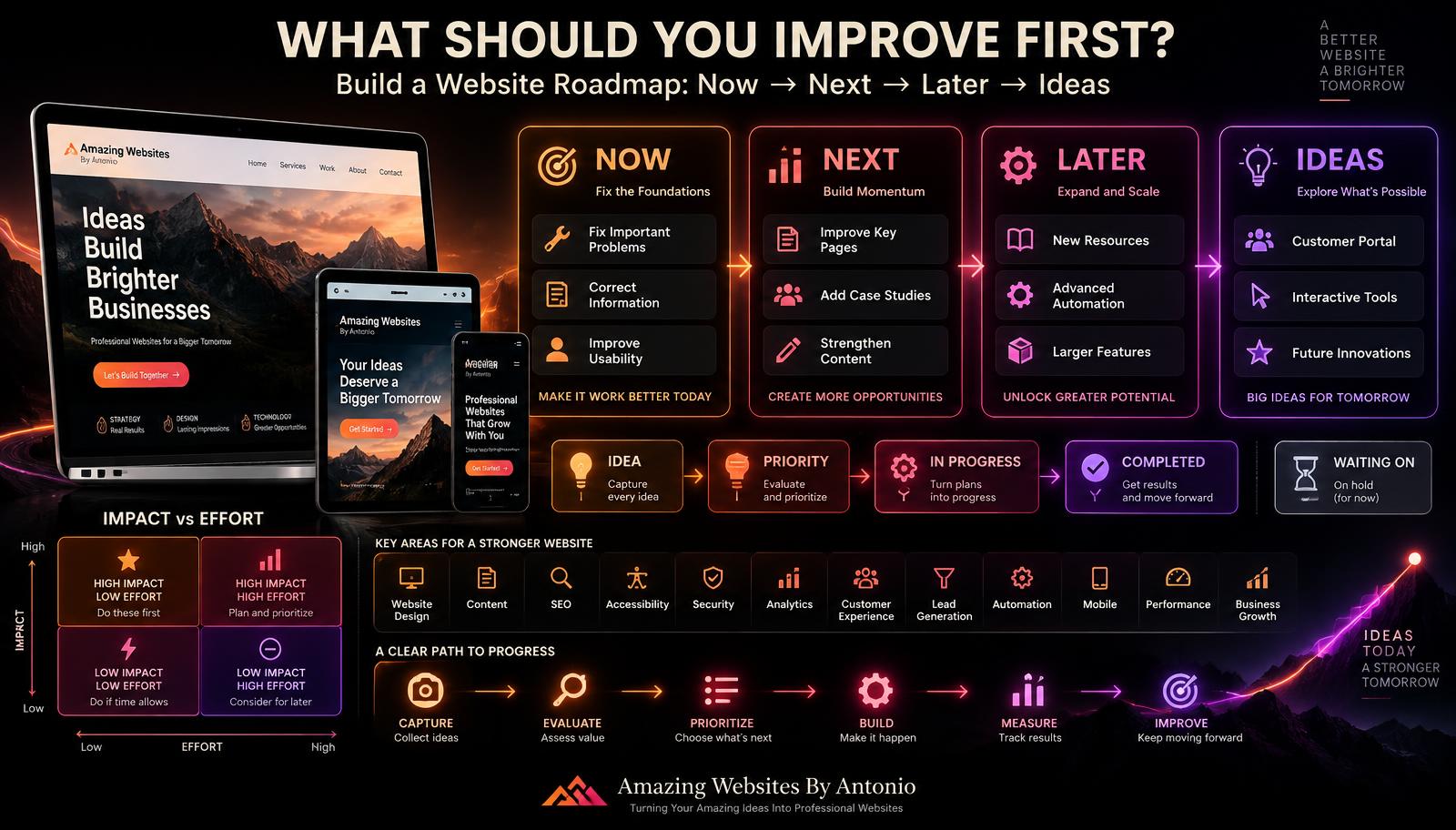
WEBSITE IMPROVEMENT ROADMAP.
A roadmap helps you decide:
- WHAT NEEDS ATTENTION NOW?
- WHAT SHOULD WE WORK ON NEXT?
- WHAT CAN WAIT?
- WHAT IS ONLY AN IDEA?
Let’s build one.
1. Start With One Master List
Before prioritizing anything, collect your website ideas in one place.
Don’t keep some in email.
Some in your notes.
Some in text messages.
Some in your head.
Create one master list.
For example:
WEBSITE IMPROVEMENT IDEAS
- Fix broken Contact button
- Update Services page
- Add new portfolio project
- Add customer testimonial
- Improve mobile navigation
- Create new FAQ
- Publish new blog series
- Improve homepage headline
- Create downloadable guide
- Add new automation
- Build customer portal
- Add video testimonials
Now you can see everything together.
2. Don’t Prioritize While Brainstorming
When you’re collecting ideas, let yourself think freely.
An idea doesn’t become a commitment simply because you wrote it down.
Capture it first.
Evaluate it second.
This prevents good ideas from being forgotten while also preventing every idea from becoming an immediate project.
3. Separate Problems From Ideas
Some items are problems.
For example:
- Contact form isn’t working.
- Mobile navigation is broken.
- Business phone number is incorrect.
Some are improvements.
For example:
- Rewrite the homepage.
- Improve the FAQ.
- Add internal links.
Others are future ideas.
For example:
- Build a customer portal.
- Create an interactive tool.
- Add a large resource library.
These categories should not automatically receive equal priority.
4. Create Four Priority Levels
A simple roadmap can use:
NOW
Important problems or high-priority opportunities.
NEXT
Valuable improvements to work on after urgent items.
LATER
Useful projects that aren’t currently necessary.
IDEAS
Possibilities worth remembering but not yet approved.
This simple system can immediately make a long list feel more manageable.
5. Put Broken Functionality First
If something prevents visitors from using the website properly, it usually deserves quick attention.
Examples:
- Broken forms
- Broken navigation
- Checkout failure
- Booking failure
- Important broken links
- Major mobile usability problems
- Missing pages
- Serious accessibility barriers
- Incorrect critical information
Fixing what is broken often matters more than adding something new.
6. Correct Inaccurate Information
Wrong information can create real customer problems.
Examples:
- Incorrect phone number
- Old email address
- Wrong business hours
- Old pricing
- Discontinued services
- Incorrect location
- Outdated staff information
Accuracy should be a high priority.
7. Consider Customer Impact
For each improvement, ask:
- How many visitors does this affect?
- How important is the problem?
- Does it prevent someone from taking action?
- Does it create confusion?
- Does it damage trust?
The more significant the customer impact, the more attention the issue may deserve.
8. Consider Business Impact
Ask:
- Could this improvement help generate leads?
- Could it improve sales?
- Could it reduce repetitive questions?
- Could it make operations easier?
- Could it better explain an important service?
- Could it improve the customer experience?
Website priorities should connect to business priorities.
9. Consider Effort
Two improvements may provide similar value but require very different amounts of work.
For example:
OPTION A:
Clarify the homepage call to action.
Estimated effort: Small.
OPTION B:
Build an entirely new customer portal.
Estimated effort: Large.
If both are useful, the smaller high-impact improvement may make sense first.
10. Think in Terms of Impact and Effort
You can create four categories:
HIGH IMPACT + LOW EFFORT
Often excellent priorities.
HIGH IMPACT + HIGH EFFORT
Important projects that need planning.
LOW IMPACT + LOW EFFORT
Quick improvements when time allows.
LOW IMPACT + HIGH EFFORT
Usually worth questioning before committing resources.
This doesn’t make the decision automatically.
But it gives you a useful framework.
11. Don’t Confuse “Easy” With “Important”
It can feel productive to complete ten tiny tasks.
But if one major problem is preventing customers from contacting you, that problem may matter more.
Don’t avoid meaningful work simply because smaller tasks are easier to check off.
12. Don’t Confuse “Big” With “Valuable”
A huge website feature isn’t automatically more valuable than a small improvement.
Changing one unclear headline might improve understanding more than adding five new pages.
Value matters more than size.
13. Connect Improvements to a Goal
Every significant website project should answer:
WHY ARE WE DOING THIS?
For example:
IMPROVEMENT: Rewrite Services page.
GOAL: Help visitors understand which service is right for them.
IMPROVEMENT: Shorten Contact form.
GOAL: Reduce unnecessary friction when visitors inquire.
IMPROVEMENT: Add case studies.
GOAL: Provide stronger proof of past work.
Goals make priorities easier to evaluate.
14. Use Customer Feedback
Your roadmap shouldn’t come only from your own ideas.
Listen to customers.
If several visitors say:
- “I couldn’t find your pricing.”
- “I wasn’t sure which service I needed.”
- “I couldn’t find the contact form.”
those patterns deserve attention.
15. Use Analytics Carefully
Analytics can help identify areas worth investigating.
For example:
A page receives substantial traffic but few visitors take the intended next step.
That doesn’t automatically tell you why.
But it gives you a question:
WHAT IS HAPPENING ON THIS PAGE?
Combine data with:
- Customer feedback
- Usability review
- Business goals
- Professional judgment
16. Review Search Performance
Search data may reveal opportunities.
Maybe visitors are discovering your website for a topic you haven’t fully developed.
That could inspire:
- A new blog.
- A stronger service page.
- A new FAQ.
- A resource.
- An internal-linking improvement.
Use search information to guide useful content—not simply to chase keywords.
17. Include Accessibility in Your Roadmap
Accessibility improvements should not automatically be pushed to “someday.”
If you’ve identified barriers that prevent people from using important content or functionality, prioritize addressing them appropriately.
Accessibility is part of user experience.
18. Include Performance Improvements
If important pages are slow, add performance improvements to the roadmap.
Potential areas might include:
- Image optimization
- Video optimization
- Script review
- Third-party integrations
- Animation
- Page structure
Performance can affect the customer experience.
19. Include Security Work
Some website work isn’t exciting or visible.
It still matters.
Examples:
- Remove unnecessary user accounts
- Review access permissions
- Enable available account protections
- Update software or integrations
- Review backup/recovery systems
- Address security alerts
Don’t let visual improvements push essential security work aside.
20. Group Related Tasks
You may discover that five tasks belong together.
For example:
SERVICES PAGE PROJECT
- Rewrite service descriptions
- Improve headings
- Add relevant testimonial
- Add FAQ section
- Improve call to action
Instead of treating these as five unrelated tasks, make them one focused project.
21. Create Roadmap Categories
Your roadmap could include:
- Technical
- Content
- Design
- SEO
- Accessibility
- Security
- Customer experience
- Lead generation
- Automation
- Portfolio
Grouping tasks makes the overall plan easier to understand.
22. Create a “Now” List
Keep this list focused.
For example:
NOW — THIS MONTH
- Fix broken Contact button.
- Correct Services pricing.
- Improve mobile navigation.
- Test project intake form.
- Update homepage call to action.
Don’t put 30 items in “NOW.”
If everything is urgent, nothing is prioritized.
23. Create a “Next” List
These are valuable projects you’ll address after the immediate priorities.
For example:
NEXT — 30 TO 60 DAYS
- Rewrite Services page
- Add two case studies
- Improve FAQ
- Add new testimonials
- Improve internal links
This gives future work a home without distracting you from today’s priorities.
24. Create a “Later” List
Some improvements are useful but don’t need immediate attention.
For example:
LATER — 60 TO 90+ DAYS
- Create resource library
- Add new lead magnet
- Expand automation
- Redesign portfolio filters
- Add advanced dashboard
Now the ideas aren’t forgotten.
They’re simply scheduled appropriately.
25. Create an “Ideas” List
Some ideas aren’t ready for a timeline.
That’s okay.
IDEAS
- Customer portal
- Interactive website quiz
- New digital product
- Membership area
- Advanced AI assistant
- New educational resource
These ideas can be reviewed later.
26. Limit Work in Progress
Starting 15 projects at once can create 15 unfinished projects.
Instead, finish a smaller number of meaningful improvements.
For example:
CURRENTLY WORKING ON:
- Services page improvement
- Mobile navigation
- New case study
Everything else waits.
Focus helps projects reach completion.
27. Define What “Done” Means
A task such as:
“Improve homepage”
is too vague.
What does finished mean?
Try:
HOMEPAGE IMPROVEMENT
- Rewrite headline
- Update supporting copy
- Improve main call to action
- Replace outdated image
- Test mobile layout
- Review accessibility
- Final quality check
Now you know when the project is complete.
28. Assign a Target Timeframe
Not every task needs an exact deadline.
But a timeframe helps.
For example:
- This week
- This month
- Next month
- Next quarter
- Someday / Idea
Choose a level of precision appropriate for the work.
29. Assign Responsibility
If multiple people work on the website, make ownership clear.
Who is responsible for:
- Writing?
- Design?
- Development?
- Approval?
- Testing?
- Content?
- Photos?
Clear ownership reduces delays.
30. Identify Dependencies
Some work can’t begin until something else happens.
For example:
- You can’t publish the case study until the client approves it.
- You can’t finish the portfolio until photos arrive.
- You can’t launch the new service page until pricing is finalized.
Document dependencies so a project doesn’t appear mysteriously stuck.
31. Keep a “Waiting On” List
Create a simple section:
WAITING ON:
- Client testimonial approval
- New product photos
- Final service pricing
- Updated logo file
- Legal policy review
This separates blocked work from work you can actively complete.
32. Review the Roadmap Monthly
Your roadmap isn’t permanent.
During your monthly website maintenance routine, review it.
Ask:
- What did we complete?
- What changed?
- What became more important?
- What is no longer necessary?
- What new ideas appeared?
Then update priorities.
33. Remove Ideas That No Longer Make Sense
Not every idea deserves to live forever.
If an idea no longer supports the business, remove it.
A clean roadmap is more useful than an endless archive of abandoned ideas.
34. Celebrate Completed Improvements
Create a:
COMPLETED
section.
For example:
- Contact form improved
- New testimonial added
- Mobile menu fixed
- Services page rewritten
- Case study published
Progress becomes easier to appreciate when you can see it.
35. Measure Important Changes
When appropriate, compare what happened before and after an improvement.
For example:
- Did more visitors complete the Contact form?
- Did customers ask fewer questions after the FAQ update?
- Did the improved Services page make the offering easier to understand?
Measurement helps you learn.
36. Don’t Expect Every Change to Create a Dramatic Result
Some improvements protect quality rather than produce an obvious number.
- Fixing accessibility.
- Correcting information.
- Improving security.
- Updating a broken link.
These still matter.
37. Leave Room for Unexpected Priorities
A roadmap should provide direction without becoming rigid.
Something may change.
A service may launch.
A problem may appear.
A customer need may emerge.
Leave room to adjust.
38. Avoid “Shiny Object” Website Strategy
New tools and trends appear constantly.
- AI feature.
- New animation.
- New platform.
- New widget.
- New design trend.
Before adding something, ask:
- Does this solve a real problem?
- Does it support the customer?
- Does it support the business?
If not, it may not belong on the roadmap.
39. Create a Simple Roadmap Dashboard
Your roadmap doesn’t need complicated software.
A simple structure can work:
WEBSITE IMPROVEMENT ROADMAP
🔴 NOW
- Fix mobile navigation
- Correct pricing
- Test forms
🟠 NEXT
- Improve Services page
- Add case studies
- Update FAQ
🟣 LATER
- Create lead magnet
- Expand portfolio
- Add new automation
💡 IDEAS
- Customer portal
- Interactive quiz
- New digital resource
⏳ WAITING ON
- Photos
- Client approval
✅ COMPLETED
- Homepage update
- New testimonial
Simple can be powerful.
40. Keep Moving Forward
A professional website doesn’t become better because you have 100 ideas.
It becomes better because you identify the right ideas and actually complete them.
One improvement.
Then another.
Then another.
Over time, those improvements add up.
WEBSITE IMPROVEMENT ROADMAP
- STEP 1: Capture the ideas
- STEP 2: Identify problems
- STEP 3: Evaluate impact
- STEP 4: Evaluate effort
- STEP 5: Connect work to goals
- STEP 6: Prioritize
- STEP 7: Build the roadmap
- STEP 8: Complete focused projects
- STEP 9: Measure & learn
- STEP 10: Review & repeat
Final Thoughts
Your website will never run out of possibilities.
There will always be:
- Something you could add.
- Something you could redesign.
- Something you could automate.
- Something you could write.
- Something you could improve.
The goal isn’t to do everything.
The goal is to do the right things in the right order.
- Fix what is broken.
- Correct what is inaccurate.
- Improve what creates friction.
- Strengthen what supports customers.
- Invest in what supports business goals.
- Save good ideas for the right time.
And let the roadmap keep you focused.
NOW → NEXT → LATER → IDEAS
Because steady, intentional improvement can take your website much further than trying to change everything at once.
Amazing Websites By Antonio
Turning Your Amazing Ideas Into Professional Websites