How to Create an AI Website Improvement Verification Report That Proves Your Changes Delivered Results
A Practical Guide to Measuring Website Improvements, Comparing Before-and-After Results, Documenting Evidence, and Confirming That Your Changes Achieved Their Goals
Imagine you've identified an important opportunity to improve your business website.
Maybe your Contact form needs better validation.
Your mobile navigation needs improvement.
Your AI assistant needs more accurate service information.
Your website pages need to load faster.
Or an important automation needs to become more reliable.
You create an improvement action plan.
Set clear goals.
Assign responsibilities.
Establish target dates.
And begin making changes.
After completing the work, you publish your improvements.
Everything looks great!
But here's an important question:
HOW DO YOU KNOW WHETHER YOUR WEBSITE IMPROVEMENT ACTUALLY WORKED?
Did your Contact form become more reliable?
Did mobile navigation become easier to use?
Did your AI assistant answer questions more accurately?
Did page loading performance improve?
Did the automation produce the expected results?
Or did you simply complete the work without confirming the outcome?
That's why improvement verification matters.
AN AI WEBSITE IMPROVEMENT VERIFICATION REPORT IS A STRUCTURED RECORD THAT COMPARES AN IMPROVEMENT'S ORIGINAL GOALS WITH ITS ACTUAL RESULTS, DOCUMENTS SUPPORTING EVIDENCE, IDENTIFIES REMAINING PROBLEMS, AND DETERMINES WHETHER THE IMPROVEMENT MEETS ITS SUCCESS CRITERIA.
It helps you move beyond checking whether a task was completed.
Instead, you evaluate whether the intended result was achieved.
For example:
You might successfully update your AI assistant's knowledge source.
But does the assistant now answer the relevant customer questions correctly?
You might redesign your mobile menu.
But can customers navigate it using the devices and interaction methods included in your requirements?
You might improve your Contact form.
But are submissions reaching the intended destination?
These are questions that verification can help answer.
For AI-powered websites, improvement verification can cover many areas:
- Website functionality
- Customer experience
- Mobile responsiveness
- Accessibility
- Contact forms
- AI assistant accuracy
- Human handoff
- Website performance
- Automations
- Integrations
- Security and privacy
- Website management procedures
The good news?
YOU DON'T NEED A LARGE DEVELOPMENT TEAM TO CREATE A PROFESSIONAL IMPROVEMENT VERIFICATION REPORT.
Even a solo entrepreneur can build a practical verification process using a checklist, spreadsheet, or document.
In Blog #133, we're exploring 50 strategies to help you measure results, document evidence, and make better website improvement decisions.
PART 1: UNDERSTAND IMPROVEMENT VERIFICATION
1. Know What Improvement Verification Means
Improvement verification evaluates whether a completed change meets its documented success criteria.
2. Understand Why Verification Matters
Completing an improvement task doesn't automatically prove that the desired outcome was achieved.
3. Separate Implementation From Results
Implementation describes what was changed.
Results describe what happened after the change.
4. Distinguish Verification From Validation
Verification checks whether defined requirements were met.
Validation considers whether the improvement addresses the intended business or customer need.
Both can be valuable.
5. Make Verification Part of Every Important Improvement
Include a verification step in your improvement action plan before work begins.
PART 2: REVIEW ORIGINAL IMPROVEMENT GOALS
6. Locate the Improvement Action Plan
Review the original improvement request and supporting information.
7. Identify the Problem Being Addressed
Clearly describe the issue that motivated the change.
8. Review Expected Outcomes
Determine what the improvement was intended to accomplish.
9. Confirm Success Criteria
Identify the measurable conditions required for acceptance.
10. Check Whether the Scope Changed
Document approved changes to the original requirements.
PART 3: COLLECT BEFORE-AND-AFTER EVIDENCE
11. Identify Baseline Measurements
Review available information from before the improvement.
12. Collect Post-Improvement Results
Measure the updated website using appropriate methods.
13. Use Comparable Testing Conditions
Keep devices, workflows, test questions, and measurement methods consistent where practical.
14. Record Evidence Sources
Document where the measurements and test results came from.
15. Identify Missing Information
Clearly label unavailable baseline data or incomplete tests rather than inventing results.
PART 4: VERIFY WEBSITE FUNCTIONALITY
16. Test the Improved Feature
Confirm that the updated feature performs its intended function.
17. Review Related Website Features
Check for unexpected effects on connected functionality.
18. Verify Important Navigation
Confirm that affected links and buttons lead to the correct destinations.
19. Test Relevant Mobile Experiences
Review the improvement on representative devices or screen sizes.
20. Evaluate Accessibility Requirements
Verify relevant keyboard, labeling, focus, and other accessibility requirements.
PART 5: VERIFY CUSTOMER WORKFLOW IMPROVEMENTS
21. Test Contact Form Changes
Submit safe test information and confirm expected behavior.
22. Verify Inquiry Storage
Check whether test submissions reach the intended private location.
23. Review Notification Results
Confirm that relevant notifications are delivered.
24. Evaluate Customer Journey Improvements
Check whether customers can complete the intended actions.
25. Consider Relevant Customer Feedback
Use available feedback to supplement testing without assuming it represents every visitor.
PART 6: VERIFY AI ASSISTANT IMPROVEMENTS
26. Review Approved AI Knowledge
Confirm that the assistant's relevant source information is current and approved.
27. Test Representative Customer Questions
Use a defined set of questions that reflects important customer needs.
28. Compare Responses With Expected Answers
Evaluate whether the assistant provides accurate and appropriate information.
29. Test Human Handoff
Confirm that the assistant directs customers to an appropriate contact method when necessary.
30. Document AI Limitations
Identify unexpected responses, unsupported claims, and questions requiring additional review.
PART 7: VERIFY PERFORMANCE AND AUTOMATIONS
31. Measure Relevant Website Performance
Use appropriate tools to review loading performance or other affected metrics.
32. Compare Results With Baselines
Determine whether meaningful changes occurred under comparable conditions.
33. Test Relevant Automations
Use safe test data and supported procedures to verify expected workflow outcomes.
34. Review Integration Results
Check whether connected services behave as required.
35. Investigate Unexpected Regressions
Document meaningful declines or new problems introduced by the improvement.
PART 8: DOCUMENT VERIFICATION RESULTS
36. Assign a Verification Identifier
Create a unique reference for the improvement review.
37. Record Completed Tests
List the tests performed and their results.
38. Keep Appropriate Supporting Evidence
Store useful records without exposing private customer information or credentials.
39. Summarize Measured Outcomes
Explain the results in clear business language.
40. Distinguish Facts From Assumptions
Separate verified findings from estimates, interpretations, and unknowns.
PART 9: MAKE AN IMPROVEMENT ACCEPTANCE DECISION
41. Compare Results With Success Criteria
Determine whether the improvement meets its defined requirements.
42. Identify Outstanding Problems
Document failed checks and incomplete verification activities.
43. Assess Business Impact
Consider whether remaining concerns affect customers or critical operations.
44. Determine the Next Action
Choose whether to accept, revise, continue testing, or escalate the improvement.
45. Record the Decision
Document the outcome, reasoning, and responsible reviewer.
PART 10: USE VERIFICATION TO DRIVE FURTHER IMPROVEMENT
46. Update the Improvement Action Register
Record the verified status and any outstanding work.
47. Review Lessons Learned
Identify what the verification process revealed.
48. Improve Future Testing Procedures
Add useful test cases or measurements to future projects.
49. Monitor Important Improvements Over Time
Continue observing changes when longer-term results matter.
50. Build an Evidence-Based Improvement Process
Use reliable measurements and verified outcomes to guide future website decisions.
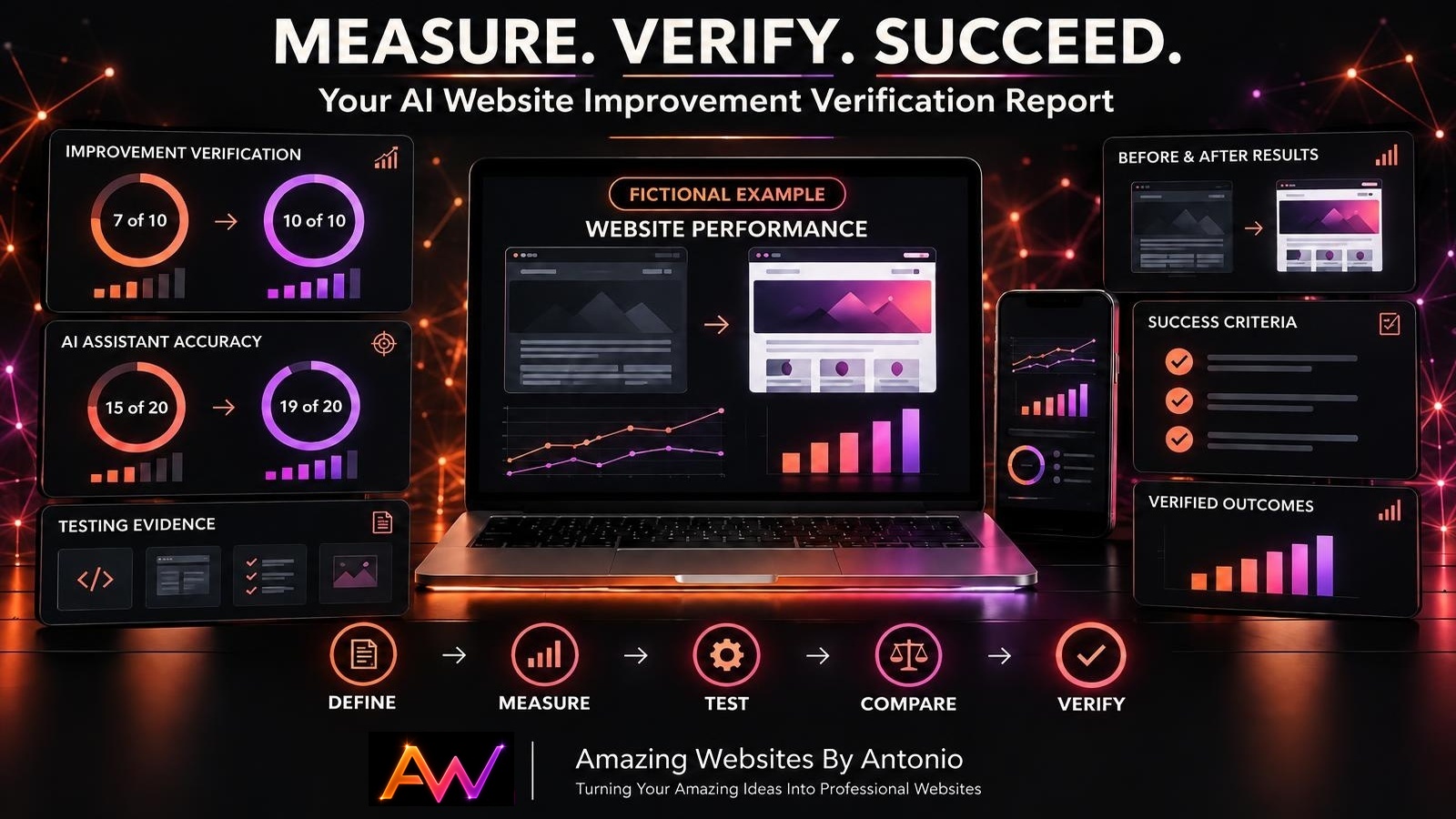
DEFINE → MEASURE → TEST → COMPARE → VERIFY → DECIDE → IMPROVE
IMPLEMENTATION COMPLETE VS. IMPROVEMENT VERIFIED
These two statuses are not the same.
| Implementation Complete | Improvement Verified |
|---|---|
| The planned work has been performed | The required outcome has been checked |
| A feature has been updated | The updated feature meets its criteria |
| A configuration has been changed | The configuration produces expected results |
| A new checklist has been written | The checklist has been tested for its intended use |
| The task is ready for review | The evidence supports an acceptance decision |
IMPORTANT:
A task can be implemented successfully while still failing to achieve its original goal.
That's why verification should be a separate step.
HOW TO COMPARE BEFORE-AND-AFTER WEBSITE RESULTS
When comparable measurements are available, use a simple table to evaluate changes.
FICTIONAL EXAMPLE
| Improvement Area | Before | After | Result |
|---|---|---|---|
| Contact Form Tests Passed | 7 of 10 | 10 of 10 | Improved |
| AI Test Questions Passed | 15 of 20 | 19 of 20 | Improved |
| Median Page Load Measurement | 3.5 sec | 2.7 sec | Faster |
| Mobile Navigation Tests Passed | 6 of 8 | 8 of 8 | Improved |
| Automation Test Failures | 3 | 0 | Fewer failures |
These numbers are fictional and do not represent actual Amazing Websites By Antonio performance.
For meaningful comparisons, use consistent measurement methods and sufficiently representative tests.
Also remember that changes in website performance may result from multiple factors.
A BEFORE-AND-AFTER COMPARISON CAN SUPPORT AN IMPROVEMENT ASSESSMENT, BUT IT DOESN'T AUTOMATICALLY PROVE THAT THE UPDATE CAUSED EVERY OBSERVED DIFFERENCE.
YOUR AI WEBSITE IMPROVEMENT VERIFICATION DASHBOARD
A verification dashboard can help organize completed and pending reviews.
Consider tracking:
- Total improvement actions
- Implemented actions
- Actions awaiting verification
- Verified improvements
- Failed verification reviews
- Improvements requiring revision
- Critical unresolved issues
- Completed test cases
- Failed test cases
- Actions accepted for closure
FICTIONAL DASHBOARD EXAMPLE
| Metric | Example |
|---|---|
| Improvement Actions | 18 |
| Implemented | 14 |
| Awaiting Verification | 4 |
| Verified | 9 |
| Needs Revision | 3 |
| Verification Failed | 2 |
| Open Critical Issues | 0 |
These figures are fictional.
A dashboard should help you identify what requires attention rather than create the appearance of success without supporting evidence.
YOUR IMPROVEMENT VERIFICATION DECISION MATRIX
| Verification Finding | Recommended Decision |
|---|---|
| All required criteria met | Verified |
| Some criteria met, minor concerns remain | Needs Review |
| Important requirements not met | Needs Revision |
| Required evidence unavailable | Verification Pending |
| Critical security or customer workflow failure | Failed — Escalate |
| Improvement no longer needed | Close or cancel through an approved decision |
IMPORTANT:
A high percentage of passing tests does not automatically justify acceptance.
Critical requirements must be satisfied regardless of the overall score.
HOW TO CREATE A MEASURABLE VERIFICATION SCORECARD
You can organize verification results by category.
Use:
- Pass: The test met its acceptance criteria.
- Fail: The test did not meet its acceptance criteria.
- Needs Review: Additional investigation is required.
- Not Tested: The test has not been performed.
- Not Applicable: The test does not apply.
EXAMPLE SCORECARD
| Verification Category | Example Status |
|---|---|
| Updated Feature Functionality | Pass |
| Mobile Experience | Pass |
| Contact Form Workflow | Pass |
| AI Assistant Accuracy | Needs Review |
| Integration Reliability | Pass |
| Accessibility Requirements | Pass |
| Security and Privacy | Not Tested |
| Final Acceptance | Pending |
This fictional example should remain pending because important verification work is incomplete.
VERIFICATION IS ABOUT MEETING DEFINED REQUIREMENTS, NOT SIMPLY COLLECTING CHECKMARKS.
COMPLETE AI WEBSITE IMPROVEMENT VERIFICATION CHECKLIST
SECTION 1 — IMPROVEMENT INFORMATION
- Improvement action ID is recorded.
- Original problem is documented.
- Expected outcome is identified.
- Success criteria are available.
- Scope changes are reviewed.
SECTION 2 — BASELINE AND RESULTS
- Baseline measurements are collected where applicable.
- Post-improvement results are recorded.
- Measurement methods are documented.
- Testing conditions are reasonably comparable.
- Missing information is clearly identified.
SECTION 3 — WEBSITE FUNCTIONALITY
- Updated functionality is tested.
- Related features are reviewed.
- Relevant navigation is verified.
- Mobile experience is checked.
- Accessibility requirements are evaluated.
SECTION 4 — CUSTOMER WORKFLOWS
- Contact Form changes are tested where applicable.
- Inquiry storage is verified.
- Expected notifications are checked.
- Important customer journeys are reviewed.
- Relevant customer feedback is considered.
SECTION 5 — AI ASSISTANT
- Approved knowledge information is reviewed.
- Representative questions are tested.
- Responses are compared with expected answers.
- Human handoff is verified.
- Important AI limitations are documented.
SECTION 6 — PERFORMANCE AND INTEGRATIONS
- Relevant performance metrics are reviewed.
- Baseline comparisons are completed where possible.
- Important automations are tested.
- Affected integrations are checked.
- Unexpected regressions are investigated.
SECTION 7 — VERIFICATION EVIDENCE
- Verification ID is assigned.
- Completed tests are listed.
- Actual results are documented.
- Appropriate evidence is retained.
- Sensitive information is protected.
SECTION 8 — FINAL DECISION
- Results are compared with success criteria.
- Outstanding issues are identified.
- Business impact is considered.
- Acceptance decision is documented.
- Responsible reviewer is identified.
- Improvement register is updated.
- Follow-up actions are assigned.
COPY-READY AI WEBSITE IMPROVEMENT VERIFICATION REPORT TEMPLATE
BUSINESS NAME:
[Enter Business Name]
WEBSITE:
[Enter Website Address]
VERIFICATION REPORT ID:
[Enter Identifier]
IMPROVEMENT ACTION ID:
[Enter Action Identifier]
REPORT DATE:
[Enter Date]
PREPARED BY:
[Enter Name]
SECTION 1 — IMPROVEMENT OVERVIEW
IMPROVEMENT TITLE:
[Enter Title]
ORIGINAL PROBLEM:
[Describe Problem]
IMPLEMENTED CHANGE:
[Describe Change]
AFFECTED WEBSITE AREAS:
[List Pages, Features, or Processes]
IMPLEMENTATION DATE:
[Enter Date]
SECTION 2 — ORIGINAL GOALS
EXPECTED OUTCOME:
[Describe Intended Result]
SUCCESS CRITERIA:
[List Measurable Requirements]
APPROVED SCOPE:
[Describe Scope]
SCOPE CHANGES:
[List Changes or None]
SECTION 3 — BASELINE MEASUREMENTS
BASELINE PERIOD:
[Enter Period]
BASELINE METRICS:
[List Measurements]
MEASUREMENT METHOD:
[Describe Method]
BASELINE EVIDENCE SOURCE:
[Enter Source]
MISSING BASELINE INFORMATION:
[List Gaps or None]
SECTION 4 — POST-IMPROVEMENT RESULTS
TESTING DATE:
[Enter Date]
POST-IMPROVEMENT METRICS:
[List Measurements]
TESTING CONDITIONS:
[Describe Conditions]
ACTUAL RESULTS:
[Summarize Results]
COMPARISON WITH BASELINE:
[Describe Changes]
SECTION 5 — FUNCTIONAL VERIFICATION
UPDATED FEATURE TEST RESULT:
Pass / Fail / Needs Review / Not Tested / Not Applicable
RELATED FUNCTIONALITY RESULT:
[Enter Result]
MOBILE RESULT:
[Enter Result]
ACCESSIBILITY RESULT:
[Enter Result]
CUSTOMER WORKFLOW RESULT:
[Enter Result]
SECTION 6 — AI ASSISTANT VERIFICATION
AI CHANGE INVOLVED:
Yes / No
APPROVED KNOWLEDGE REVIEW:
[Enter Result]
TEST QUESTIONS COMPLETED:
[Enter Number]
TEST QUESTIONS PASSED:
[Enter Number]
IMPORTANT FAILURES:
[List Failures]
HUMAN HANDOFF RESULT:
[Enter Result]
AI VERIFICATION STATUS:
Pass / Fail / Needs Review / Not Tested / Not Applicable
SECTION 7 — INTEGRATION AND PERFORMANCE RESULTS
INTEGRATIONS TESTED:
[List Integrations]
AUTOMATION RESULTS:
[Enter Results]
PERFORMANCE RESULTS:
[Enter Results]
UNEXPECTED REGRESSIONS:
[List Findings]
SECTION 8 — EVIDENCE AND ISSUES
EVIDENCE REFERENCES:
[List Safe References]
FAILED TESTS:
[List Failures]
OUTSTANDING ISSUES:
[List Issues]
ISSUE SEVERITY:
Critical / High / Medium / Low
CORRECTIVE ACTIONS:
[List Actions]
SECTION 9 — FINAL VERIFICATION DECISION
SUCCESS CRITERIA MET:
Yes / No / Partially / Not Verified
FINAL STATUS:
Verified / Needs Review / Needs Revision / Verification Pending / Failed
DECISION REASON:
[Explain Decision]
REVIEWED BY:
[Enter Name]
DECISION DATE:
[Enter Date]
SECTION 10 — FOLLOW-UP AND IMPROVEMENT
LESSONS LEARNED:
[List Lessons]
REMAINING ACTIONS:
[List Actions]
ACTION OWNER:
[Enter Name]
TARGET DATE:
[Enter Date]
NEXT REVIEW DATE:
[Enter Date]
ADDITIONAL NOTES:
[Enter Notes]
EXAMPLE AI WEBSITE IMPROVEMENT VERIFICATION SCENARIO
The following scenario is fictional.
Situation: A Business Owner Improves an AI Assistant's Service Information
A business owner notices that the website's AI assistant sometimes gives outdated information about a service.
The owner creates an improvement action plan.
The goal is to update approved service information and improve the assistant's responses.
Step 1 — Define the Original Problem
The assistant occasionally provides outdated service descriptions.
Step 2 — Establish a Baseline
The owner creates 20 representative test questions.
Before the improvement, 15 responses meet the defined acceptance criteria.
Step 3 — Define the Success Goal
The owner sets a target of at least 19 passing responses out of 20, with no failures involving critical service information.
Step 4 — Implement the Improvement
The owner reviews and updates the approved knowledge content through the supported website workflow.
Step 5 — Retest the Assistant
The owner repeats the defined test questions under comparable conditions.
Step 6 — Record the Results
The new test produces 19 passing responses out of 20.
Step 7 — Review the Remaining Failure
The owner checks whether the remaining failure affects a critical requirement.
Step 8 — Evaluate Acceptance Criteria
If the remaining failure is noncritical and all other required criteria are satisfied, the owner can consider the improvement verified under the documented acceptance rules.
If the remaining failure is critical, the improvement should remain open.
Step 9 — Document the Decision
The owner records the actual results, evidence, and reasoning.
Step 10 — Update the Improvement Register
The action receives its final status, and any additional work is tracked.
LESSON:
Improvement verification helps turn a completed technical change into an evidence-supported business decision.
YOUR 30-DAY AI WEBSITE IMPROVEMENT VERIFICATION IMPLEMENTATION PLAN
WEEK 1 — DEFINE VERIFICATION REQUIREMENTS
- Review your improvement action plan.
- Identify measurable success criteria.
- Select relevant testing methods.
- Gather available baseline measurements.
- Create a verification report template.
GOAL: Establish what evidence is needed to confirm improvement success.
WEEK 2 — PREPARE VERIFICATION TESTS
- Create functional test cases.
- Define customer workflow checks.
- Prepare AI assistant test questions.
- Identify relevant performance measurements.
- Document expected results.
GOAL: Make verification consistent and repeatable.
WEEK 3 — VERIFY A COMPLETED IMPROVEMENT
- Select a suitable implemented improvement.
- Perform required tests.
- Collect actual results.
- Compare outcomes with baseline information.
- Document failures and unexpected effects.
GOAL: Practice evaluating an improvement using evidence.
WEEK 4 — REVIEW AND CLOSE
- Review verification findings.
- Evaluate success criteria.
- Assign corrective actions where needed.
- Record the final acceptance decision.
- Update your improvement action register.
GOAL: Build a reliable improvement verification process.
THE AI WEBSITE IMPROVEMENT VERIFICATION FRAMEWORK
DEFINE
Identify the original improvement goal and success criteria.
↓
MEASURE
Collect relevant baseline and post-improvement information.
↓
TEST
Perform appropriate functional and customer workflow checks.
↓
COMPARE
Evaluate actual results against expected outcomes.
↓
VERIFY
Determine whether requirements have been met.
↓
DECIDE
Accept the improvement, request revisions, or continue verification.
↓
DOCUMENT
Record evidence, results, and remaining concerns.
↓
IMPROVE
Use findings to strengthen future website projects.
FINAL THOUGHTS
Creating a professional business website is an exciting accomplishment.
It represents your creativity.
Your services.
Your brand.
And your commitment to helping customers.
But successful website management involves more than building new features.
It also involves understanding whether your improvements are making a meaningful difference.
Maybe you've improved your Contact form.
Updated your AI assistant.
Enhanced mobile navigation.
Optimized website performance.
Or strengthened an important automation.
Those changes may look promising.
But how do you know whether they achieved their intended goals?
That's why improvement verification matters.
It helps you evaluate actual results.
Compare outcomes with expectations.
Document supporting evidence.
Identify remaining problems.
And make informed decisions about future work.
COMPLETING AN IMPROVEMENT IS AN ACHIEVEMENT.
VERIFYING THAT THE IMPROVEMENT DELIVERED ITS INTENDED RESULTS IS WHAT HELPS TURN THAT ACHIEVEMENT INTO MEASURABLE PROGRESS.
Start with clear success criteria.
Collect appropriate evidence.
Test important functionality.
Review the results.
And document your conclusions.
Because professional website management isn't just about making changes.
IT'S ABOUT KNOWING WHETHER THOSE CHANGES ARE HELPING YOUR WEBSITE AND BUSINESS MOVE FORWARD.
SET CLEAR GOALS.
MEASURE YOUR RESULTS.
VERIFY YOUR IMPROVEMENTS.
KEEP BUILDING BETTER WEBSITES.
Amazing Websites By Antonio
Turning Your Amazing Ideas Into Professional Websites