A Practical Guide to Investigating Website Failures, Identifying Underlying Causes, Applying the Five Whys Method, and Creating Corrective and Preventive Actions
Imagine you're managing your professional business website.
Your homepage is working.
Your Contact form is available.
Your AI assistant is answering customer questions.
And your automations are helping your business run smoothly.
Then something unexpected happens.
Your Contact form stops sending notifications.
You investigate the problem.
Make a correction.
Test the workflow.
And everything starts working again.
Problem solved!
Or so you think.
A few weeks later, the same problem returns.
You make another correction.
Everything works again.
But then it happens a third time.
Now you're asking an important question:
WHY DOES THIS PROBLEM KEEP COMING BACK?
Maybe the immediate issue was fixed.
But the underlying cause was never addressed.
Perhaps an integration repeatedly loses authorization.
Maybe an important configuration is being overwritten during updates.
Or perhaps there is no process for checking whether a connected service remains healthy.
These are possibilities that require investigation—not conclusions you should assume.
That's where an AI website root cause analysis report becomes valuable.
AN AI WEBSITE ROOT CAUSE ANALYSIS REPORT IS A STRUCTURED DOCUMENT USED TO INVESTIGATE A WEBSITE PROBLEM, IDENTIFY EVIDENCE-SUPPORTED UNDERLYING CAUSES, DOCUMENT CONTRIBUTING FACTORS, AND PLAN ACTIONS THAT REDUCE THE RISK OF RECURRENCE.
It helps you move beyond temporary fixes.
Instead of repeatedly addressing the same symptom, you investigate why the problem occurs.
Instead of making assumptions, you collect evidence.
And instead of closing an issue immediately after restoring functionality, you consider whether a preventive improvement is needed.
For AI-powered websites, root cause analysis can help investigate:
- Contact form failures
- Missing email notifications
- Incorrect AI assistant responses
- Outdated AI knowledge
- Automation failures
- Broken integrations
- Duplicate customer inquiries
- Missing or inconsistent data
- Website performance problems
- Navigation errors
- Publishing failures
- Configuration changes
- Security incidents
- Recurring customer complaints
The good news?
YOU DON'T NEED A LARGE TECHNOLOGY TEAM TO PERFORM A USEFUL ROOT CAUSE ANALYSIS.
Even a solo entrepreneur can use a structured report, a timeline, and carefully chosen diagnostic questions to investigate recurring website problems.
In Blog #143, we're exploring 50 practical strategies to help you understand why website problems happen and reduce the likelihood of them returning.
PART 1: UNDERSTAND ROOT CAUSE ANALYSIS
1. Know What Root Cause Analysis Means
Root cause analysis, often called RCA, is a structured investigation into the underlying factors that produced an unwanted outcome.
2. Understand Why RCA Matters
Correcting a visible symptom may restore functionality without addressing the conditions that caused the problem.
3. Distinguish Symptoms From Causes
A symptom is what you observe.
A cause explains why the symptom occurred.
4. Recognize Contributing Factors
Some incidents have multiple causes or conditions that contributed to the failure.
5. Focus on Prevention, Not Blame
The goal is to improve systems and processes rather than assign personal blame.
PART 2: DEFINE THE WEBSITE PROBLEM
6. Write a Clear Problem Statement
Describe what failed, when it happened, and what should have happened.
7. Identify the Affected System
Determine whether the issue involves a form, AI assistant, automation, integration, or another website component.
8. Document the Business Impact
Consider how the problem affected customers, information, and operations.
9. Establish the Investigation Scope
Define which systems, events, and time periods will be reviewed.
10. Determine the Investigation Priority
Give urgent attention to issues involving security, privacy, or essential business functions.
PART 3: COLLECT INVESTIGATION EVIDENCE
11. Review Relevant Error Logs
Examine available system and integration error records.
12. Document a Timeline
Record important events before, during, and after the failure.
13. Review Recent Changes
Identify updates, migrations, or configuration changes that may be relevant.
14. Compare Successful and Failed Events
Look for meaningful differences between normal and abnormal behavior.
15. Preserve Appropriate Evidence
Keep useful records while protecting private information and credentials.
PART 4: APPLY ROOT CAUSE ANALYSIS METHODS
16. Use the Five Whys Method
Ask why the problem occurred, then investigate the explanation behind each answer.
17. Create a Cause-and-Effect Diagram
Group possible causes into categories such as technology, process, configuration, data, and external services.
18. Review Dependencies
Identify whether a failure in one service affected another.
19. Test Competing Explanations
Use evidence to distinguish plausible causes from verified findings.
20. Recognize Investigation Limits
Document uncertainty when available evidence cannot establish the cause.
PART 5: INVESTIGATE AI ASSISTANT PROBLEMS
21. Identify the AI Failure Type
Determine whether the problem involves accuracy, knowledge availability, routing, or another behavior.
22. Review Approved Knowledge Sources
Check whether the relevant information is correct and current.
23. Evaluate AI Configuration Changes
Review applicable instructions, settings, and integrations.
24. Test Representative Questions
Compare actual responses with approved expectations.
25. Identify Recurrence Risks
Determine whether similar errors could appear in other customer interactions.
PART 6: INVESTIGATE AUTOMATION AND INTEGRATION FAILURES
26. Review Automation Triggers
Confirm whether the expected event occurred.
27. Examine Workflow Execution
Identify which steps completed and which failed.
28. Review Integration Dependencies
Check connected services, permissions, and relevant availability information.
29. Investigate Repeated Error Patterns
Look for recurring failures involving the same step or dependency.
30. Verify the Supported Root Cause
Use logs, tests, and other evidence to establish the most defensible explanation.
PART 7: CREATE CORRECTIVE ACTIONS
31. Identify Immediate Containment Actions
Protect customers and essential operations while the investigation continues.
32. Define Corrective Actions
Specify what will be changed to address verified causes.
33. Assign Action Owners
Identify who is responsible for completing each action.
34. Establish Completion Criteria
Define what evidence will show that the action was implemented correctly.
35. Test Corrective Actions
Verify that the intended problem is resolved without introducing new failures.
PART 8: CREATE PREVENTIVE IMPROVEMENTS
36. Identify Similar Risks
Look for other workflows that may have the same weakness.
37. Improve Monitoring
Add appropriate checks that can detect future failures earlier.
38. Update Maintenance Procedures
Document new checks or configuration requirements.
39. Improve Change Management
Introduce relevant testing or approval steps for future updates.
40. Update Troubleshooting Documentation
Add verified findings to the maintenance knowledge base.
PART 9: DOCUMENT AND REVIEW RCA RESULTS
41. Create a Unique RCA Report ID
Use a consistent reference number.
42. Record Evidence-Supported Findings
Clearly distinguish verified facts from hypotheses.
43. Document Corrective and Preventive Actions
Include owners, due dates, and verification requirements.
44. Review Residual Risk
Identify remaining risks after corrective actions.
45. Obtain Appropriate Approval
Record the investigation review and closure decision.
PART 10: MEASURE LONG-TERM EFFECTIVENESS
46. Monitor for Recurrence
Observe whether the same failure returns.
47. Review Related Incidents
Check whether similar problems occur elsewhere.
48. Evaluate Action Effectiveness
Determine whether the improvements address the identified causes.
49. Update the RCA When New Evidence Appears
Reopen or revise conclusions when additional information changes the findings.
50. Make RCA Part of Continuous Improvement
Use recurring problems as opportunities to improve website reliability.
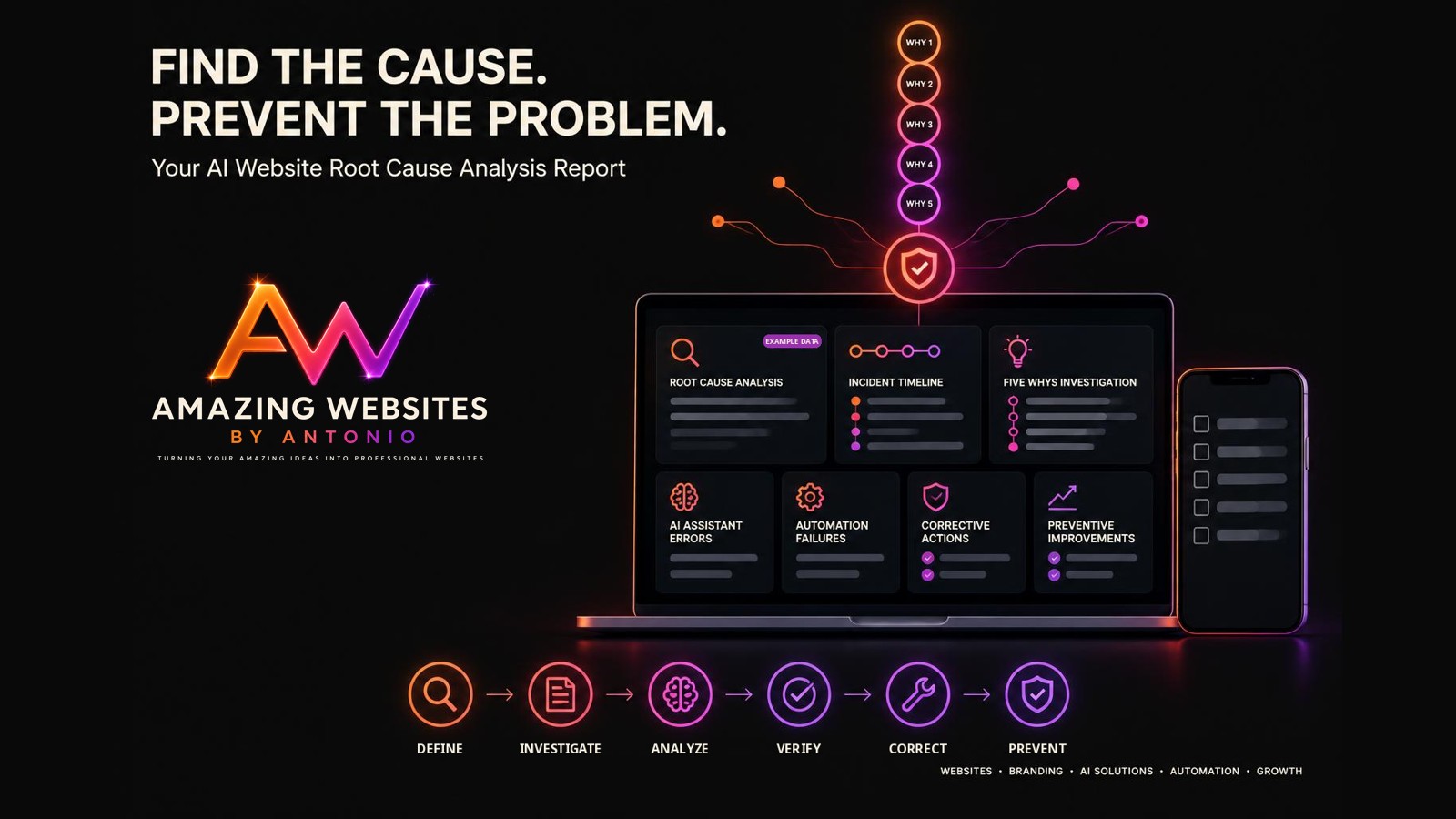
DEFINE → INVESTIGATE → ANALYZE → VERIFY → CORRECT → PREVENT → MONITOR → IMPROVE
SYMPTOM VS. ROOT CAUSE VS. CONTRIBUTING FACTOR
Understanding these differences is essential.
| Term | Meaning | Fictional Example |
|---|---|---|
| Symptom | Observable problem | Contact form notification missing |
| Immediate Failure | Step that did not complete | Notification automation failed |
| Root Cause | Underlying condition supported by evidence | Integration authorization renewal was not completed |
| Contributing Factor | Condition that increased impact or likelihood | No monitoring alert for failed notifications |
| Corrective Action | Change addressing the verified cause | Restore and properly manage the integration connection |
| Preventive Improvement | Change reducing future risk | Establish authorization monitoring and review procedures |
IMPORTANT:
The same incident may have more than one underlying cause.
Do not force a complex problem into a single explanation without sufficient evidence.
HOW TO USE THE FIVE WHYS METHOD
The Five Whys method is a simple way to explore possible cause-and-effect relationships.
You begin with a problem and repeatedly ask why it happened.
The goal isn't necessarily to ask exactly five questions.
The goal is to investigate until you reach a meaningful, evidence-supported explanation.
FICTIONAL EXAMPLE: CONTACT FORM NOTIFICATIONS KEEP FAILING
PROBLEM:
A business owner repeatedly fails to receive Contact form notifications.
WHY #1
Why didn't the business owner receive the notification?
Because the notification automation did not complete.
WHY #2
Why didn't the automation complete?
Because the connected email service rejected the authorization request.
WHY #3
Why was the authorization request rejected?
Because the connection's authorization was no longer valid.
WHY #4
Why wasn't the connection restored promptly?
Because the business owner was unaware that reauthorization was required.
WHY #5
Why wasn't the owner aware?
Because the maintenance process did not include a defined method for reviewing integration authorization failures.
POSSIBLE ROOT CAUSE FINDING
The fictional investigation identifies a gap in integration monitoring and maintenance responsibilities.
CORRECTIVE ACTION
Restore the supported connection and verify the notification workflow.
PREVENTIVE IMPROVEMENT
Establish an appropriate process for reviewing integration errors and authorization status.
IMPORTANT:
This example assumes that the evidence supports each answer.
In a real investigation, every step must be checked.
The Five Whys method generates a line of inquiry; it does not automatically prove the root cause.
YOUR AI WEBSITE ROOT CAUSE ANALYSIS FLOWCHART
WEBSITE PROBLEM DETECTED
↓
IS THERE AN IMMEDIATE SECURITY, PRIVACY, OR CRITICAL BUSINESS RISK?
YES → Follow the approved incident response or recovery procedure.
NO → Continue investigation.
↓
DEFINE THE PROBLEM
What happened?
What should have happened?
↓
COLLECT EVIDENCE
Review logs, events, changes, and test results.
↓
IDENTIFY POSSIBLE CAUSES
List plausible explanations.
↓
TEST THE EXPLANATIONS
Compare hypotheses with available evidence.
↓
IS THE CAUSE SUFFICIENTLY SUPPORTED?
NO → Gather more evidence or document the limitation.
YES → Continue.
↓
CREATE CORRECTIVE ACTIONS
Address the verified cause.
↓
CREATE PREVENTIVE IMPROVEMENTS
Reduce recurrence risks.
↓
VERIFY AND MONITOR
Confirm the correction and observe ongoing results.
↓
DOCUMENT AND CLOSE
Record findings, evidence, actions, and approval.
FIVE COMMON ROOT CAUSE CATEGORIES
1. CONFIGURATION
Examples:
- Incorrect settings
- Missing required permissions
- Unexpected configuration changes
2. INTEGRATIONS
Examples:
- Failed authorization
- Unavailable connected services
- Changed integration requirements
3. DATA
Examples:
- Incorrect field mapping
- Missing required values
- Unexpected duplicates
4. PROCESS
Examples:
- Missing maintenance procedures
- Incomplete testing
- Unclear responsibilities
5. PLATFORM OR ENVIRONMENT
Examples:
- Service interruptions
- Compatibility changes
- Unsupported functionality
These categories help organize an investigation.
They do not establish the cause without evidence.
YOUR ROOT CAUSE INVESTIGATION MATRIX
| Investigation Area | Question | Evidence to Review |
|---|---|---|
| Website Feature | What failed? | Test results and user reports |
| Timeline | When did it begin? | Event history and timestamps |
| Recent Changes | What changed beforehand? | Change and release records |
| Configuration | Are required settings correct? | Authorized configuration review |
| Integration | Did a connected service fail? | Integration logs and service status |
| Data | Was information missing or altered? | Reconciliation results |
| AI Assistant | Was approved information available? | Knowledge sources and test results |
| Automation | Which workflow step failed? | Trigger and execution logs |
| Business Process | Was a required check missing? | Maintenance procedures |
| Verification | Does the proposed cause explain the failure? | Reproducible tests and corroborating evidence |
CORRECTIVE ACTION VS. PREVENTIVE ACTION
These activities serve different purposes.
| Corrective Action | Preventive Improvement |
|---|---|
| Addresses an identified failure or its verified cause | Reduces the likelihood of similar future failures |
| Responds to a known issue | Strengthens controls against recurrence |
| Requires verification | Requires effectiveness monitoring |
| May restore current functionality | Improves long-term reliability |
FICTIONAL EXAMPLE
Problem: A website notification automation fails.
Corrective Action: Repair the verified integration configuration.
Preventive Improvement: Add appropriate connection monitoring and document maintenance responsibilities.
Both may be needed.
Restoring functionality does not necessarily remove the risk of recurrence.
YOUR RCA ACTION TRACKER
| Action | Purpose | Owner | Verification |
|---|---|---|---|
| Restore affected integration | Correct current failure | Assigned administrator | Successful end-to-end test |
| Review related workflows | Identify similar weaknesses | Website owner | Related workflow test results |
| Update monitoring procedure | Detect future failures | Maintenance owner | Monitoring check verified |
| Update knowledge base | Preserve verified solution | Documentation owner | Article reviewed |
| Review recurrence | Evaluate effectiveness | Website owner | Follow-up monitoring evidence |
For a solo entrepreneur, the same person may own several actions.
However, the responsibilities should still be documented.
YOUR RCA REPORT QUALITY SCORECARD
Use this illustrative scorecard.
Assign:
- 2 points: Requirement satisfied
- 1 point: Partially satisfied
- 0 points: Not satisfied
| RCA Quality Category | Maximum Points |
|---|---|
| Clear Problem Statement | 2 |
| Business Impact Documented | 2 |
| Investigation Scope Defined | 2 |
| Timeline Recorded | 2 |
| Relevant Evidence Collected | 2 |
| Competing Causes Considered | 2 |
| Root Cause Supported by Evidence | 2 |
| Corrective Actions Assigned | 2 |
| Preventive Improvements Documented | 2 |
| Verification and Follow-Up Planned | 2 |
| Total | 20 |
Illustrative Interpretation
| Score | Suggested Interpretation |
|---|---|
| 18–20 | Generally well documented |
| 14–17 | Some investigation or documentation gaps |
| 10–13 | Significant improvements needed |
| 0–9 | Investigation is incomplete |
IMPORTANT:
A high score does not prove that the root cause has been identified correctly.
The conclusion must be supported by appropriate evidence.
YOUR AI WEBSITE ROOT CAUSE ANALYSIS DASHBOARD
A dashboard can help organize recurring website problems and improvement actions.
Consider tracking:
- RCA investigations opened
- RCA investigations completed
- Recurring incidents
- Verified root causes
- Unconfirmed causes
- Corrective actions assigned
- Corrective actions completed
- Preventive improvements implemented
- Actions awaiting effectiveness review
- Reopened incidents
FICTIONAL DASHBOARD EXAMPLE
| Metric | Example |
|---|---|
| RCA Investigations Opened | 12 |
| RCA Investigations Completed | 9 |
| Verified Root Causes | 7 |
| Investigations With Unconfirmed Causes | 2 |
| Corrective Actions Assigned | 15 |
| Corrective Actions Completed | 11 |
| Preventive Improvements Implemented | 6 |
| Actions Awaiting Effectiveness Review | 4 |
These figures are fictional and do not represent actual Amazing Websites By Antonio website incidents.
HOW TO MEASURE RECURRING WEBSITE PROBLEMS
One useful measure is the recurrence rate for a clearly defined category of incidents.
RECURRENCE RATE = (REPEATED INCIDENTS IN THE DEFINED CATEGORY ÷ TOTAL INCIDENTS IN THAT CATEGORY) × 100
FICTIONAL EXAMPLE
A business records 20 Contact form notification incidents during a defined period.
Five meet the business's documented criteria for recurrence.
5 ÷ 20 × 100 = 25%
The recurrence rate is 25%.
However, interpretation requires care.
Changes in monitoring, traffic, or incident classification can affect the results.
A low recurrence rate also does not prove that a corrective action was effective.
Review the relevant evidence and business impact.
COMPLETE AI WEBSITE ROOT CAUSE ANALYSIS CHECKLIST
SECTION 1 — PROBLEM DEFINITION
- Problem is clearly described.
- Expected behavior is documented.
- Actual behavior is recorded.
- Affected systems are identified.
- Business impact is reviewed.
SECTION 2 — INVESTIGATION PLANNING
- Investigation scope is defined.
- Priority is established.
- Responsible owner is assigned.
- Evidence requirements are identified.
- Relevant stakeholders are identified.
SECTION 3 — EVIDENCE COLLECTION
- Error logs are reviewed where available.
- Timeline is documented.
- Recent changes are reviewed.
- Successful and failed events are compared.
- Sensitive evidence is protected.
SECTION 4 — ROOT CAUSE ANALYSIS
- Symptoms are distinguished from causes.
- Five Whys analysis is considered.
- Contributing factors are reviewed.
- Competing explanations are tested.
- Uncertainty is documented.
SECTION 5 — AI ASSISTANT INVESTIGATION
- AI failure type is identified.
- Approved knowledge is reviewed.
- Relevant configuration is checked.
- Representative tests are performed.
- Related response risks are considered.
SECTION 6 — AUTOMATION AND INTEGRATION INVESTIGATION
- Trigger behavior is reviewed.
- Workflow execution is examined.
- Integration dependencies are checked.
- Recurring errors are investigated.
- Root cause conclusions are supported.
SECTION 7 — CORRECTIVE ACTIONS
- Immediate containment is considered.
- Corrective actions are defined.
- Action owners are assigned.
- Completion criteria are documented.
- Corrective actions are tested.
SECTION 8 — PREVENTIVE IMPROVEMENTS
- Similar risks are identified.
- Monitoring improvements are considered.
- Maintenance procedures are updated.
- Change management improvements are reviewed.
- Knowledge base documentation is updated.
SECTION 9 — RCA REVIEW
- RCA report ID is assigned.
- Evidence-supported findings are documented.
- Corrective and preventive actions are recorded.
- Residual risks are reviewed.
- Approval is documented.
SECTION 10 — EFFECTIVENESS
- Recurrence monitoring is established.
- Related incidents are reviewed.
- Action effectiveness is evaluated.
- New evidence is incorporated.
- Lessons learned support continuous improvement.
COPY-READY AI WEBSITE ROOT CAUSE ANALYSIS REPORT TEMPLATE
BUSINESS NAME:
[Enter Business Name]
WEBSITE:
[Enter Website Address]
RCA REPORT ID:
[Enter Identifier]
RELATED ISSUE ID:
[Enter Identifier]
DATE CREATED:
[Enter Date]
PREPARED BY:
[Enter Name]
SECTION 1 — PROBLEM OVERVIEW
PROBLEM TITLE:
[Enter Title]
PROBLEM DESCRIPTION:
[Describe Problem]
EXPECTED BEHAVIOR:
[Describe Expected Behavior]
ACTUAL BEHAVIOR:
[Describe Actual Behavior]
AFFECTED SYSTEMS:
[List Systems]
BUSINESS IMPACT:
[Describe Impact]
SECTION 2 — INVESTIGATION DETAILS
INVESTIGATION START DATE:
[Enter Date]
INVESTIGATION OWNER:
[Enter Name]
INVESTIGATION SCOPE:
[Describe Scope]
PRIORITY:
Critical / High / Medium / Low
IMMEDIATE CONTAINMENT ACTIONS:
[List Actions]
SECTION 3 — INCIDENT TIMELINE
EVENT 1:
[Date, Time, and Description]
EVENT 2:
[Date, Time, and Description]
EVENT 3:
[Date, Time, and Description]
RELEVANT RECENT CHANGES:
[List Changes]
SECTION 4 — EVIDENCE
ERROR LOG REFERENCES:
[List References]
TEST RESULTS:
[List Results]
CONFIGURATION FINDINGS:
[List Findings]
INTEGRATION FINDINGS:
[List Findings]
DATA FINDINGS:
[List Findings]
EVIDENCE LIMITATIONS:
[Describe Limitations]
SECTION 5 — POSSIBLE CAUSES
HYPOTHESIS 1:
[Describe Possibility]
SUPPORTING EVIDENCE:
[List Evidence]
CONTRADICTING EVIDENCE:
[List Evidence]
HYPOTHESIS 2:
[Describe Possibility]
SUPPORTING EVIDENCE:
[List Evidence]
CONTRADICTING EVIDENCE:
[List Evidence]
SECTION 6 — FIVE WHYS ANALYSIS
PROBLEM:
[Enter Problem]
WHY 1:
[Enter Evidence-Supported Answer]
WHY 2:
[Enter Evidence-Supported Answer]
WHY 3:
[Enter Evidence-Supported Answer]
WHY 4:
[Enter Evidence-Supported Answer]
WHY 5:
[Enter Evidence-Supported Answer]
ANALYSIS LIMITATIONS:
[Describe Uncertainty]
SECTION 7 — ROOT CAUSE FINDINGS
VERIFIED ROOT CAUSE:
[Describe Finding or State Not Yet Established]
CONTRIBUTING FACTORS:
[List Factors]
SUPPORTING EVIDENCE:
[List Evidence]
CONFIDENCE OR LIMITATIONS:
[Describe Limitations]
SECTION 8 — CORRECTIVE AND PREVENTIVE ACTIONS
CORRECTIVE ACTION 1:
[Describe Action]
OWNER:
[Enter Name]
TARGET DATE:
[Enter Date]
VERIFICATION REQUIREMENT:
[Describe Requirement]
PREVENTIVE IMPROVEMENT 1:
[Describe Improvement]
OWNER:
[Enter Name]
TARGET DATE:
[Enter Date]
EFFECTIVENESS MEASURE:
[Describe Measure]
SECTION 9 — VERIFICATION AND MONITORING
CORRECTIVE ACTION TEST RESULTS:
[Enter Results]
RELATED WORKFLOWS TESTED:
[List Workflows]
RESIDUAL RISKS:
[List Risks]
MONITORING PERIOD:
[Enter Period]
RECURRENCE FINDINGS:
[Enter Findings]
SECTION 10 — REVIEW AND CLOSURE
FINAL RCA STATUS:
Open / Under Investigation / Corrective Action In Progress / Monitoring / Closed
REVIEWED BY:
[Enter Name]
REVIEW DATE:
[Enter Date]
APPROVAL STATUS:
Approved / Additional Investigation Required
LESSONS LEARNED:
[List Lessons]
KNOWLEDGE BASE ARTICLE REFERENCE:
[Enter Reference]
NEXT EFFECTIVENESS REVIEW:
[Enter Date]
EXAMPLE AI WEBSITE ROOT CAUSE ANALYSIS SCENARIO
The following scenario is fictional.
Situation: A Solo Entrepreneur Investigates Recurring Contact Form Notification Failures
A solo entrepreneur manages a professional business website.
The Contact form accepts customer inquiries.
But email notifications occasionally fail.
The owner has restored the notification workflow several times.
Now the same problem has returned.
Instead of applying another temporary correction, the entrepreneur performs a root cause analysis.
Step 1 — Define the Problem
The owner documents when expected notifications were missing.
Step 2 — Review Business Impact
The owner checks whether inquiries were stored and whether customer follow-up was delayed.
Step 3 — Collect Evidence
The owner reviews available automation logs, integration errors, and relevant configuration history.
Step 4 — Create a Timeline
The owner records when the failures occurred and when the workflow was restored.
Step 5 — Identify Possible Causes
The owner considers authorization problems, configuration changes, service interruptions, and trigger failures.
Step 6 — Test the Explanations
Available logs show that the automation repeatedly failed because the email integration's authorization was no longer valid.
Step 7 — Investigate the Underlying Process
The owner discovers that no maintenance procedure existed for reviewing integration authorization failures.
Step 8 — Create Corrective Actions
The owner restores the connection using the service's supported process and verifies the complete notification workflow.
Step 9 — Create Preventive Improvements
The owner establishes appropriate integration monitoring and documents maintenance responsibilities.
Step 10 — Monitor Effectiveness
The owner reviews future workflow results and records whether the failure returns.
LESSON:
A temporary fix restores a function.
Root cause analysis helps identify why the failure occurred and what improvements may reduce the risk of recurrence.
YOUR 30-DAY AI WEBSITE ROOT CAUSE ANALYSIS IMPLEMENTATION PLAN
WEEK 1 — DEFINE AND INVESTIGATE
- Identify recurring website problems.
- Choose a high-priority issue.
- Write a clear problem statement.
- Document business impact.
- Collect relevant evidence.
GOAL: Establish an accurate understanding of the problem.
WEEK 2 — ANALYZE POSSIBLE CAUSES
- Create an incident timeline.
- Review relevant changes.
- Apply the Five Whys method where appropriate.
- Identify contributing factors.
- Test competing explanations.
GOAL: Develop evidence-supported root cause findings.
WEEK 3 — IMPLEMENT IMPROVEMENTS
- Define corrective actions.
- Assign responsibilities.
- Establish verification requirements.
- Identify preventive improvements.
- Update relevant documentation.
GOAL: Address verified causes and reduce recurrence risks.
WEEK 4 — VERIFY AND MONITOR
- Test corrective actions.
- Review related workflows.
- Monitor for recurrence.
- Evaluate residual risks.
- Document investigation results and lessons learned.
GOAL: Confirm the improvements and establish appropriate follow-up monitoring.
IMPORTANT:
Some investigations require more than 30 days.
Do not close an RCA solely because the planned schedule has ended.
THE AI WEBSITE ROOT CAUSE ANALYSIS FRAMEWORK
DEFINE
Describe the problem and its impact.
↓
INVESTIGATE
Collect relevant evidence.
↓
ANALYZE
Evaluate possible causes and contributing factors.
↓
VERIFY
Determine which conclusions are supported.
↓
CORRECT
Address verified causes.
↓
PREVENT
Improve processes and controls.
↓
MONITOR
Review effectiveness and recurrence.
↓
IMPROVE
Use lessons learned to strengthen website management.
FINAL THOUGHTS
Creating a professional business website is an exciting accomplishment.
It represents your creativity.
Your services.
Your brand.
And your commitment to helping customers.
But even well-managed websites can experience unexpected problems.
A Contact form may stop working.
An AI assistant may provide outdated information.
An automation may fail.
An integration may become unavailable.
Or a website feature may behave differently after an update.
Fixing these problems is important.
But when the same issue keeps returning, it's time to investigate more deeply.
That's why an AI website root cause analysis report matters.
It helps you understand the problem.
Collect evidence.
Identify underlying causes.
Document contributing factors.
Create corrective actions.
And establish improvements that reduce the risk of recurrence.
A TEMPORARY FIX MAY RESTORE YOUR WEBSITE TODAY.
ROOT CAUSE ANALYSIS HELPS YOU UNDERSTAND WHAT NEEDS TO CHANGE FOR TOMORROW.
Start with a clear problem statement.
Follow the evidence.
Test possible explanations.
Document verified findings.
And monitor the effectiveness of your improvements.
Because professional website management isn't just about fixing problems when they happen.
IT'S ABOUT LEARNING WHY THEY HAPPEN AND BUILDING MORE RELIABLE SYSTEMS FOR THE FUTURE.
INVESTIGATE THE PROBLEM.
IDENTIFY THE CAUSE.
PREVENT RECURRENCE.
KEEP BUILDING BETTER WEBSITES.
Amazing Websites By Antonio
Turning Your Amazing Ideas Into Professional Websites